-
Written By Eva Shirley
-
Approved By Shivam Rathore
-
Updated on May 29th, 2026
-
Reading Time: 2 minutes
Convert MBOX to PST Without Outlook – Safe & Simple Methods

Summary: Switching email clients is honestly more difficult than it should be. If you’ve been using Thunderbird, Apple Mail, or even saved Gmail backups, there’s a chance your emails are in MBOX format. That’s fine until you try to open them in Microsoft Outlook. Outlook does not support MBOX files, so you need to convert them first to open MBOX files in Outlook. It’s a common situation in 2026, and especially when those emails have important client conversations or records you actually need. You can try the manual method, or use Aryson MBOX Converter to handle it properly.
Why Users Convert MBOX file to PST?
Mainly, PST works perfectly with Microsoft Outlook on Windows; there are no compatibility issues. Backing up a PST file is simple, and your data stays safe without much effort. Outlook has better email tools and business features that most people actually need day to day.
?
Can I convert MBOX to PST for free?
Absolutely, converting MBOX files to PST is possible through free manual methods. Thunderbird, along with Outlook configuration, is one option many users try. The process involves several steps and works well for smaller mailboxes. For larger mailboxes with important data, a dedicated converter tool tends to give more accurate and complete results.
Manual Method to Export MBOX to PST
You can use this manual method if you have fewer files for conversion. This is a free method to convert MBOX files into PST.
- You need to install Mozilla Thunderbird and add the ImportExportTools NG add-on.
- Then, import the MBOX file into the Thunderbird application.
- You have to configure the same Gmail account in Thunderbird through IMAP settings.
- Drag and move MBOX emails into the Gmail folder in Thunderbird.
- Afterward, add the same Gmail account to Microsoft Outlook on Windows.
- Final step, go to File >> Open & Export >> Export to a PST file >> Save it.
|
Convert MBOX to PST using Thunderbird Mozilla Thunderbird lets users import MBOX files and move mailbox data into Outlook PST format through IMAP synchronization. |
Limitations of the Manual Method
- This manual method takes a long time to complete the process.
- It requires a proper configuration of IMAP and Thunderbird.
- This process is slow for large files to move MBOX to PST.
- Users must have proper knowledge to configure the ImportExport Tools properly.
Professional Utility to Convert MBOX to PST
If you want a direct method to export your MBOX files to PST, then use the MBOX Converter Tool. It is made to simplify the conversion process for non-technical users as well. Also, it has several built-in file formats and email clients to convert data directly. The user can migrate specific data by choosing the date filter option. It make sure to convert MBOX to PST with attachments.
Step-by-Step to Transfer MBOX to PST
- Download and run the MBOX Converer Tool on your device.
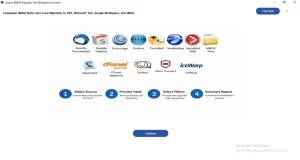
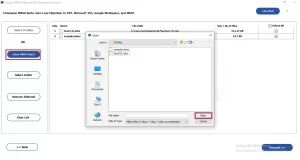
- .Look at the left side, select file/folder and navigate to .mbox files >> Open.
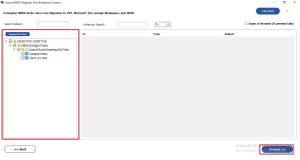
- Preview the folders and files in a tree structure and click on Proceed.
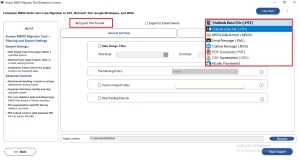
- Select PST as the output format from the given file formats.
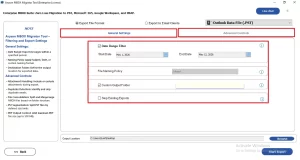
- You can enable the additional filters for selective data conversion.
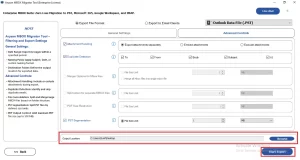
- In the end, click on Browse to save resultant files >> Start Process.
Real-World Scenario:
One of our users recently moved from Mozilla Thunderbird to Microsoft Outlook on a Windows 11 laptop. Years of emails, attachments, and client conversations were stored in MBOX format, and Outlook had no way to open those files directly.
The user first tried the manual Thunderbird method, but it does not keep the folder structure intact. Later, the user used our MBOX to PST Converter, and the entire mailbox was transferred into Outlook PST format smoothly.
Comparison Between Manual and Professional Software
| Features | Manual Method | Professional Method |
| Cost | Free | Trial Available |
| Conversion Process | Lengthy and Complex | Simple and Direct |
| Bulk Conversion | Not supported | Supported |
| Maintain Folder Hierarchy | Limited | Yes |
| Email Attachments Preservations | Not Always Accurate | Yes |
| Risk of Data Loss | Possible | Minimal |
Conclusion
To finish it up, converting MBOX to PST is not a complicated process once you know your options. If you’ve got a small mailbox, the free Thunderbird method works fine. If you need something faster and more reliable, especially for big migrations, professional software is worth it. In other words, just make sure you back up your MBOX file before you start.
Frequently Asked Question
Q1. Can I batch convert MBOX to PST files at once?
Ans. Yes, professional MBOX to PST Converter tools support batch conversion, allowing users to convert multiple MBOX files into PST format simultaneously without losing mailbox data.
Q2. Is there any free method to convert MBOX file to PST?
Ans. Yes, users can use manual methods with email clients like Thunderbird and Outlook, but the process is lengthy, complex, and may risk data loss.
Q3. Do I need technical knowledge to convert MBOX to PST?
Ans. Manual methods require some technical knowledge, while automated MBOX to PST Converter tools are designed with simple interfaces suitable for all users.
Q4. What is MBOX File?
Ans. MBOX is a mailbox file format used to store emails by email clients like Thunderbird, Apple Mail, Eudora, and several other applications.
Q5. Is it Possible to transfer MBOX to PST on Windows and MacOS?
Ans. Yes, users can convert MBOX files to PST format on both Windows and macOS using compatible manual methods or professional conversion software.
Q6. How to export MBOX to PST without losing data?
Ans. You can use a reliable MBOX to PST Converter tool to export mailbox data safely while maintaining email formatting, attachments, and folder structure.
Q7. Will the folder hierarchy remain intact after the MBOX to PST conversion?
Ans. Yes, advanced MBOX Converter tools preserve the original folder hierarchy, email properties, and mailbox structure throughout the conversion process accurately.
Q8. Fastest Way to Convert MBOX to PST?
Ans. The fastest and easiest method is using a professional MBOX to PST Converter tool that supports bulk conversion with secure and quick processing.
About The Author:

Eva Shirley is a skilled technical content writer with expertise in creating engaging and informative content. With over 5 years of experience and a passion for writing, she has solved many users' queries by providing quality content.
Related Post