-
Written By Eva Shirley
-
Approved By Mithilesh Tata
-
Publish on November 28th, 2025
-
Reading Time: 4 minutes
How to Export Office 365 Data to CSV: Complete Guide

Overview: Both individuals and organizations need to manage their emails using Office 365. But sometimes, they need their emails, contacts, and other mailbox data in a simple, editable, and portable format. Hence, enterprises choose to export Office 365 Data to CSV so that they can easily open their emails in Excel, Google Sheets, and various other applications for different purposes. This article will guide you through the steps of exporting emails via a hands-on approach and the Aryson Office 365 Backup Tool to achieve 100% data accuracy.
Why Export Office 365 Contacts to CSV?
Before starting the actual export process, let’s understand why we even need to export Office 365 to CSV.
- You can create a simple and accessible backup of your mailbox data.
- As well as, it becomes easier to analyze emails or contacts in Excel or Google Sheets.
- Moreover, users can migrate data to other platforms or email services.
- Additionally, CSV files are easy to maintain and edit for reporting purposes.
- Also, it allows users to share their data in a universally supported format.
Best Solutions to Export Office 365 Data to CSV
Here in this section. We will discuss various methods to export Office 365 files to CSV. The first approach is to use reliable software to perform the conversion quickly and securely. Whereas the other method is the manual approach, which is ideal for exporting a few emails.
Solution 1: Most Recommended Software to Export Office 365 to CSV
Aryson Office 365 Backup Tool is the most efficient software used to export Office 365 emails into CSV format. The software allows the user to export their Office 365 emails within a few seconds without affecting the data integrity. As well as, It also provides users with an advanced preview panel to cross-verify the selected files before exporting them. Additionally, it offers a user-friendly and interactive interface to enable beginners to export Office 365 to MSG, PST, PDF, CSV, and other file formats. Also, there are various features like Skip Previous Migration, Custom Folder Name, Date Range feature, etc. Make sure to follow the steps below carefully in order to avoid any human errors.
Quick Tutorial to Export Office 365 Data to CSV
- Open the Aryson Office 365 Backup Tool and click Backup.
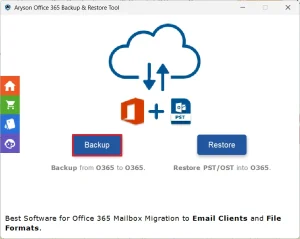
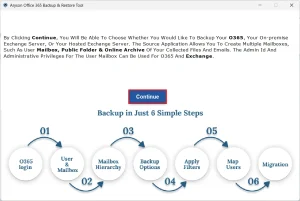
- Then, click the Continue button to proceed further.
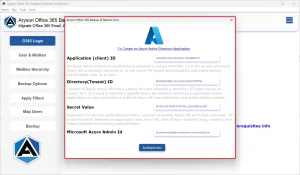
- After that, input your Office 365 account credentials & sign in.
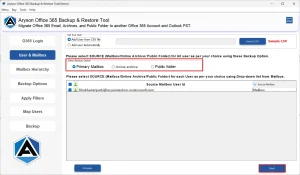
- Now, choose the primary mailbox to export its files.
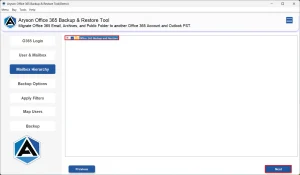
- Next, select and preview the files to export & click Next.
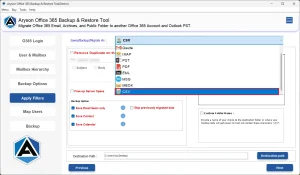
- Then, under file formats, select CSV as the output format.
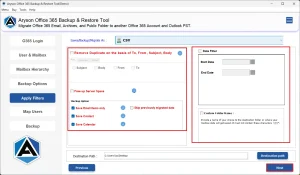
- At last, utilise the advanced features if required, & click Next.
Important Note: However, this method works well for any number of files; you may proceed with the manual method if you have to export a few emails only. But remember, you must have MS Outlook installed on your system, and acquire certain technical knowledge to perform the hands-on approach.
Solution 2: Backup Office 365 Data as CSV Manually
Microsoft Outlook can easily export Emails from Office 365 to CSV format through its Import/Export features. Therefore, to proceed with this method, you must install MS Outlook on your system and acquire a certain level of technical understanding.
- To begin, open MS Outlook on your system.
- Then, input your Office 365 account credentials and sign in.
- After that, go to the File menu >> Open & Export >> Import/Export.
- Now, select the Export to a file option & click Next.
- Next, choose Microsoft Excel or CSV as the export format.
- Select the mailbox folder you want to export.
- Finally, select a destination folder & click Finish.
Conclusion
The above blog discussed different approaches to export Office 365 data to CSV. Although both methods work efficiently, the choice of method depends on the user’s expertise and the number of files they have. For exporting a few emails, you may use the manual approach. Whereas, to export a large number of files, you must opt for the reliable software above. You can even customize your file selection and export your files as per your expertise, using the advanced features of the software.
Frequently Asked Questions
Q.1 Can I export multiple Office 365 accounts data to CSV at once?
Ans. Yes, using the Aryson Office 365 Backup Tool, you can easily export multiple Office 365 accounts data to CSV at once.
Q.2 Do I need Microsoft Excel to view Office 365 CSV exports?
Ans. No, you don’t need Microsoft Excel to view Office 365 CSV exports if you are using the automated solution above.
Q.3 How do I save Office 365 data as CSV?
Ans. Using Aryson Office 365 Backup Tool, you can easily save Office 365 data as CSV.
Steps to export are as follows:
1. Open the Aryson Office 365 Backup Tool >> click Backup.
2. Select the Continue button to proceed further.
3. Enter Office 365 login details >> sign in.
4. Select & preview the files to export >> click Next.
5. Choose CSV as file format >> use advanced features >> Next.
Q.4 Are attachments included when exporting Office 365 emails to CSV?
Ans. Yes, if you are using the automated solution above, your attachments will be included when exporting Office 365 emails to CSV.
Q.5 Can I export Office 365 calendars or tasks to CSV?
Ans. Yes, with the help of Aryson Office 365 Backup Tool, you can export Office 365 calendars or tasks to CSV.
About The Author:

Eva Shirley is a skilled technical content writer with expertise in creating engaging and informative content. With over 5 years of experience and a passion for writing, she has solved many users' queries by providing quality content.
Related Post