×

Your Aryson download task is in progress here

How to Convert MBOX Files: A Complete Step-by-Step Guide

Install Gmail Backup Wizard

Launch the MBOX Converter

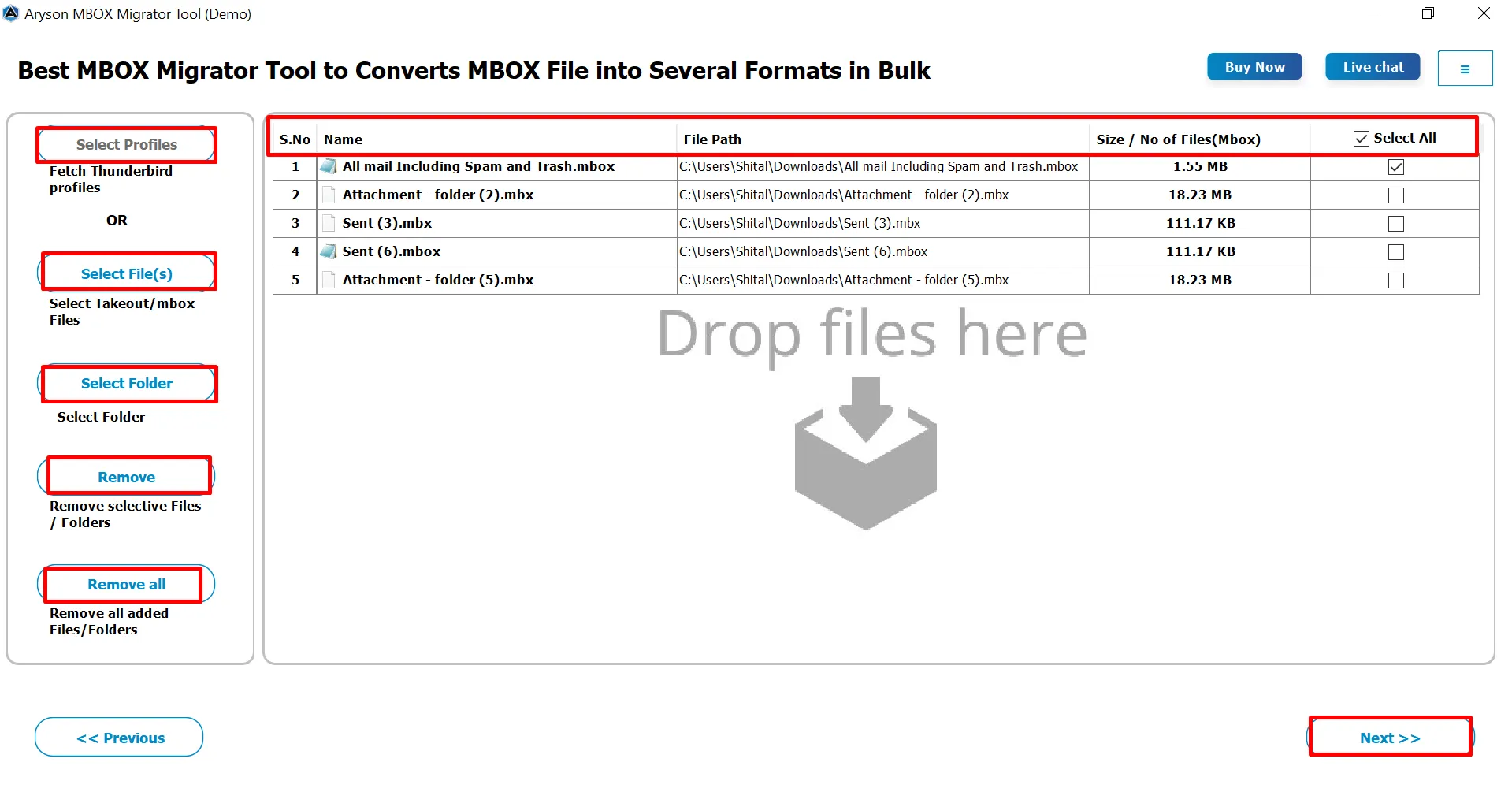
Launch the MBOX File Converter, and use the Add Files or Add Folder option to load single or multiple MBOX files from your system for secure processing.

Choose the Desired Files/Folders

Preview & Select Output Format / Email Client

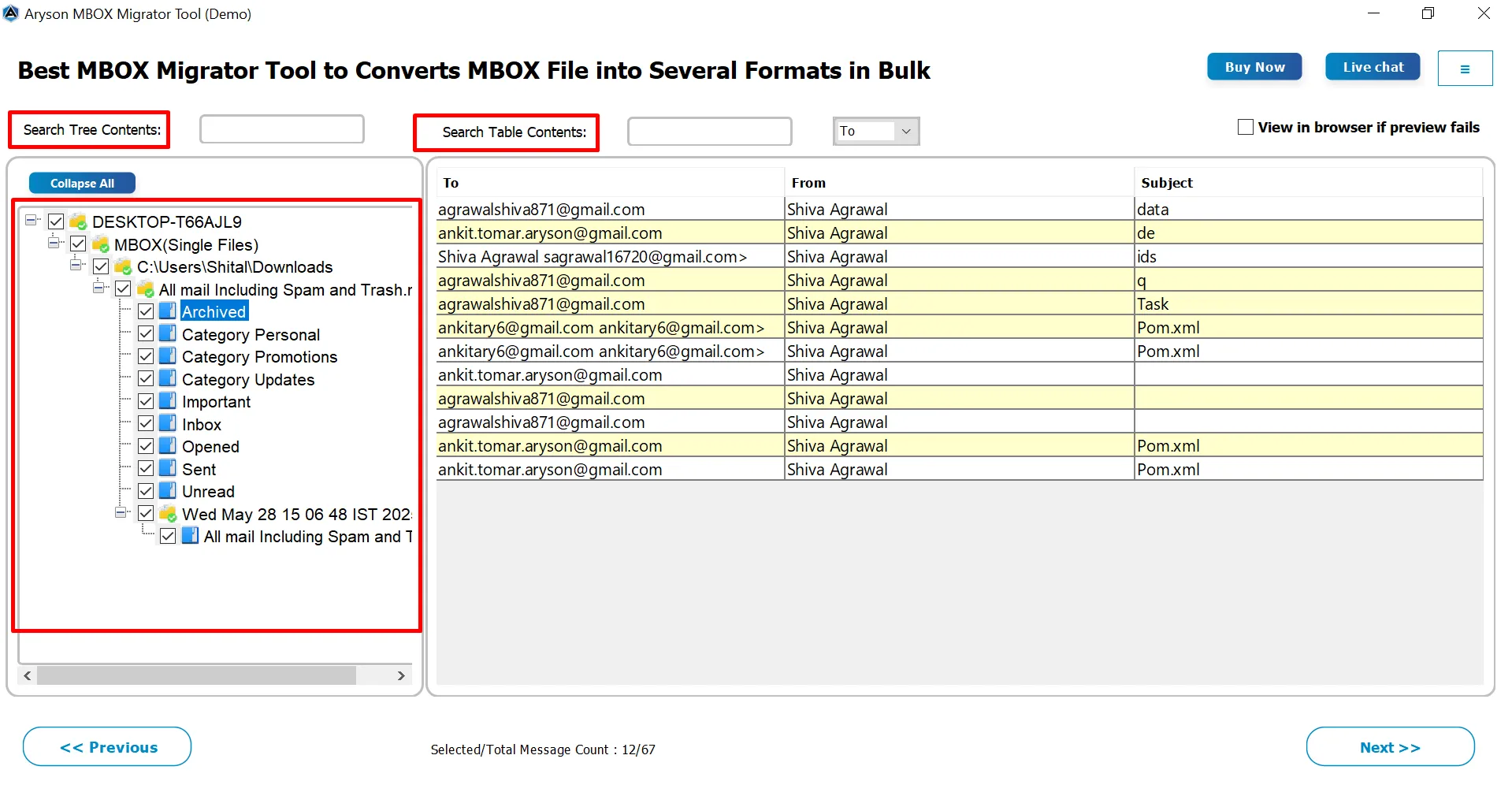
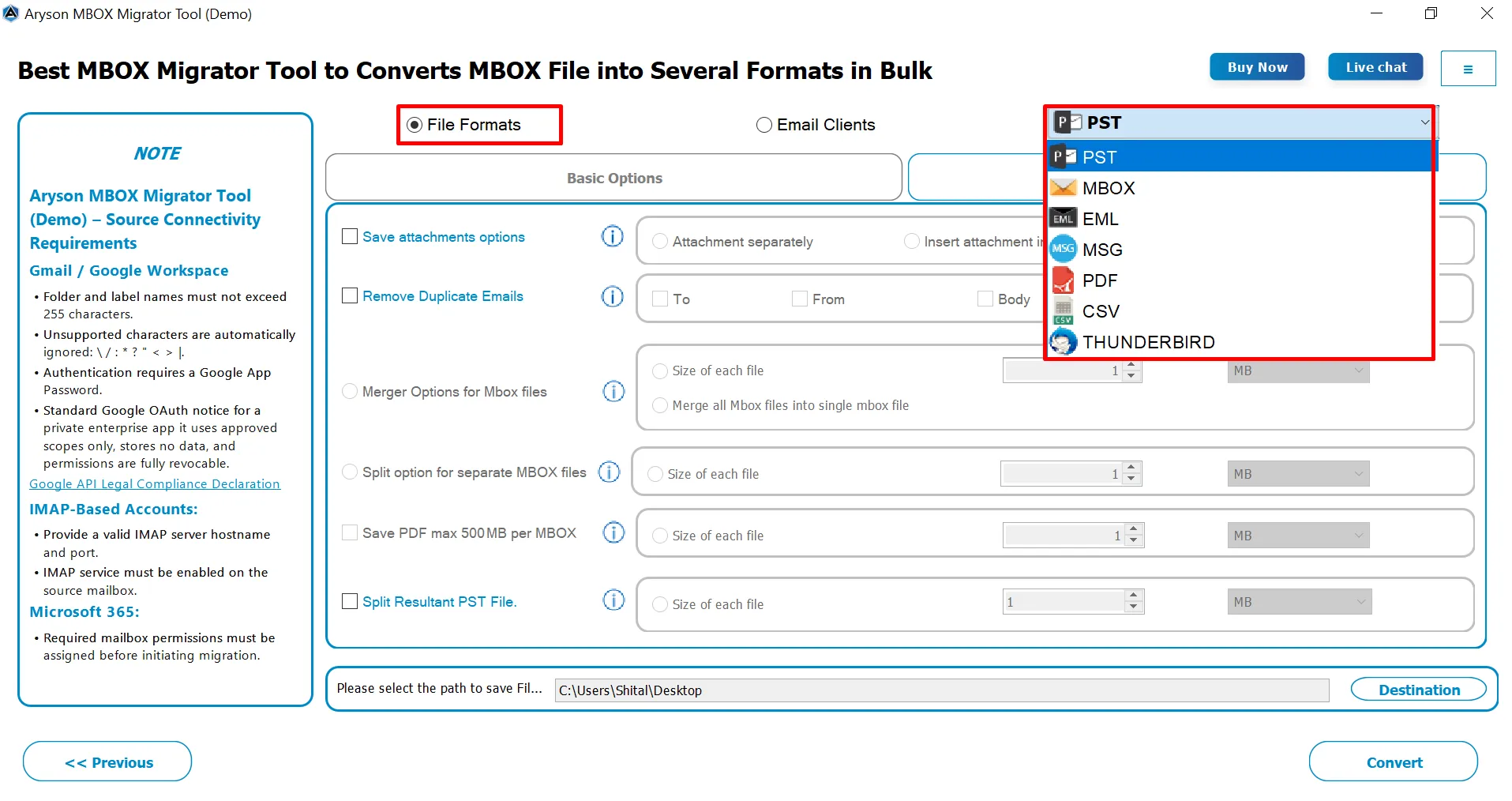
Preview mailbox data with emails and attachments, then choose the required output file format or select an email client to migrate MBOX data accurately.

Migrate these Files/Folders to Email or File Formats

Apply Filters, Choose Destination & Convert

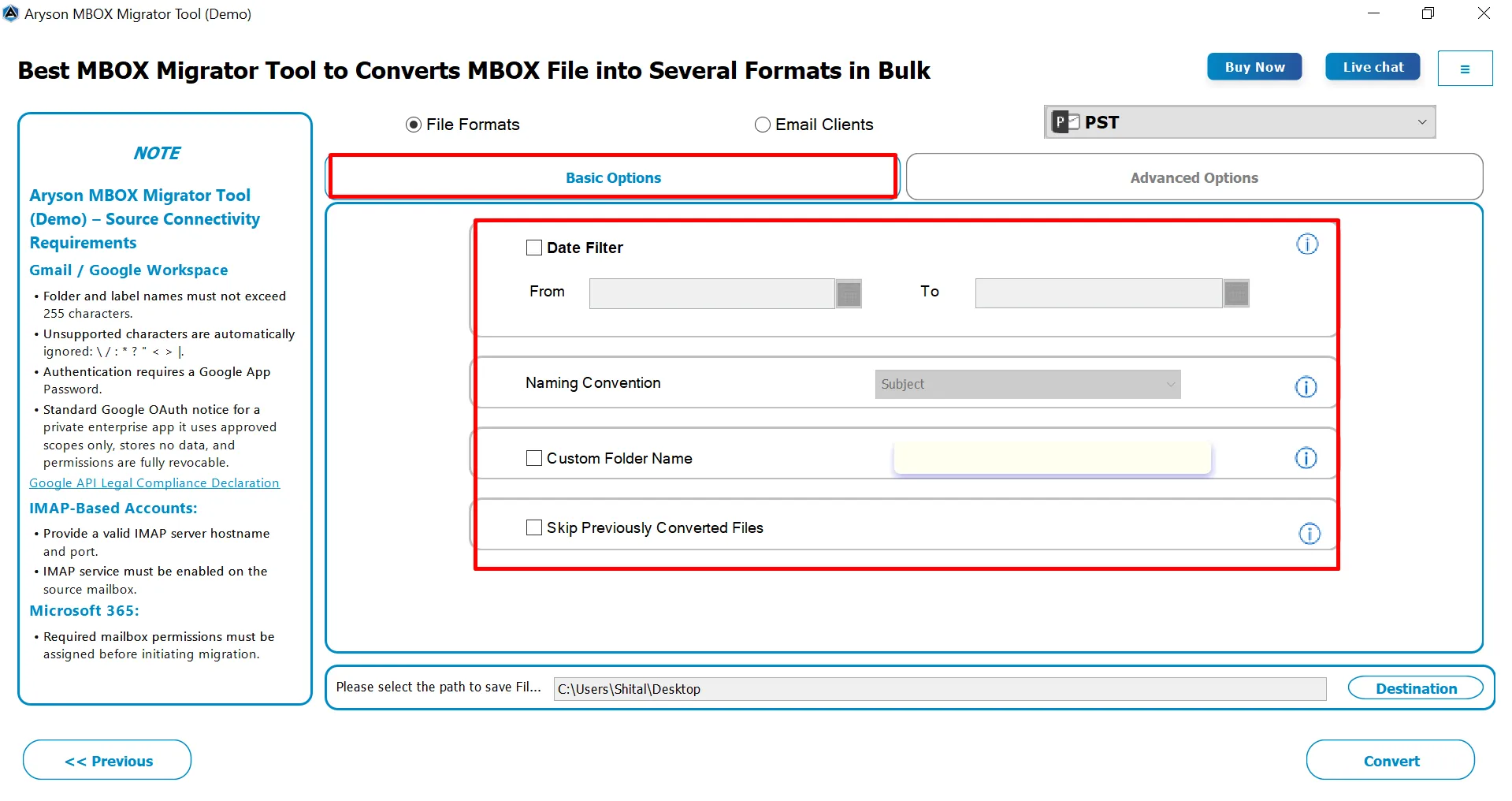
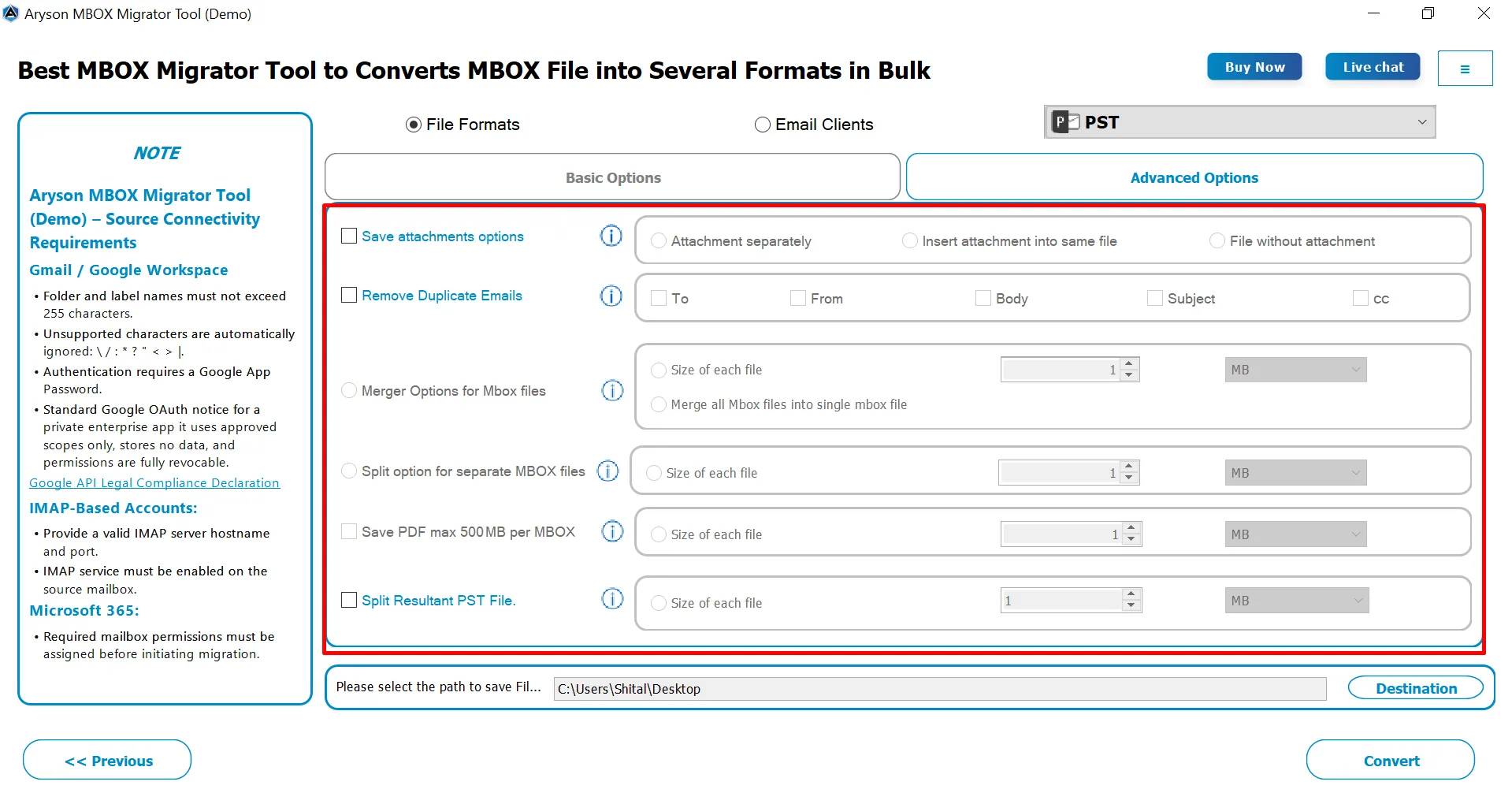
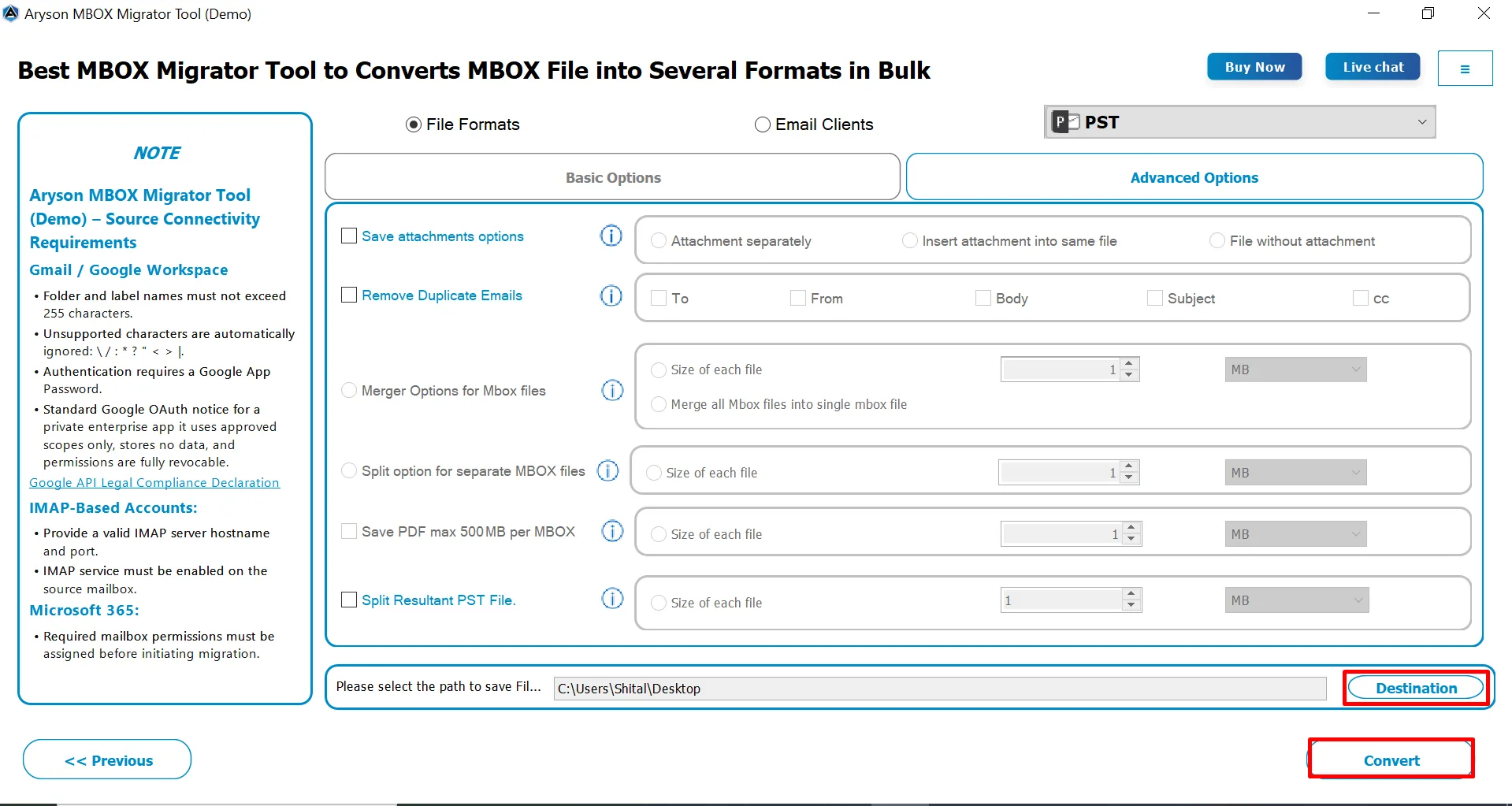
Apply date or folder filters, select the destination path, and click Convert to start the MBOX file conversion or email client migration smoothly.

Comprehensive Features of MBOX Converter

Explore enterprise-grade features designed to deliver secure, accurate, and efficient MBOX migration and conversion.

Multiple Formats

Multiple Output Formats

MBOX Converter Tool converts MBOX files to PST, MBOX, EML, MSG, PDF, CSV, and Thunderbird formats, ensuring maximum compatibility with different email clients and platforms. This flexibility supports backup, migration, and offline access, while preserving original email properties and attachments throughout the conversion process.

Cloud Migration

Direct Cloud & Email Migration

This software migrates MBOX mailboxes directly to Office 365, Google Workspace, Gmail, IMAP, and Outlook.com. It maintains original folder hierarchy, metadata, and email formatting during transfer, ensuring seamless migration across platforms without data loss or structural changes, suitable for both personal and enterprise use.

Auto Detection

Intelligent Auto-Detection of MBOX Files

Automatically detects standard, legacy, and extension-less MBOX files, including .mbox, .mbx, and .mbs variants. The detection engine of the MBOX Converter software validates each file before loading, preventing invalid data from processing and ensuring stable performance even with complex folder structures or scattered mailbox sources.

Data Inegrity

Complete Data Integrity Preservation

The MBOX Converter Wizard preserves original folder structure, email formatting, metadata, and attachments during conversion or migration. This ensures that emails retain their authenticity and context, making the output reliable for audits, compliance, and everyday use without any loss of information or hierarchy.

Date Range Filter and Duplicate Removal

Bulk Conversion & Migration

This software supports bulk conversion and migration of multiple MBOX files or folders in a single process. This batch processing capability saves time, reduces manual effort, and makes the software ideal for large archives and enterprise environments where multiple mailboxes must be processed efficiently.

Filter

Selective Filters for Targeted Conversion

Applies date range and folder-level filters to selectively convert only required emails. This feature helps reduce processing time, optimize storage, and allows users to export specific mailbox data for audits, compliance, or selective migration tasks, rather than converting entire mailboxes.

Custom Folder Naming Option

Date Range Filter & Custom Folder Name

You can apply date range filters to convert only specific emails within a selected time period and assign custom folder names for organized output. This helps streamline migration, reduce unnecessary data transfer, and keep converted mailboxes structured, searchable, and easy to manage.

Remove Duplicate Email

Remove Duplicate Emails for Clean Mailboxes

Detects and removes duplicate emails based on fields such as To, From, Subject, Body, or CC, helping maintain a clutter-free mailbox, reduce redundancy, and optimize storage during conversion or migration.

Merge

Flexible Attachment Saving & MBOX Merging Option

With Save Attachments Options and Merge Options for MBOX Files, you can save attachments separately, embed them, export without attachments, or combine multiple MBOX files into one for simplified management.

Split

Advanced File Splitting & Size Control Features

Using the Split Option for Separate MBOX Files and the Save PDF Max 500 MB per MBOX features efficiently manage large files, improve performance, and prevent corruption during exports. Using this feature, organisations can accomplish the entire splitting task in a few seconds.

Attachment

Flexible Attachment Handling

MBOX Converter Tool offers flexible attachment handling options such as saving attachments separately, embedding them within the same file, or excluding attachments entirely. This provides better storage control and helps users customize the output based on their requirements for archiving, compliance, or data management.

Free Trial and Simple Interface

Large File Handling & Efficient Output

Splits large PST files into smaller segments and manages PDF output size efficiently to prevent oversized files. This improves performance, reduces corruption risk, and ensures compatibility with Outlook and other platforms, especially when working with huge mailboxes or long-term archives.

Preview

Preview and Authentication Methods

MBOX Converter provides multiple preview modes for email verification before conversion, including HTML, Plain Text, Headers, MIME, and raw HTML. Uses OAuth-based Modern Authentication for secure cloud migration, and generates detailed conversion and migration reports for auditing without storing mailbox content.

Free Trial

Wide Windows Compatibility & Free Demo Version

Compatible with all major Windows versions (7–11 and Server), the MBOX Converter runs effortlessly on both 32-bit and 64-bit systems with minimal resources. Try the free demo to preview emails, scan multiple MBOX files, and convert up to 50 emails per folder before upgrading.

MBOX Converter - System Requirements

Software Name: MBOX Converter Tool
Processors: Minimum 2.4 GHz Processor
RAM: Minimum 4 GB (recommended)
Minimum Hard Drive Space: 500 MB of free space
Supported Operating System:
  • Windows OS: 11, 10, 8.1, 8, 7, Vista, XP, 2000, 98, NT, and 95.
  • Mac OS: OS X Mountain Lion(10.8), OS X Mavericks(10.9), OS X Yosemite(10.10), OS X El Capitan(10.11), macOS Sierra(10.12), macOS High Sierra(10.13), OS X Mojave(10.14)

Software Requirements

(For Windows)

  • Hard Disk Space: 500 MB of free hard disk space required
  • RAM required: 4 GB of RAM (4 GB is recommended)
  • Processor: Intel® Core™ 2 Duo CPU E4600 @ 2.40GHz 2.39GHz
  • Supported Windows OS: Windows 11, 10, 8.1, 8, 7, Vista, XP, 2000, 98, NT, and 95.

(For Mac)

  • Hard Disk Space: 500 MB of free hard disk space required
  • RAM required: 4GB RAM Recommended
  • Processor: Mac System with Apple Silicon Processor M1, M2, M3, and M4 series
  • Mac OS: OS X Mountain Lion(10.8), OS X Mavericks(10.9), OS X Yosemite(10.10), OS X El Capitan(10.11), macOS Sierra(10.12), macOS High Sierra(10.13), OS X Mojave(10.14)

Free Download

Size: 227MB   Version: 26.01 ( Updated On 02 January 2026 )

Product Guides

Software Guide Immediate Activation pdf-imgInstallation pdf-imgUninstallation

Trial Limitations

Users can test this software using the free demo version, which exports only 50 emails per MBOX file. If you want to migrate the entire mailbox, simply purchase and activate the full version of the Aryson MBOX Migrator Tool.

FAQ

MBOX Supported Email Programs:


Mozilla Thunderbird, SeaMonkey, Apple Mail, Entourage, Opera Mail, Postbox, as well as MBOX files of Google Takeout & Google Vaults.

MBOX Converter – Pricing Plans

Single User

Best For: For home usage/personal use

$49 USD

Pay With FastSpring

  • Licence Validity - 1 Year
  • Technical Support: 1 Year (24x5)
  • Convert MBOX/MBX Files in Bulk
  • Export MBOX to PST, MSG, EML, MBOX, & PDF.

Read More

Recommended

Administrator

Best For: For Business, Corporate & Academic Usage

$199 USD

Pay With FastSpring

  • License Validity: 2 Years
  • Technical Support: 2 Years (24x5)
  • Convert MBOX/MBX Files in Bulk
  • Export MBOX to PST, MSG, EML, MBOX, CSV & PDF.
  • Migrate MBOX files into Office 365, Thunderbird, and Gmail, with or without attachments

Read More

Technician

Best For: Commercial/Businessb/Govt./Firm/Organisation/Technical Usage

$299 USD

Pay With FastSpring

  • Licence Validity: 3 Years
  • Technical Support: 3 Years (24x5)
  • Convert MBOX/MBX Files in Bulk
  • Export MBOX to PST, MSG, EML, MBOX, CSV & PDF
  • Migrate MBOX files into Office 365, Thunderbird, Gmail, Google Workspace, IMAP servers, and GoDaddy

Read More

Enterprise

Best For: Commercial/Business/Govt./Firm/Organisation/Technical Usage

$599 USD

Pay With FastSpring

  • License Validity: 5 Years
  • Technical Support: 5 Years(24x5)
  • Convert MBOX/MBX Files in Bulk
  • Export MBOX to PST, MSG, EML, MBOX, CSV & PDF.
  • Migrate MBOX files into Office 365, Thunderbird, Gmail, Google Workspace, IMAP servers, GoDaddy, and Outlook Live

Read More

Single User

Best For: For home usage/personal use

$49 USD

Pay With FastSpring

  • License validity - 1 Year
  • Technical Support: 1 Year (24x5)
  • Convert MBOX/MBX Files in Bulk
  • Export MBOX to PST, MSG, EML, MBOX, & PDF.

Read More

Recommended

Administrator

Best For: For Business, Corporate & Academic Usage

$199 USD

Pay With FastSpring

  • License Validity: 2 Years
  • Technical Support: 2 Years (24x5)
  • Convert MBOX/MBX Files in Bulk
  • Export MBOX to PST, MSG, EML, MBOX, CSV & PDF.
  • Migrate MBOX files into Office 365, Thunderbird, and Gmail, with or without attachments

Read More

Technician

Best For: Commercial/Business/Govt./Firm/Organisation/Technical Usage

$299 USD

Pay With FastSpring

  • Licence Validity: 3 Years
  • Technical Support: 3 Years (24x5)
  • Convert MBOX/MBX Files in Bulk
  • Export MBOX to PST, MSG, EML, MBOX, CSV & PDF.
  • Migrate MBOX files into Office 365, Thunderbird, Gmail, Google Workspace, IMAP servers, and GoDaddy

Read More

Enterprise

Best For: Commercial/Business/Govt./Firm/Organisation/Technical Usage

$599 USD

Pay With FastSpring

  • License Validity: 5 Years
  • Technical Support: 5 Years(24x5)
  • Convert MBOX/MBX Files in Bulk
  • Export MBOX to PST, MSG, EML, MBOX, CSV & PDF.
  • Migrate MBOX files into Office 365, Thunderbird, Gmail, Google Workspace, IMAP servers, GoDaddy, and Outlook Live

Read More

Proven Success Across Professional & Enterprise Environments

See Why IT Teams and Professionals Trust MBOX Converter Tool

Frequently Asked Questions (FAQ)

The MBOX Converter supports MBOX files created by Thunderbird, Apple Mail, Eudora, Entourage, SeaMonkey, Opera Mail, Postbox, and Google Takeout, ensuring broad compatibility.

Yes, along with the Windows version, this software comes in a version for Mac i.e Mac MBOX Converter.

Yes, the MBOX Converter Software preserves the original folder hierarchy and maintains email integrity during conversion and migration. All email formatting, metadata, attachments, and folder structure remain intact in the output.

Yes, MBOX Migrator supports bulk conversion and migration. You can add multiple MBOX files or entire folders and process them in a single batch operation, which makes it ideal for large archives and enterprise migrations.

Yes, the MBOX File Converter provides advanced filters such as date range and folder-level selection. You can choose specific folders or emails from a selected date range to convert.

No, this software provides a user-friendly interface suitable for both beginners and professionals.

Yes, the MBOX File Converter provides multiple preview modes, including HTML, Plain Text, Headers, MIME, and raw HTML views. This allows you to verify emails and attachments before starting the conversion or migration process.

Yes, a free demo version is available. The demo allows you to preview emails and attachments and convert up to 50 emails per folder. This helps you evaluate the tool’s performance and accuracy before purchasing the full version.

Our Clients

We have The Privilege Of Serving Prestigious Clients

clients1 clients2 clients3 clients4 clients5 clients6
live Chat live chat