×

Your Aryson download task is in progress here

How Does an MSG Migrator Work?

Install Gmail Backup Wizard

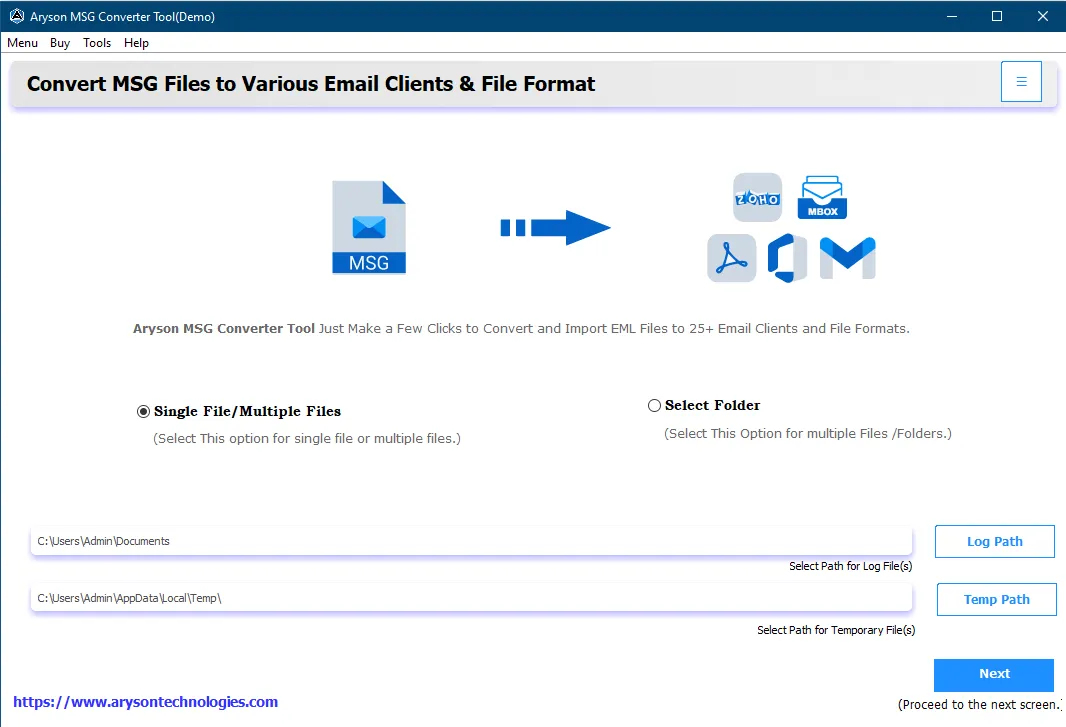
Install MSG Converter:

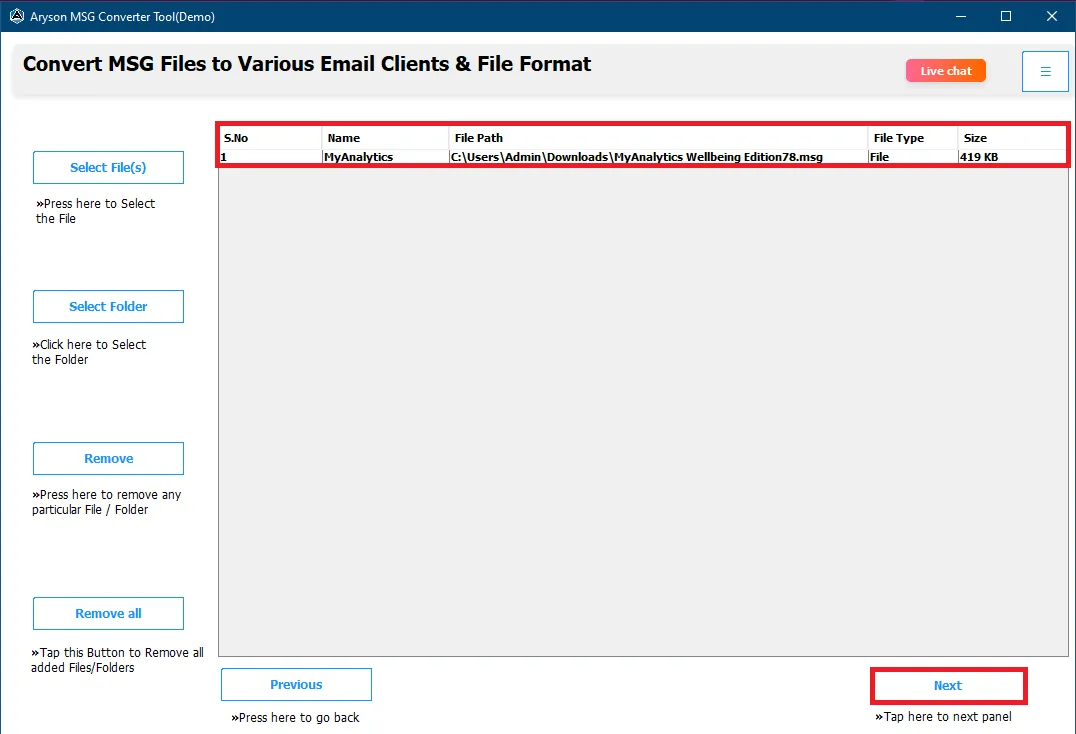
Download and launch the MSG Converter Tool as an administrator. Then, choose from Select Files or Select Folders to add your MSG file.

Choose the Desired Files/Folders

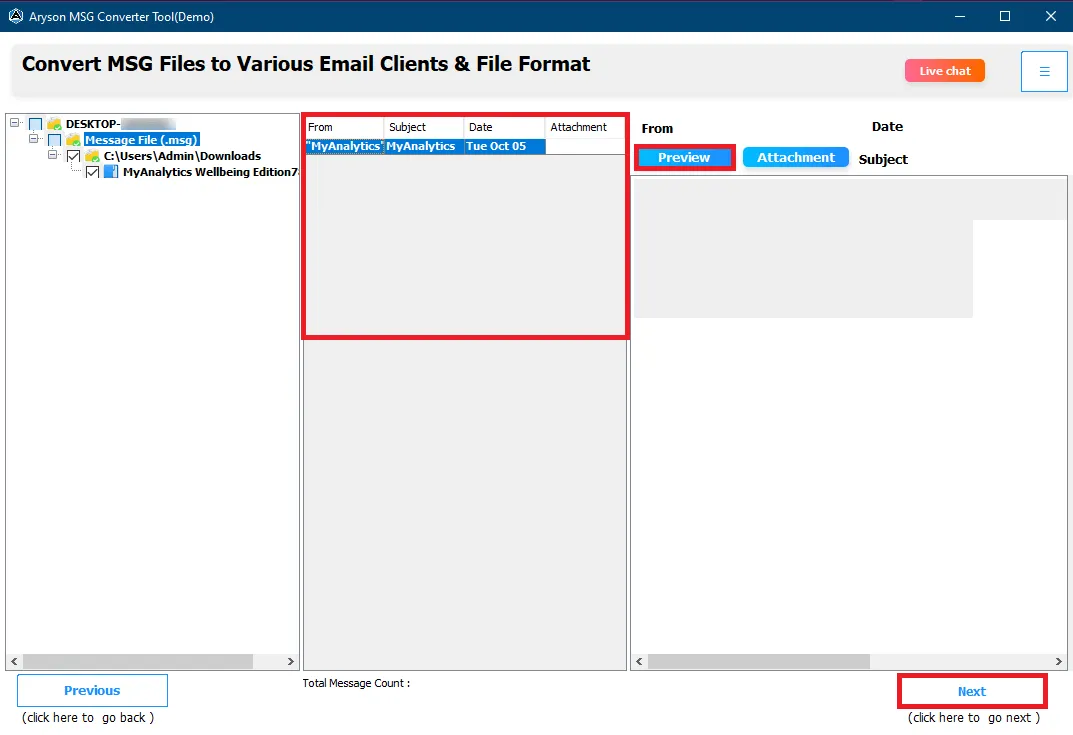
Select File Format and Choose the File Format:

Next, before conversion, preview your data and select the required output format or email platform from the list accordingly.

Migrate these Files/Folders to Email or File Formats

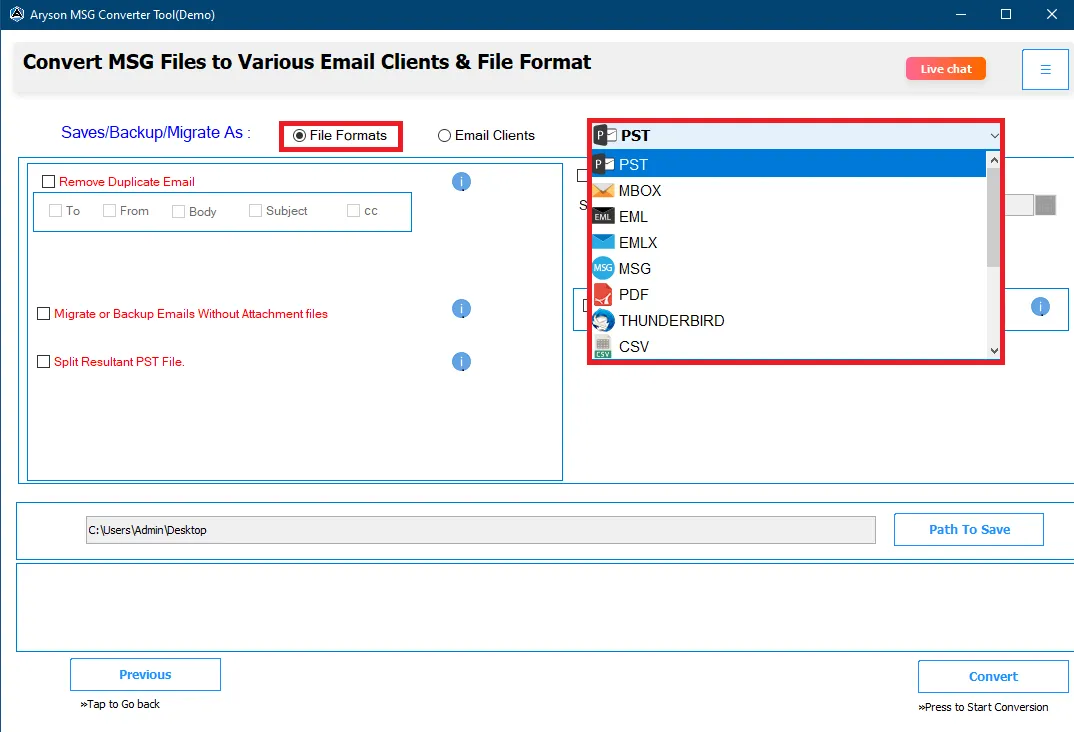
Apply Required Filters and Press Convert:

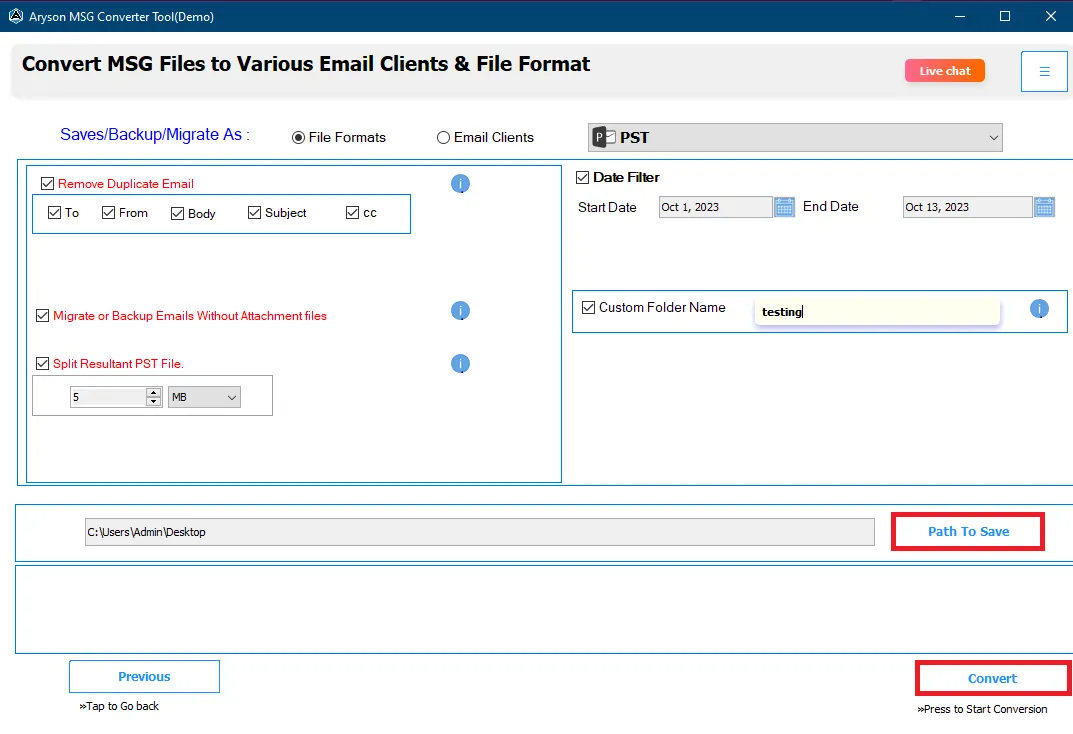
In the final step, choose a destination path to save your MSG file and press the Convert to start the process of migration.

Exclusive Features of the MSG Converter Tool

Convert MSG Files into Multiple File Formats

Convert MSG Files into Multiple File Formats

While using this tool, users can convert Outlook MSG files into 20+ different file formats and email platforms. It helps in the process of email migration along with attachments, contacts, calendars, tasks, notes, and other mailbox items. With only a few clicks, users can convert MSG files into file formats such as PST, MBOX, EML, EMLX, MSG, DOC, PDF, Thunderbird, CSV, XLSV, OFT, and WDSEML to make email data available across several platforms.

Batch Conversion

Batch Conversion of MSG Files

MSG Migrator Software allows the conversion of one or more MSG files at the same time. This batch conversion feature is useful in handling large email collections. Without slowing down the software, users can save time by processing all selected files together. During conversion, IT professionals and business users can handle bulk MSG data and make sure that emails, attachments, and formatting remain unchanged.

Direct Migration to Email Accounts

Direct Migration to Email Accounts

This tool supports direct migration of MSG emails to popular email services and clients. Users can transfer MSG files to Gmail, Office 365, Yahoo Mail, Hotmail, IMAP, iCloud, GoDaddy, and HostGator. This feature eliminates the need for manual import steps, ensuring a smooth transfer while preserving all email properties, attachments, and folder structure.

Email Extraction in CSV Format

Email Extraction in CSV Format

This software helps users to extract emails from MSG files into CSV format. It saves important email details such as sender, recipient, subject, date, and message content in a structured file. This makes it easier to analyze, store, or manage email data. The feature is especially helpful for reporting, auditing, and handling large volumes of email information efficiently.

Date Range Filter and Duplicate Removal

Date Range Filter and Duplicate Removal

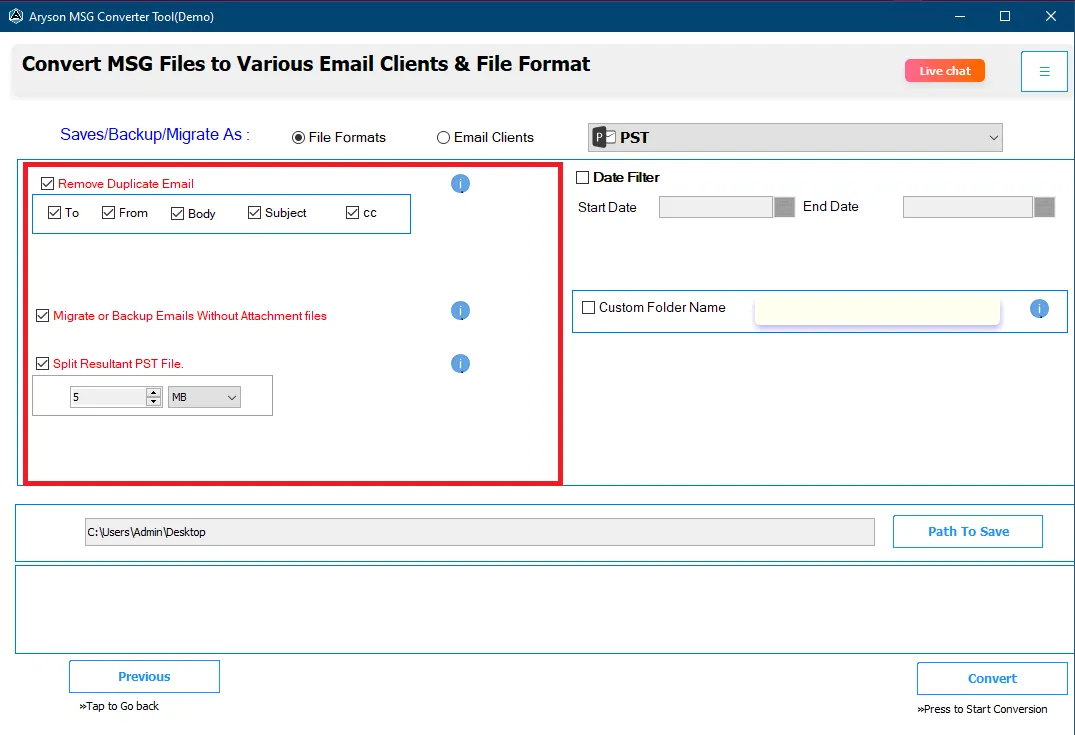
Mac MSG Converter for Mac allows users to filter emails based on a selected date range by selecting a start and end date. This feature helps to reduce unnecessary data processing and saves time. The duplicate removal option automatically finds and skips identical emails during conversion. Together, these features help create a clean and well-organized output.

Save Files in the Same Source Location

Save Files in the Same Source Location

This feature allows users to save the converted files in the same folder as the original MSG files. It helps to keep data organized and avoids confusion about where the converted files are stored. As a result, by keeping the same source and destination location, users can easily find and manage their files without changing their existing folder structure.

Custom Folder Naming Option

Custom Folder Naming Option

Outlook MSG File Converter provides a custom folder naming feature that allows users to rename folders during the conversion process. This helps to organize converted data according to projects, departments, or personal preferences. Additionally, users can easily manage their files by assigning meaningful folder names as needed and quickly locating emails.

Split Large Output Files

Split Large Output Files

The software includes an option to separate the resultant data into separate required files on the basis of a custom size. This helps manage large email data more easily and reduces the risk of file corruption. Splitting files also improves performance and makes storage, sharing, and backup of converted data more convenient.

Maintain Original Folder Structure

Maintain Original Folder Structure

MSG Migrator preserves the original folder hierarchy of MSG files during conversion. All folders and subfolders remain exactly the same as in the source data. This helps users easily navigate their emails after conversion and makes sure that no important folder organization is lost in the process.

Free Trial and Simple Interface

Free Trial and Simple Interface

MSG Migrator Software provides a free trial version that allows users to test the software. The interface is clean, simple, and easy to understand, making it suitable for both technical and non-technical users. Moreover, it makes sure that users experience a smooth conversion and can convert 50 emails per folder in the trial version.

MSG File Converter: System Requirements

Software Name: MSG File Converter Tool
Processors: Minimum 2.4 GHz Processor
RAM: Minimum 4 GB (recommended)
Minimum Hard Drive Space: 500 MB of free space
Supported Operating System: Windows OS: 11, 10, 8.1, 8, 7, Vista, XP, 2000, 98, NT, and 95.

Software Specifications

  • RAM requirement: 4 GB of RAM (4 GB is recommended)
  • Hard Disk Space: 500 MB of free hard disk space required.

Free Download

Size: 120MB   Version: 23.10

Product Guides

Software Guide Immediate Activation pdf-imgInstallation pdf-imgUninstallation

Trial Limitations

The Aryson MSG Converter Tool's free demo allows you to convert up to 50 emails from each folder while also testing its features. You need a license to convert entire mailboxes without restrictions.

FAQ

Client Review For Outlook MSG File Converter

VerifiedVerified Purchaser Testimonials - MSG File Converter

MSG File Converter – Pricing Plans

Single User

Best For: Personal and home users

$29 USD

Pay With FastSpring

  • License validity and updates - 1 Year
  • Software support period - 1 Year (24x5)
  • Free technical support (24×5, Mon–Fri) - 1 Year
  • 24×7 sales assistance
  • Works with all Windows versions
  • Easy and user-friendly interface
  • 30-day money-back guarantee
  • Access to all main software features
  • Convert MSG files accurately
  • Convert single and multiple MSG files
  • Convert emails with attachments
  • Preview emails and attachments before conversion
  • Remove duplicate emails automatically
  • Convert selected emails using filters
  • Convert MSG to PST, PDF, EML, MBOX, CSV, and more
Recommended

Administrator

Best For: Business and academic use

$99 USD

Pay With FastSpring

  • License validity and updates - 3 Years
  • Software support period - 3 Years
  • Free technical support (24×5, Mon–Fri) - 3 Years
  • 24×7 sales assistance
  • Works with all Windows versions
  • Easy and user-friendly interface
  • 30-day money-back guarantee
  • Access to all main software features
  • Convert MSG files accurately
  • Convert single and multiple MSG files
  • Convert emails with attachments
  • Preview emails and attachments before conversion
  • Remove duplicate emails automatically
  • Convert selected emails using filters
  • Convert MSG to PST, PDF, EML, MBOX, CSV, and more
  • Export MSG to Office 365, Gmail, Yahoo Mail, and file formats

Technician

Best For: IT professionals and service providers

$199 USD

Pay With FastSpring

  • License validity and updates - 5 Year
  • Software support period - 5 Years
  • Free technical support (24×5, Mon–Fri) - 5 Years
  • 24×7 sales assistance
  • Works with all Windows versions
  • Easy and user-friendly interface
  • 30-day money-back guarantee
  • Access to all main software features
  • Convert MSG files accurately
  • Convert single and multiple MSG files
  • Convert emails with attachments
  • Preview emails and attachments before conversion
  • Remove duplicate emails automatically
  • Convert selected emails using filters
  • Convert MSG to PST, PDF, EML, MBOX, CSV, and more
  • Export MSG to Office 365, Gmail, Yahoo Mail, and file formats
  • Move MSG files to Thunderbird, AOL, Hotmail, IMAP

Enterprise

Best for: Large organizations and enterprises

$499 USD

Pay With FastSpring

  • License validity and updates - 7 Year
  • Software support period - 7 Years
  • Free technical support (24×5, Mon–Fri) - 7 Years
  • 24×7 sales assistance
  • Works with all Windows versions
  • Easy and user-friendly interface
  • 30-day money-back guarantee
  • Access to all main software features
  • Convert MSG files accurately
  • Convert single and multiple MSG files
  • Convert emails with attachments
  • Preview emails and attachments before conversion
  • Remove duplicate emails automatically
  • Convert selected emails using filters
  • Convert MSG to PST, PDF, EML, MBOX, CSV, and more
  • Export MSG to Office 365, Gmail, Yahoo Mail, and file formats
  • Move MSG files to Thunderbird, AOL, Hotmail, IMAP
  • Import MSG files into Zoho Mail, iCloud, GoDaddy, and HostGator

Single User

Best For: Personal and home users

$29 USD

Pay With FastSpring

  • License validity and updates - 1 Year
  • Software support period - 1 Year (24x5)
  • Free technical support (24×5, Mon–Fri) - 1 Year
  • 24×7 sales assistance
  • Works with all Windows versions
  • Easy and user-friendly interface
  • 30-day money-back guarantee
  • Access to all main software features
  • Convert MSG files accurately
  • Convert single and multiple MSG files
  • Convert emails with attachments
  • Preview emails and attachments before conversion
  • Remove duplicate emails automatically
  • Convert selected emails using filters
  • Convert MSG to PST, PDF, EML, MBOX, CSV, and more
Recommended

Administrator

Best For: Business and academic use

$99 USD

Pay With FastSpring

  • License validity and updates - 3 Years
  • Software support period - 3 Years
  • Free technical support (24×5, Mon–Fri) - 3 Years
  • 24×7 sales assistance
  • Works with all Windows versions
  • Easy and user-friendly interface
  • 30-day money-back guarantee
  • Access to all main software features
  • Convert MSG files accurately
  • Convert single and multiple MSG files
  • Convert emails with attachments
  • Preview emails and attachments before conversion
  • Remove duplicate emails automatically
  • Convert selected emails using filters
  • Convert MSG to PST, PDF, EML, MBOX, CSV, and more
  • Export MSG to Office 365, Gmail, Yahoo Mail, and file formats

Technician

Best For: IT professionals and service providers

$199 USD

Pay With FastSpring

  • License validity and updates - 5 Year
  • Software support period - 5 Years
  • Free technical support (24×5, Mon–Fri) - 5 Years
  • 24×7 sales assistance
  • Works with all Windows versions
  • Easy and user-friendly interface
  • 30-day money-back guarantee
  • Access to all main software features
  • Convert MSG files accurately
  • Convert single and multiple MSG files
  • Convert emails with attachments
  • Preview emails and attachments before conversion
  • Remove duplicate emails automatically
  • Convert selected emails using filters
  • Convert MSG to PST, PDF, EML, MBOX, CSV, and more
  • Export MSG to Office 365, Gmail, Yahoo Mail, and file formats
  • Move MSG files to Thunderbird, AOL, Hotmail, IMAP

Enterpriser

Best For: Large organizations and enterprises

$499 USD

Pay With FastSpring

  • License validity and updates - 7 Year
  • Software support period - 7 Years
  • Free technical support (24×5, Mon–Fri) - 7 Years
  • 24×7 sales assistance
  • Works with all Windows versions
  • Easy and user-friendly interface
  • 30-day money-back guarantee
  • Access to all main software features
  • Convert MSG files accurately
  • Convert single and multiple MSG files
  • Convert emails with attachments
  • Preview emails and attachments before conversion
  • Remove duplicate emails automatically
  • Convert selected emails using filters
  • Convert MSG to PST, PDF, EML, MBOX, CSV, and more
  • Export MSG to Office 365, Gmail, Yahoo Mail, and file formats
  • Move MSG files to Thunderbird, AOL, Hotmail, IMAP
  • Import MSG files into Zoho Mail, iCloud, GoDaddy, and HostGator

Single User

Best For: Personal and home users

$29 USD

Pay With FastSpring

  • License validity and updates - 1 Year
  • Software support period - 1 Year (24x5)
  • Free technical support (24×5, Mon–Fri) - 1 Year
  • 24×7 sales assistance
  • Works with all Windows versions
  • Easy and user-friendly interface
  • 30-day money-back guarantee
  • Access to all main software features
  • Convert MSG files accurately
  • Convert single and multiple MSG files
  • Convert emails with attachments
  • Preview emails and attachments before conversion
  • Remove duplicate emails automatically
  • Convert selected emails using filters
  • Convert MSG to PST, PDF, EML, MBOX, CSV, and more
Recommended

Administrator

Best For: Business and academic use

$99 USD

Pay With FastSpring

  • License validity and updates - 3 Years
  • Software support period - 3 Years
  • Free technical support (24×5, Mon–Fri) - 3 Years
  • 24×7 sales assistance
  • Works with all Windows versions
  • Easy and user-friendly interface
  • 30-day money-back guarantee
  • Access to all main software features
  • Convert MSG files accurately
  • Convert single and multiple MSG files
  • Convert emails with attachments
  • Preview emails and attachments before conversion
  • Remove duplicate emails automatically
  • Convert selected emails using filters
  • Convert MSG to PST, PDF, EML, MBOX, CSV, and more
  • Export MSG to Office 365, Gmail, Yahoo Mail, and file formats

Technician

Best For: IT professionals and service providers

$199 USD

Pay With FastSpring

  • License validity and updates - 5 Year
  • Software support period - 5 Years
  • Free technical support (24×5, Mon–Fri) - 5 Years
  • 24×7 sales assistance
  • Works with all Windows versions
  • Easy and user-friendly interface
  • 30-day money-back guarantee
  • Access to all main software features
  • Convert MSG files accurately
  • Convert single and multiple MSG files
  • Convert emails with attachments
  • Preview emails and attachments before conversion
  • Remove duplicate emails automatically
  • Convert selected emails using filters
  • Convert MSG to PST, PDF, EML, MBOX, CSV, and more
  • Export MSG to Office 365, Gmail, Yahoo Mail, and file formats
  • Move MSG files to Thunderbird, AOL, Hotmail, IMAP

Enterprise

Best For: Large organizations and enterprises

$499 USD

Pay With FastSpring

  • License validity and updates - 7 Year
  • Software support period - 7 Years
  • Free technical support (24×5, Mon–Fri) - 7 Years
  • 24×7 sales assistance
  • Works with all Windows versions
  • Easy and user-friendly interface
  • 30-day money-back guarantee
  • Access to all main software features
  • Convert MSG files accurately
  • Convert single and multiple MSG files
  • Convert emails with attachments
  • Preview emails and attachments before conversion
  • Remove duplicate emails automatically
  • Convert selected emails using filters
  • Convert MSG to PST, PDF, EML, MBOX, CSV, and more
  • Export MSG to Office 365, Gmail, Yahoo Mail, and file formats
  • Move MSG files to Thunderbird, AOL, Hotmail, IMAP
  • Import MSG files into Zoho Mail, iCloud, GoDaddy, and HostGator

Frequently Asked Questions

The MSG converter tool is compatible with many email clients because it can convert MSG files to a variety of formats, such as PST, EML, MSG, MBOX, PDF, and more.

Yes, Aryson MSG Converter Software helps in bulk conversion and enables users to convert multiple MSG files, which saves time and effort.

Yes, users can preserve the email attachments and formatting while using the MSG File Converter.

Yes, the Aryson MSG File Converter Tool works with both Windows and Mac.

Yes, you can get the free version of MSG File Converter to convert 50 emails per folder.

You can easily import your MSG files into different email clients such as Gmail, Office 365, etc.

Yes, this tool helps to handle the migration of large MSG files efficiently without any errors.

Our Clients

We have The Privilege Of Serving Prestigious Clients

clients1 clients2 clients3 clients4 clients5 clients6
live Chat live chat