-
Written By Eva Shirley
-
Approved By Shivam Rathore
-
Updated on August 13th, 2026
-
Reading Time: 2 minutes
Top Ways to Convert MBOX to EML With Attachments Intact in 2026

User Query: “I have several MBOX mailbox files that I need to access in an email client supporting EML format. How can I convert MBOX to EML while keeping all email attachments, metadata, and folder structure intact?”
Summary: Switching email clients is common, but moving mailbox data is not always easy. Many applications use MBOX format, while others support EML files, so users often need to Convert MBOX to EML for smooth access. This guide explains both manual and professional methods for conversion. It also shows how the Aryson MBOX Converter helps complete the process while keeping attachments safe and intact.
Top Reasons to Export MBOX to EML Format
There are several reasons why users choose to convert MBOX files into EML format:
- EML files can be opened by many email clients.
- Each email is stored as an individual file for easier management.
- EML files are useful for email archiving and backup.
- Users can access specific emails without loading the entire mailbox.
- Email attachments remain associated with their respective messages.
?
Can I Convert MBOX to EML for Free?
Users can export MBOX files to EML without any cost. Thunderbird provides a free solution to save emails from MBOX mailboxes as EML files, although it performs best with limited email data. However, this native approach works best for smaller mailboxes. For large MBOX files and bulk conversion requirements, users often prefer a dedicated conversion tool.
Manual Method to Convert MBOX to EML
If you have a limited number of mailbox files, Thunderbird can help you perform the conversion without additional software.
|
Convert MBOX to EML Using Thunderbird Mozilla Thunderbird supports MBOX files and allows users to save emails individually in EML format. |
Steps to Migrate MBOX to EML:
- First, install Mozilla Thunderbird on your computer.
- Next, add the ImportExportTools NG add-on.
- Then, import the MBOX file into Thunderbird.
- After that, open the imported mailbox folder.
- Now, select the emails you want to export.
- Subsequently, right-click and choose the Export option.
- Then, select EML as the saving format.
- Finally, choose a destination folder and complete the process.
Limitations of the Manual Method
- The process becomes slow for large mailboxes.
- Bulk conversion requires additional effort.
- Thunderbird installation is mandatory.
- Users must manually manage exported files.
- There is a higher chance of missing emails during large exports.
- Not suitable for enterprise-level migrations.
Professional Utility to Convert MBOX to EML
For users who want a direct & efficient solution, the MBOX Converter Tool can simplify the entire process. It allows users to convert mailbox files while preserving attachments and email properties. The software also supports batch conversion and multiple saving formats. Additionally, users can check this guide to convert MBOX to PST for related mailbox conversion requirements. The software can also help users migrate mailbox data to different email clients & file formats without data loss.
Steps to Convert MBOX to EML in batch:
- Firstly, install & launch the MBOX Converter >> click Continue.
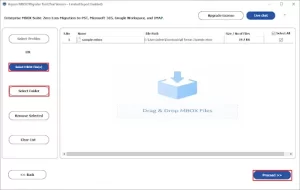
- After that, click on Select MBOX File(s)/Select Folder to add the MBOX file & tap Proceed.
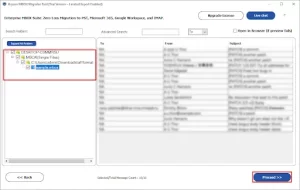
- Then, preview and select the MBOX files >> tap Proceed.
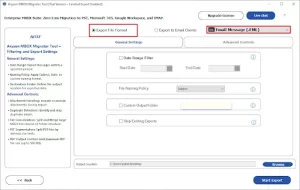
- Now, choose EML as the saving file format.
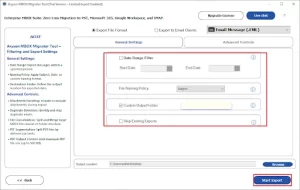
- At last, apply filters and features and click Start Export.
Real-World Scenario:
Recently, a freelance designer from Germany needed to move years of archived emails from Thunderbird to an application that supports EML files. Initially, he tried the manual Thunderbird method. While it worked for a few folders, exporting thousands of emails individually took a significant amount of time.
Later, he used the Aryson MBOX Converter Tool to convert the complete mailbox. The software exported all emails with attachments and maintained the original mailbox structure. This saved hours of manual work and helped him access his emails without any compatibility issues.
Comparison Between Manual and Professional Software
| Features | Manual Method | Professional Method |
| Cost | Free | Trial Available |
| Conversion Process | Lengthy Steps | Simple and Direct |
| Bulk Conversion | Limited | Supported |
| Attachment Preservation | Partial | Yes |
| Folder Hierarchy | Limited | Yes |
| Multiple Export Formats | No | Yes |
Conclusion
In this article, we explained different ways to convert MBOX to EML format. The manual method can work well if you only have a small amount of data. But for larger mailboxes, it can become slow and difficult to manage. In such cases, using a professional tool makes the process easier and more reliable. You can choose the method based on the size of your mailbox and your needs.
Frequently Asked Questions
Q1. Can I convert MBOX to EML file format manually without any software?
Ans: Yes, manual conversion is possible using email clients like Thunderbird. However, the process can be time-consuming. Many users prefer an MBOX Converter because it simplifies the task and reduces manual effort.
Q2. Do I need technical knowledge to migrate MBOX to EML?
Ans: Not really. A basic understanding of email clients is enough for manual steps. Still, using an MBOX Converter is a better option for beginners as it does not require technical configuration.
Q3. What is MBOX File?
Ans: An MBOX file is a common email storage format used by many email clients. It stores multiple emails in a single file, including messages and attachments.
Q4. What is the best way to export multiple MBOX files to EML at once?
Ans: The most effective method is to use an MBOX Converter. It supports batch conversion, so you can export multiple MBOX files to EML in one go without manual repetition.
Q5. Is it safe to use the MBOX Converter?
Ans: Yes, a reliable MBOX Converter is safe to use. It keeps your emails, attachments, and folder structure intact during the conversion process.
Q6. How to import MBOX to EML?
Ans: You can do it manually through Thunderbird by exporting emails one by one. For a quicker approach, an MBOX Converter allows direct conversion from MBOX to EML with minimal steps.
Q7. Is it possible to convert MBOX to EML on Windows and MacOS?
Ans: Yes, conversion is possible on both Windows and MacOS. You can use Thunderbird or an MBOX Converter, which works smoothly on both platforms for easy migration.
About The Author:

Eva Shirley is a skilled technical content writer with expertise in creating engaging and informative content. With over 5 years of experience and a passion for writing, she has solved many users' queries by providing quality content.
Related Post