-
Written By Eva Shirley
-
Approved By Shivam Rathore
-
Publish on June 12th, 2026
-
Reading Time: 2 minutes
How to Convert MBOX to MSG File Format: Step-by-Step Guide

Summary: Most of the email applications, that include Thunderbird and Apple Mail, store mailbox data in MBOX files. However, if you want to use Microsoft Outlook, you’ll need to convert those emails into the MSG format, which Outlook uses for individual messages. Moreover, this conversion helps make emails easier to access and share within the Outlook environment. This article explains the different ways to convert MBOX to MSG, which include Aryson MBOX Converter you can complete the process without data loss
Things to check before you convert MBOX file to MSG
- Before you begin the conversion, create a backup of your important MBOX files.
- Check the storage space available in your system, as large files take up a large amount of space.
- Different Outlook versions handle different versions (make sure converted MSG files are compatible with the Outlook you plan to use).
- Choose the method wisely so that your attachments or HTML emails are preserved after conversion.
?
How to Convert MBOX to MSG for free?
A partial free approach is available to convert your MBOX files to MSG. Use Thunderbird to access your MBOX files and Outlook to save emails in MSG format. This method is suitable for small-scale conversions.
Manual Method: Convert MBOX to MSG Via Thunderbird and Outlook
You can convert MBOX files to MSG with the help of Thunderbird and Microsoft Outlook. This method involves the process to export emails from Thunderbird and then save them as MSG files through Outlook.
Steps to Migrate MBOX to MSG
- To initiate the process, download Mozilla Thunderbird on your computer if not already installed.
- Open Thundebird >> use an MBOX import add-on, such as ImportExportTools NG, to load your MBOX files into the application.
- After import, select the required emails or folders and export them in EML format to a local folder.
- Launch MS Outlook >> create a folder where you want to store the imported emails.
- Drag and drop the exported EML files from your local folder into the Outlook folder.
- Open the required email in Outlook, create File >> Save As, >> select MSG format as the output format. Repeat the process for the remaining emails to export MBOX to MSG.
Limitations of the Manual Method
- The process involves multiple applications and several manual steps.
- Microsoft Outlook is required to save emails in MSG format
- Moreover, there is a possibility of folder loss at the time of conversion.
- Bulk conversion is not supported, which makes this method unsuitable.
Advanced Solution: Convert MBOX to MSG Via Professional Software
The MBOX Converter Tool provides a simple way to export your data in bulk. It allows the user to preview the emails before begin the conversion process. You can select multiple files and folders at once. Moreover, the utility makes sure to maintain the original email formatting throughout the migration. In addition, it offers various export file formats to convert MBOX to EML, CSV, and other formats and in different email clients.
Easy Steps to Convert MBOX to MSG with Attachments:
- Install and launch the MBOX Converter on your system.
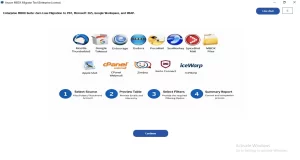
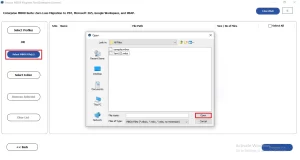
- Select file/folder to choose the MBOX file from your device >> Open.
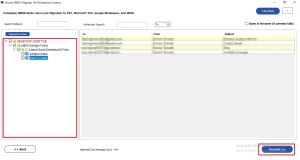
- Preview the tree-structure panel where all your MBOX files are located >> Proceed.
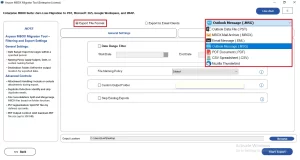
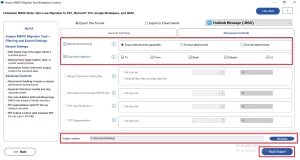
- Choose the MBOX from the export file format drop-down.
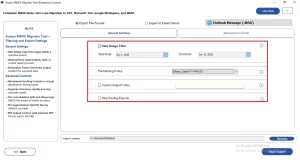
- If you want to select data conversion, then enable the required filters.
- Browse the path to save files and click on Start Export to begin the process.
- After completion, a completion status appears.
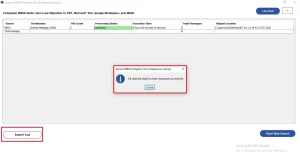
Note: You can download the log report to review the entire process. The report provides details about the converted items and helps the user to verify that the operation was completed successfully.
Real-Life Scenario:
David worked in a customer support department and maintained years of email conversations in Thunderbird. When his company migrated to Microsoft Outlook, he first needed to convert MBOX to PST to move their mailbox into the new environment.
Later, he was asked to share specific emails with the manager and clients as individual Outlook messages. Since manual export takes a lot of time, he converted the required MBOX emails to MSG format with the help of an advanced solution. It makes it easier to access and organize the important communications.
Conclusion
To wrap it up, we covered all the aspects of why users convert MBOX to MSG format. We also discussed the two methods, you can choose any one that fulfils your needs. The manual method is reliable for small file conversion, and it has several limitations. Thereafter, for bulk conversion, choose an advanced solution that converts efficiently.
Frequently Asked Questions
Q1. Is there a free method to convert MBOX to MSG?
Ans. Yes, you can use email clients such as Mozilla Thunderbird along with Microsoft Outlook to manually convert MBOX emails to MSG. However, the process can be time-consuming when dealing with large mailboxes.
Q2. Can I export MBOX to MSG on Windows and Mac?
Ans. Yes, MBOX files can be converted to MSG on both Windows and Mac systems. The method you choose will depend on the software or email applications available on your device.
Q3. What is the easiest way to convert MBOX to MSG files?
Ans. Using a professional MBOX converter is generally the simplest option. It automates the process and reduces the risk of data loss during conversion.
Q4. Which Is the Best Software to Convert MBOX to MSG?
Ans. The tool is one that preserves email formatting, attachments, and folder structure while supporting bulk conversion. Choose software that offers a preview feature and maintains data integrity throughout the process.
Q5. Can I convert a MBOX File to MSG Without Any Technical Knowledge?
Ans. Yes, a professional MBOX conversion tool is designed with user-friendly interfaces. They allow users to complete the conversion with just a few simple steps.
Q6. Why do users need to migrate MBOX to MSG?
Ans. Users often convert MBOX to MSG to access emails in Microsoft Outlook or to move data from MBOX-based email clients into an Outlook environment. MSG files also make it easier to manage individual emails.
Q7. Will attachments be preserved when I export MBOX to MSG?
Ans. Yes, a MBOX conversion tool will retain email attachments, formatting, metadata, and other message properties during the export process. Always verify the software’s capabilities before starting the conversion.
About The Author:

Eva Shirley is a skilled technical content writer with expertise in creating engaging and informative content. With over 5 years of experience and a passion for writing, she has solved many users' queries by providing quality content.
Related Post