-
Written By Vishal Kumar
-
Approved By Mithilesh Tata
-
Publish on March 19th, 2026
-
Reading Time: 4 minutes
Top Methods to Convert MSG to Word (Doc/Docx) format

Summary: Want a reliable solution to convert your MSG to Word documents? Most of the enterprises and IT professionals face difficulties when they need email data in a format that supports easy editing and sharing. Since MSG files are primarily associated with Outlook, managing them outside the application can be difficult. To make the data more flexible and easy to edit, most users prefer to convert their MSG files to Word. Therefore, in this blog, we will outline the effective methods to convert MSG to Word. Along with that, we will discuss how Aryson MSG file Converter tool simplifies and speeds up the entire conversion process.
TL; DR: Professionals convert MSG files to Word (DOC/DOCX) to make email content easier to edit, share, and manage. This can be achieved manually through Microsoft Outlook and Word for limited files or via an MSG Converter tool that maintains formatting and attachments.
Reasons to Convert MSG to DOC
Conversion helps users to improve accessibility, usability, and document management for various reasons, which are listed below:
- The DOC format helps users to edit and format their email messages.
- You can convert email content into a format for reports and documentation.
- Furthermore, sharing emails doesn’t require an email client.
- Provides improved readability in a commonly used document format.
- DOC assists you in keeping records for compliance and legal purposes.
- Also, it guarantees cross-platform compatibility for email content.
Proven Approaches to Convert MSG to Word
There are various methods that help you to convert your MSG files to DOC format, and the choice depends on your technical knowledge and the volume of emails. Below, we have discussed the proven approaches that provide accurate conversion.
- Built-in Technique
- Automated Solution
Approach 01: Built-in Technique to Convert MSG to Docx
This manual technique allows users to manually convert their MSG files to DOC with the help of Microsoft Outlook and Word. It is suitable for a small number of emails. Moreover, make sure that Microsoft Outlook and Word are installed on your system.
Easy Steps to Change MSG to DOC:
- Firstly, you have to launch Microsoft Outlook on your computer.
- After that, browse and select the MSG file you want to convert.
- In this step, you have to open the MSG file within Outlook.
- Proceed to File >> Save As and choose HTML or TXT to save your email.
- Afterwards, open Word, then go to File >> Open to load the saved file.
- Lastly, review the formatting, make changes if needed, and save as DOCX.
Limitations of the Built-in Method
- This approach handles only a few files, not large-scale conversion.
- Likewise, it is time-consuming due to multiple steps for each email.
- Users require both Microsoft Outlook and Word installed on the system.
- Subsequently, this approach does not preserve attachments automatically.
- There is a high chance of human error while you save or import files.
Approach 02: Automated Solution to Convert MSG to Word
The MSG Converter tool provides a reliable way to convert your MSG files into Word documents with less manual effort. Likewise, it helps in batch conversion, preserves email formatting & attachments. Therefore, this makes it ideal for enterprises and IT professionals who have to process their large volumes of emails efficiently with complete data accuracy. You can also check out our guide on Convert MSG File to PNG to see how email messages can be converted into image format for record-keeping.
Steps to Convert MSG File to Word:
- To begin, you need to install and launch the MSG Converter Tool.
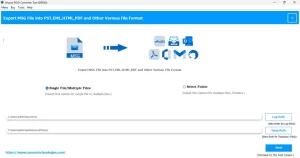
- After that, add single MSG files or an entire folder that has MSG emails.
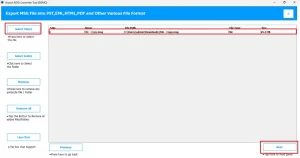
- Now, you can preview the selected emails to verify your content.
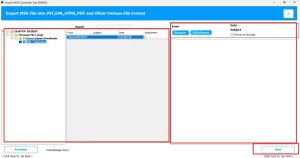
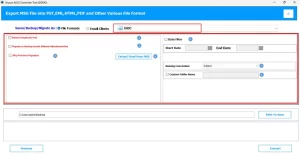
- Afterwards, choose DOCX as the output format >> apply optional filters.
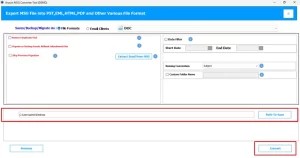
- At last, select the destination folder >> click Convert to start the conversion.
End Note
In this blog, we discussed reliable methods to convert MSG to Word & covered both the built-in manual approach and the automated MSG converter tool. The manual method is suitable for a small volume of data. While the automated solution provides a more accurate and scalable way to handle your large volumes of emails. Choose the method that best fits your requirements, and you can get an error-free conversion. Likewise, for any assistance, our support team is always available to help.
Frequently Asked Question
Q.1. Does Aryson MSG File Converter support converting MSG files with attachments?
Ans: Yes, the above-discussed MSG converter tool preserves all attachments while converting MSG files to DOC or DOCX format. Moreover, it makes sure that no email content or files are lost during the process.
Q.2. Can I search MSG content after converting to DOC?
Ans: Yes, once the MSG files are converted to Word documents, the content becomes fully searchable using Microsoft Word’s search functionality, making it easier to locate specific information.
Q.3. How to convert Outlook messages to DOCX?
Ans: You can quickly convert Outlook MSG files to DOCX using the MSG Converter Tool in just a few steps. Follow the given steps:
1. Launch the MSG converter tool.
2. Then, add MSG files or folders.
3. Preview emails to confirm content.
4. Select DOCX as the output format and apply filters if needed.
5. Choose the destination folder and click Convert.
About The Author:

Vishal Kumar is an experienced technical content writer with a passion for simplifying complex topics. Specializing in email and cloud migration solutions, he crafts informative and reader-friendly content that empowers users to understand and manage their digital tools more effectively. His insights have been featured on several respected tech platforms, earning the trust of a wide audience.
Related Post