-
Written By Eva Shirley
-
Approved By Shivam Rathore
-
Updated on May 26th, 2026
-
Reading Time: 5 minutes
Easy verify solution to convert MSG to EMLX on Window & Mac

Summary: As you know, email formats are different on Windows and Mac platforms. Microsoft Outlook uses MSG files, while Apple Mail supports EMLX files. Therefore, users may face issues when they switch emails from Windows to Mac. Conversion of MSG files to EMLX makes sure of smooth access on Mac OS. In this article, we will explain the simple and appropriate method to convert MSG to EMLX, along with the Aryson MSG Converter Tool for hassle-free conversion.
What are MSG and EMLX files?
MSG Files: It is an individual email message file that is created by Outlook. It stores the complete email information, including the email body, subject line, sender and receiver details, attachments, and date and time. Typically, the MSG files are mainly used in Windows environments.
EMLX Files: This file format is used by Apple Mail, the default email application on macOS systems. Moreover, it stores email content in a structured text format that Apple Mail can easily read and manage.
Note: If you move from Outlook Windows to Mac, you need to change the MSG files to EMLX for better compatibility.
Most Common Reasons to Export MSG to EMLX
- For better compatibility with Mac, users need to save MSG files to EMLX format.
- EMLX files are directly opened in Apple Mail, which eliminates the need for Mac Outlook.
- Conversion is required to make sure of smooth email access across different platforms.
- The users who want to archive emails on Mac prefer EMLX for better organisation.
- Email migration from Windows to Mac infrastructure; conversion ensures proper transfer of emails.
Proven Method to Change MSG File to EMLX
Now, let’s walk through the most reliable approach that completes the conversion process with ease:
- Manual Method
- Professional Software
Method 01: Manual Method to Save MSG File to EMLX
There is no direct built-in option in Outlook to save MSG files to EMLX. However, you can proceed with a manual method for a small file conversion.
Step 01: In Outlook Windows, open the MSG File
- First, start by launching Outlook on your Windows system.
- After that, you need to locate the MSG files on your computer.
- Next, to open an MSG file in Outlook, you need to double-tap on it.
Step 02: Convert MSG to EML Format
As Outlook does not directly offer a Save as EML option. So follow a drag-and-drop method:
- Then, you have to open Outlook and create a new folder on your desktop.
- Now, drag the opened email from Outlook and drop it in a desktop folder.
- Thereafter, the email will be saved as an MSG file again.
Note: Outlook does not export to EML in many versions. Therefore, you need either Windows Mail (older version) or an intermediate email client that supports EML export.
Step 03: Move EML File to Mac
Now, you need to copy the exported EML files to your Mac system through a USB drive, cloud storage & email transfer.
Step 04: Import EML into Apple Mail
- For the importation, you need to open Apple Mail on your Mac.
- Next, click on File >> Import Mailboxes.
- Afterwards, select the files in mbox format (Apple Mail accepts EML through import).
- Then browse and select the EML files.
- Finally, click on ‘Continue‘ to start the import process.
Step 05: Locate the Imported Emails
- After import, go to the Import folder in Apple Mail.
- At last, Apple Mail automatically stores imported emails in EMLX format internally.
Drawback of the Manual Method:
- It consumes a lot of time for the conversion of bulk files.
- There is a risk of change in formatting at the time of conversion.
- Moreover, it is a must to have Outlook on your device to perform the conversion.
Method 02: Professional Software to Convert MSG Files to EMLX
To overcome the above limitations, you can proceed with the MSG Converter Tool. It is secure software that converts the data without any loss. Additionally, when you use this software, you don’t need to install Outlook on your system for the conversion of files. Also, it saves time and effort for both individuals and organisations that handle a large volume of files.
Simple Process to Convert MSG to EMLX:
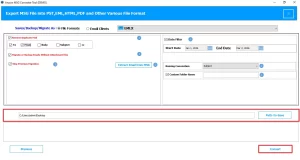
- First, launch the MSG Converter Tool and run it as administrator.
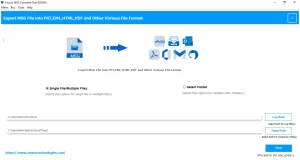
- Thereafter, you need to select the file or folder and navigate to .msg files >> open.
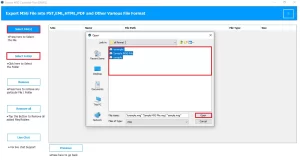
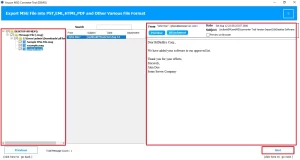
- Next, preview the files, and you can also view the complete attachments and click Next.
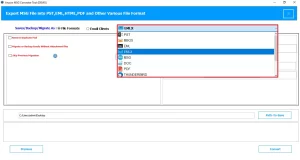
- Now, select EMLX as the output format of the resultant files.
- Moreover, for accurate email conversion, enable the required features.
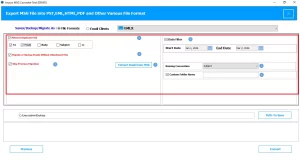
- Lastly, choose the destination path to save and start the conversion by clicking on Convert.
Note: If you want to convert emails into a document format, you can read this article: Convert MSG file to PDF.
Key Features of This Software:
- It is highly reliable for the bulk conversion of emails simultaneously.
- Along with that, it preserves the email attachments and folder hierarchy.
- Also, it provides an advanced filter option for favourable file conversion.
- Moreover, this software is compatible with both Mac and Windows OS.
Final Conclusion
In conclusion, we discussed all the scenarios in which the MSG to EMLX conversion is important. The right method for conversion helps you to save your MSG files in EMLX easily. In this article, we covered the most appropriate manual method and professional software that exports your files in a smooth way. Ultimately, you can follow any of the methods to fulfil your conversion process without any hassle.
Frequently Asked Question
Q.1. Why would I need to change MSG file to EMLX?
Ans. It is required to change MSG files to EMLX when you migrate from Outlook on Windows to Apple Mail on Mac. As EMLX is compatible with Apple Mail, the MSG format is not supported by Apple Mail.
Q.2. Is there any free method to save MSG as EMLX?
Ans. No, there is no direct way to save MSG as EMLX. Instead, you must convert the MSG file to EML and then import it to Apple Mail.
Q.3. Can I export MSG to EMLX without Outlook installed?
Ans. Yes, the MSG Converter Tool exports your MSG files to EMLX without Outlook installed.
Q.4. What is the best method to convert MSG files to EMLX without data loss?
Ans. The professional method is the best method that can export all your data in bulk without any loss.
About The Author:

Eva Shirley is a skilled technical content writer with expertise in creating engaging and informative content. With over 5 years of experience and a passion for writing, she has solved many users' queries by providing quality content.
Related Post