-
Written By Eva Shirley
-
Approved By Shivam Rathore
-
Updated on May 26th, 2026
-
Reading Time: 3 minutes
Import OLM File to Yandex Mail – Fast, Safe & Simple

Summary: Have you ever tried to open your old OLM files and realised that Yandex Mail doesn’t support them directly? Some of the users feel frustrated when their important emails are stuck in one email client. To help them resolve this issue, this blog will guide you through some simple and reliable ways to import OLM file to Yandex Mail effortlessly, including the Aryson OLM file Converter. Let us first understand why moving your data the right way really matters.
Why Transfer OLM file to Yandex Mail?
- Users can access their OLM emails anytime via Yandex Mail’s cloud-based platform.
- After the import, you can prevent data loss during local system crashes.
- Moreover, Yandex Mail provides users with secure cloud storage.
- Additionally, Yandex Mail offers an organised interface to manage emails efficiently.
- Also, Yandex can easily sync OLM data across multiple devices.
How to Open OLM File into Yandex Mail?
The following are the two approaches we are going to discuss in this blog to Open OLM File into Yandex Mail.
- The Automated Software
- Using Microsoft Outlook
Method 1: Quick Way to Import OLM File to Yandex Mail
Aryson OLM file Converter Tool is one of the most reliable software to import OLM files to Yandex Mail. This software provides the user with a preview panel to cross-verify the selected OLM files before importing them. Moreover, using the same utility, many enterprises import OLM Contacts to iCloud, Thunderbird, IMAP, and many more email clients. Additionally, the advanced features of the software, such as the Date Range filter and Skip Previous migration, allow users to be more specific about the data selection. Also, you can try the demo version of the software to convert upto 50 emails for free.
Steps to Import OLM to Yandex Mail
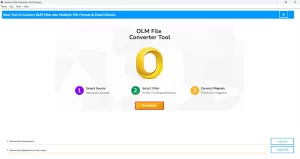
- Download the Aryson OLM file Converter Tool >> run it as administrator.
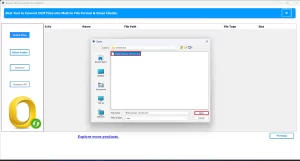
- After that, load one or more files into the software and click on Next.
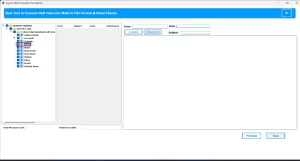
- Now, preview the selected data & attachments before importing them >> Next.
- Next, select the Yandex Mail email client as the destination.
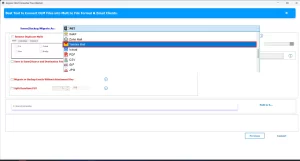
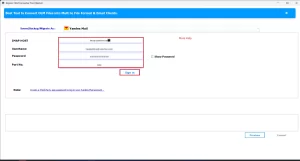
- Enter your valid Yandex Mail credentials to log in.
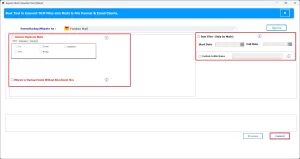
- Next, apply the required features of the software & click Convert.
Additional Note: However, this method works well; you can opt for the alternate solution discussed ahead if you have a small amount of data and acquire sufficient technical skills.
Method 2: Manual Method to Import OLM File to Yandex Mail
Yandex Mail does not provide users with any direct method to convert OLM file to Yandex. For that, you must connect an active Yandex account to Mac Outlook using IMAP. Then, you can use Outlook as the intermediary platform to move mailbox data from the OLM file into your Yandex folders.
Step 1: Add an Active Yandex Mail Account in Outlook
- To initiate, log in to your Yandex Mail account in Outlook.
- After that, run Mac Outlook on your system.
- Then, navigate to Outlook >> select Preferences >> click on Accounts.
- Next, click on the + icon to add a new account.
- Provide the valid Yandex Mail login credentials.
- Choose IMAP as the account type.
- Adjust the server settings as given below.
|
Incoming (IMAP): |
imap.yandex.com |
|
Outgoing (SMTP): |
smtp.yandex.com |
|
SSL/TLS |
Enable |
Step 2: Move OLM Files to Yandex Folders
- Next, import your OLM file into Mac Outlook.
- Then, select the desired mailbox/folder to migrate.
- Now, drag and drop the selected emails into your Yandex Mail folders.
- Next, repeat the same process to import OLM files into Yandex Mail.
Conclusion
In this blog, we discussed two different methods to import OLM File to Yandex Mail. However, both methods work well. You can pick one as per your convenience and import needs. The manual method is suitable for technical users who have small datasets to handle. Whereas, the automated software can import a large number of files within seconds. Now, the choice is upto the user only.
Frequently Asked Question
Q.1.Can I directly import OLM file into Yandex Mail?
Ans- Yes, using the above software, you can effortessly move OLM files to Yandex Mail.
Q.2. What is the best method to import OLM to Yandex Mail?
Ans- Aryson OLM Converter is the best method to import OLM to Yandex Mail.
Q.3. Can I convert multiple OLM files into Yandex Mail at once?
Ans- Yes, you can convert multiple OLM files into Yandex Mail at once, using the above OLM Converter.
About The Author:

Eva Shirley is a skilled technical content writer with expertise in creating engaging and informative content. With over 5 years of experience and a passion for writing, she has solved many users' queries by providing quality content.
Related Post