-
Written By Eva Shirley
-
Approved By Shivam Rathore
-
Updated on May 26th, 2026
-
Reading Time: 4 minutes
How to Import OLM Contacts to iCloud – Best & Verified Guide

Summary: In the year 2026, users migrating from Outlook for Mac to Apple’s ecosystem may feel confusing at first. However, when you use the right approach, users can easily import OLM contacts to iCloud without any data loss. As iCloud does not directly support OLM files, users must rely on the right method to complete the data migration safely. There are several approaches to accomplish this importation. In this guide, we will discuss the most appropriate approach, including the Aryson OLM Converter Tool that will maintain the folder hierarchy.
Why do Users Import OLM to iCloud Mail?
Generally, several enterprises and IT admins nowadays switch to iCloud for convenience and long-term readability. iCloud offers a seamless integration with Apple Mail.
The reasons included;
- iCloud offers easy synchronization across iPhone, iPad, and Mac.
- It stores contacts safely in the cloud with strong security measures.
- Moreover, iCloud contacts integrate smoothly with Apple Mail, Facetime and other Apple services.
- Users can access their contacts anytime by signing in to iCloud from any browser.
Consequently, when you import the OLM contacts to iCloud, it helps users centralise their data in one trusted system.
How to Import OLM Contacts to iCloud Mail?
There are a number of ways to import OLM data to iCloud Mail. However, in this section, we will discuss the two most effective methods to import your OLM files into iCloud Mail.
- Manual Workaround
- Automated Software
Method 01: Import OLM files into iCloud Mail Manually
Generally, you can import your OLM contacts to iCloud manually by exporting them from Outlook for Mac in a supported format. This method works best when you have a few contacts.
Working Process to Move OLM File to iCloud Mail:
- First, Open Outlook for Mac on your system.
- Then, select the People / Contacts section from the navigation panel.
- After that, choose the contacts you want to move.
- Now, click on the File and select the Export option.
- Save the contacts as a vCard (.vcf) file on your Mac.
- Then, you have to open a web browser and sign in to iCloud.com.
- Go to Contacts, click the Settings (gear) icon, and choose Import vCard.
- After that, select the exported VCF file and upload it.
After the import completes, iCloud displays your OLM contacts, and they sync automatically across all connected Apple devices.
Limitations of the Manual Method
- This manual method does not support bulk import of your OLM files to iCloud.
- You have to perform the steps repeatedly, which can be time-consuming.
- In this method, import large file may cause a loss of data.
Method 02: Automated Approach to Import OLM Contacts to iCloud
Aryson OLM Converter is a reliable solution to import OLM contacts into iCloud. During the process of migration, you can maintain all the original contact details. It also provides a preview feature so that you can check your contacts before the import process. This utility offers options such as removing duplicates and selective migration, which makes the process simple. Besides iCloud, this utility also supports multiple email platforms and formats, so you can open OLM File in Zoho Mail.
Steps to Transfer OLM Emails to iCloud :
- Firstly, install & run the Aryson OLM Converter Tool on your existing PC.
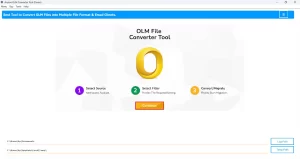
- After that, open the desired files/folders you want to migrate >> Next.
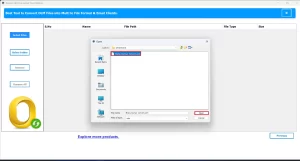
- Now, select single or multiple OLM files & cross-verify them before migration>> Next.
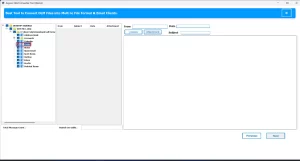
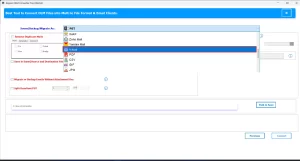
- Next, choose the iCloud option under the email clients dropdown list.
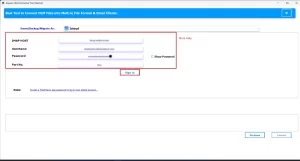
- Then, enter your valid iCloud credentials to log in.
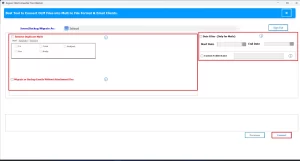
- Next, use the additional filters of the software & hit Convert to transfer OLM File to iCloud.
Writer’s Advice
In conclusion, import OLM contacts to iCloud becomes simple when you choose the right approach. Although the manual or IMAP approach works when you have a small number of files, it includes limitations. It is recommended to use an automated software that ensures an accurate data transfer and a scalable option for long-term use.
Frequently Asked Question
Q1. How do I migrate OLM files to iCloud account?
Ans. You can migrate OLM files to export contacts as VCF manually, syncing emails using IMAP, or you can use an Aryson OLM migration tool for a complete transfer.
Q2. Is it possible to import OLM to iCloud mail without data loss?
Ans. Yes. Aryson OLM converter ensures zero data loss and preserves folder structure, metadata, and attachments.
Q3. Can I move OLM file to iCloud Mail using IMAP?
Ans. Yes, but IMAP only transfers emails. It does not support contacts, calendars, or notes.
Q4. What is the best way to transfer OLM emails to iCloud?
Ans. The best way is to use a trusted OLM migration tool that supports direct iCloud export with full data integrity.
Q5. Why do users want to import OLM contacts to iCloud?
Ans. Users prefer iCloud for its seamless Apple device integration, automatic syncing, security, and ease of access.
About The Author:

Eva Shirley is a skilled technical content writer with expertise in creating engaging and informative content. With over 5 years of experience and a passion for writing, she has solved many users' queries by providing quality content.
Related Post