-
Written By Eva Shirley
-
Approved By Shivam Rathore
-
Updated on May 26th, 2026
-
Reading Time: 4 minutes
How to migrate MSG to iCloud with Attachment: Complete Solution

Summary: MSG files in Microsoft Outlook are basically used to store your individual emails on a local system, which makes them ideal for offline use but limits accessibility across multiple devices. In contrast, iCloud provides a cloud-based platform where emails are automatically synced & can be accessed anytime on Apple devices. Because of this, most of the users often struggle to access their data freely across devices. In this blog, we will cover the most secure methods to migrate MSG to iCloud so that you can manage your emails more efficiently. We will also introduce the Aryson MSG File Converter Tool for error-free migration.
Reasons to Import MSG Files to iCloud
Now, in this section, we will discuss the key reasons for the export process.
- Access emails anytime from any Apple device without system restrictions.
- Users can keep emails automatically synced across all connected devices.
- It provides better protection of data with secure cloud storage.
- iCloud helps you to securely manage & organize your emails in single place.
- Subsequently, iCloud reduces the risk of data loss caused by system failures.
Most Reliable Approaches to Migrate MSG to iCloud
There are several ways to migrate your MSG files to iCloud, but not all are equally practical. For now, we will focus on two widely used methods that are preferred by most of the enterprises.
- Native Approach
- Automated Solution
Approach 01: Native Approach to Import MSG to iCloud Mail
This approach converts your MSG files into a compatible format before moving to iCloud Mail. It is generally useful for a small number of files.
Steps to Import Outlook MSG to iCloud Mail:
- Place all your MSG files in one folder >> open them in Microsoft Outlook.
- After that, you have to save each file as EML via the “Save As” option.
- Now, open an email client like Apple Mail >> add your iCloud account.
- Thereafter, you have to drag the EML files into your iCloud Mail folder.
- Finally, wait for syncing to finish the process of conversion.
Limitations of the Native Approach
- The process gets slow when you have a larger number of MSG files to handle.
- There’s always a chance that a few emails might get missed along the process.
- Moreover, a proper account setup is needed, which can take a considerable amount of time.
- Subsequently, your folder order and structure may not remain exactly the same.
- Likewise, users require a steady internet connection for smooth syncing.
Approach 02: Automated Solution to Migrate MSG to iCloud Mail
The Aryson MSG File Converter Tool is the most secure solution for the migration of your MSG files to iCloud Mail. It lets you load MSG files and transfer them without doing everything manually. Moreover, it also keeps basic email details like attachments and folders. Options like date range help you transfer only the emails you need. Likewise, you can simply import MSG Files to thunderbird & other formats that include PDF, PST, Gmail, and many more.
Steps to Open MSG File in iCloud Mail:
- Open the Aryson MSG File Converter Tool after installing it.
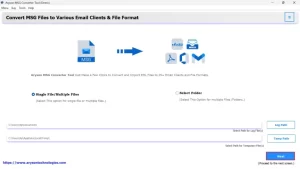
- After that, you have to add MSG files or a full folder.
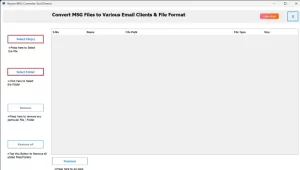
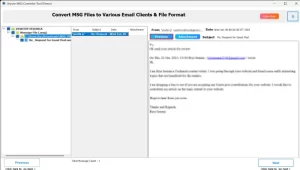
- Now, you need to check the emails in the preview section.
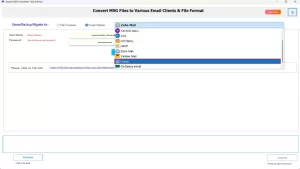
- Choose iCloud Mail as the saving option.
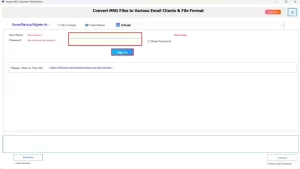
- Thereafter, you have to enter your login details as needed.
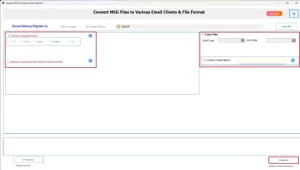
- Thereafter, you have to apply filters if needed >> press Convert.
Manual vs Professional Solution Comparison
|
Basis |
Manual Method |
Professional Solution |
|
Time |
It is slow for many files |
This provides faster conversion |
|
Effort |
Leads to repetitive work |
Less manual work to transfer MSG Files to iCloud Mail |
|
Data Size |
This works for small data |
It handles large data |
|
Data Safety |
There are chances of missing data |
It helps in better data handling |
|
Structure |
May not keep folders |
Keeps folder structure |
|
Skills |
You need basic knowledge |
This is easy for any user |
End Note
To conclude, the process to migrate MSG to iCloud Mail is not very complex, but the method you choose makes a difference. We covered two effective approaches. The manual one can be fine for a small number of emails, though it takes more time and careful execution. The second professional utility works better when you have a larger set of files to move. If you face any issues during the process, you can contact the support team for help.
Frequently Asked Question
Q.1. Can I import MSG files directly into iCloud Mail?
Ans: No, iCloud Mail does not support MSG files directly. You need to use a method or a tool to move these emails into your iCloud account.
Q.2. What is the easiest way to transfer MSG files to iCloud Mail?
Ans: Using a tool like the Aryson MSG File Converter Tool is one of the easiest ways. It lets you load MSG files and move them to iCloud without going through long manual steps.
Q.3. Can I open MSG files in iCloud Mail without conversion?
Ans: No, MSG files cannot be opened in iCloud Mail as they are. They need to be converted or imported through a supported method.
Q.4. How to import Outlook MSG files to iCloud Mail manually?
Ans: You can first open MSG files in Microsoft Outlook, then move them to an iCloud account configured in Outlook using IMAP. After that, the emails will sync to your iCloud Mail.
About The Author:

Eva Shirley is a skilled technical content writer with expertise in creating engaging and informative content. With over 5 years of experience and a passion for writing, she has solved many users' queries by providing quality content.
Related Post