-
Written By Eva Shirley
-
Approved By Shivam Rathore
-
Updated on May 26th, 2026
-
Reading Time: 4 minutes
How to import MSG files to Thunderbird Safely – Expert Guide

Summary: Do you face difficulty when you try to use MSG files from Microsoft Outlook in Mozilla Thunderbird? Outlook supports the MSG format by default. But Thunderbird does not provide direct support, which makes the process to access these files a challenge. This difference makes it difficult to view or organize your email data in Thunderbird without the process of conversion. In this blog, we will cover the reliable methods to import MSG files to Thunderbird without any data loss. Besides, we will discuss the Aryson MSG File Converter Tool, which helps individuals & enterprises to get accurate conversion with less time.
Reasons to Import MSG Files into Thunderbird
The procedure to move your MSG files to Thunderbird helps users to manage their emails more easily across different platforms. There are some key reasons for this conversion:
- Thunderbird helps to store all email data in one place for easy access.
- Users can keep email details like sender, subject, and date intact.
- Moreover, you can arrange emails in a clear and structured format.
- Subsequently, Thunderbird helps to avoid reliance on Microsoft Outlook.
- Likewise, you can access emails smoothly on different systems.
Proven Approaches to Import MSG Files to Thunderbird
There are different methods available to move your MSG files into Thunderbird, which depend on user requirements and the amount of data. You can select a suitable method that helps to provide simple and accurate email transfers.
- Native Technique
- Automated Solution
Approach 01: Native Technique to Move MSG file to Thunderbird
This technique provides a basic process to access your MSG files in Thunderbird through format conversion. Moreover, this is basically for your small amount of data.
Simple Steps to Import .msg files into Thunderbird
- To begin, you need to open the folder where the MSG file is stored.
- After that, you have to right-click the file and choose Rename.
- Now, you need to change the extension from .msg to .eml.
- Thereafter, you have to right-click the converted EML file.
- Next, you need to select Open with Thunderbird.
- Finally, you have to simply check the email content in Thunderbird.
Limitations of the Native Method
- Bulk conversion of MSG files is not supported.
- Changing the file extension may not always give proper results.
- Moreover, each file requires individual handling.
- Your attachments may not open or display correctly.
- Likewise, it is not practical to handle large volumes of MSG files.
Approach 02: Automated Solution to Import MSG files to Thunderbird
The Aryson MSG File Converter Tool is the appropriate solution that helps you to transfer your MSG files into Thunderbird in a simple and organized way. It works with multiple files at the same time and retains original email properties. Moreover, this tool provides various filter options to select only specific data for conversion. Subsequently, with an easy-to-use interface, it helps you to complete the migration without any issues. Furthermore, users can import MSG to Yahoo Mail via the same utility.
Steps to Open MSG File in Thunderbird:
- Start the Aryson MSG File Converter Tool on your system.
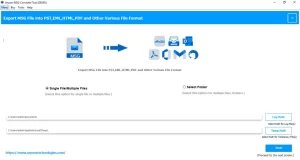
- After that, use Select File or Select Folder to load your MSG data.
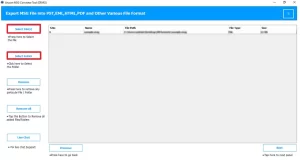
- Now, you need to pick the emails or folders you want to export.
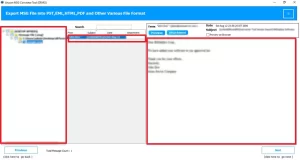
- Thereafter, you have to select Thunderbird as the output type.
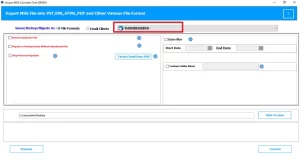
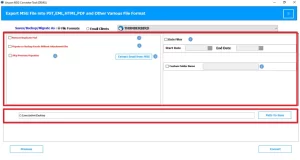
- Simply apply filters if required and choose the save location.
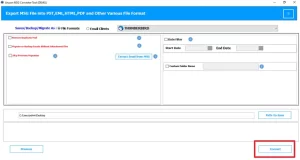
- At last, you have to press Convert to complete the process.
End Note
This blog explained simple methods to import MSG files to Thunderbird using different approaches. The manual approach handles fewer files but needs greater time and effort. In contrast, the professional utility helps to make the conversion quicker and supports bulk files as well. Subsequently, it helps to keep your important details intact during transfer. A suitable method helps you access MSG files in Thunderbird smoothly and maintain better email organization.
Frequently Asked Question
Q1. What is the best format to open MSG files in Thunderbird?
Ans: The best format is EML, as Thunderbird supports it directly and preserves email structure. For quick and direct conversion, you can use the above-mentioned Aryson MSG File Converter Tool.
Q2. What is the best tool to import MSG files to Thunderbird?
Ans: Aryson MSG Converter Tool is a reliable option to transfer MSG files into Thunderbird with accuracy and ease. Steps to follow:
1. Open the Aryson MSG File Converter Tool.
2. Click Select File/Folder to load MSG files.
3. Choose the emails or folders.
4. Select Thunderbird as output.
5. Apply filters and set the location.
6. Click Convert to finish.
Q3. Is it possible to import .msg files into Thunderbird with no technical knowledge?
Ans: Yes, with the help of Aryson MSG File Converter Tool, users can complete the process without technical skills, as the tool offers a simple interface and guided steps for easy conversion.
About The Author:

Eva Shirley is a skilled technical content writer with expertise in creating engaging and informative content. With over 5 years of experience and a passion for writing, she has solved many users' queries by providing quality content.
Related Post