-
Written By Eva Shirley
-
Approved By Shivam Rathore
-
Updated on May 26th, 2026
-
Reading Time: 4 minutes
How to Convert MSG File to MBOX: Simple and Secure Methods

Summary: Are you facing issues while opening your MSG files in your MBOX-supported email client? Most of the users find it difficult to access their MSG files outside of Outlook, especially when changing their email platforms or moving their data. As MSG files are mainly designed for Outlook, they are not directly supported by many other applications. If you are among those who are facing this issue, then this blog will guide you with simple methods to convert MSG file to MBOX, including the Aryson MSG Converter for easy transfer.
Why Do Users Prefer to Convert MSG to MBOX?
Before we move ahead, it is important to know why most of the users prefer to convert their MSG files to MBOX.
- Many email clients like Thunderbird and Apple Mail support the MBOX.
- MBOX makes it easier to migrate emails between different platforms.
- Users can store multiple emails in a single MBOX for better management.
- Moreover, MSG files are mainly supported by Microsoft Outlook only.
- Also, users can create a backup that can be accessed in various applications.
As discussed, switching from MSG to MBOX provides better access across the various platforms. Now we will move forward with the best available solutions.
Reliable Methods to Convert MSG File to MBOX
For the process of conversion, users can choose one of the given approaches for a smooth transfer. Each of the given approaches has its own advantages, which depend on technical skills and the size of the data.
- Manual Method
- Professional Conversion Tool
Manual Approach to Export MSG Files to MBOX Format
In this method, you can easily convert your MSG files by using Microsoft Outlook and Mozilla Thunderbird. Now, we will discuss the complete process to perform the conversion manually.
Steps to Convert MSG into MBOX Manually:
- Firstly, open the folder on your system where the MSG files are stored.
- After that, right-click on the required MSG file >> Open With >> Outlook.
- Now, in Outlook, you need to go to File and press the Save As option.
- Next, you can pick TXT (Text Only) as the saving format and save the file.
- Then, you have to rename your saved file extension from .txt to .eml.
- After that, manually import your EML file into Mozilla Thunderbird.
- At the end, export the imported emails from Thunderbird in MBOX format.
Limitations of the Manual Method
- The process is lengthy and involves multiple applications.
- Subsequently, it is not practical to convert a large number of MSG files.
- Moreover, users should install both Outlook and Thunderbird.
- There is a risk of data loss or formatting changes during conversion.
- Also, the steps must be repeated for each file, making it time-consuming.
Professional Solution to Convert MSG File to MBOX
Aryson MSG Convert Tool is a reliable utility that helps the users to convert their MSG files into MBOX format. It keeps the original email content and unchanged formatting during the conversion. The software provides users the ability to preview their data so that users can check their selected files before processing. With the support for bulk conversion and additional filters like duplicate mail removal, it makes the entire process quick.
Steps to Transfer MSG to MBOX Using the Tool:
- Firstly, you need to download and launch the Aryson MSG Converter.
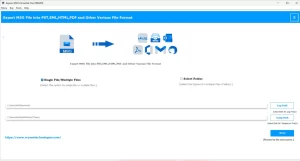
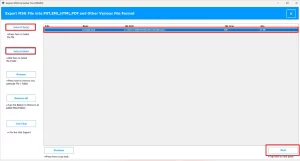
- After that, press Select Files/Select Folder to upload your msg file >> Next.
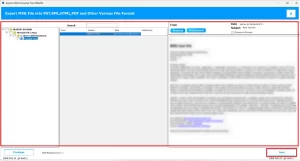
- Now, preview the data of your selected file and press the Next button.
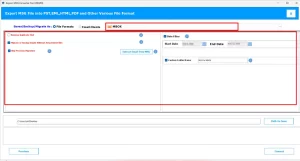
- Then, pick MBOX as the file format >> apply the necessary filters.
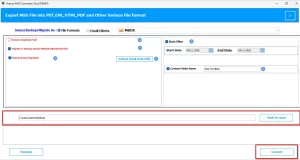
- At the end, choose the Path to Save >> Convert to migrate MSG to MBOX.
End Note
In this blog, we have discussed the two effective ways to convert MSG file to MBOX. The manual approach may work for minor files, but it can be lengthy and less convenient. On the other hand, the automated software provides advanced features that help to make the conversion faster. During the process, if you face any issues, then you can contact our technical support team for help.
Frequently Asked Question
Q.1. What is the best way to convert MSG file to MBOX format?
Ans: The most effective way is to use a professional tool like Aryson MSG Converter Tool. It converts MSG files to MBOX quickly while keeping attachments, formatting, and email properties intact.
Q.2. Can I convert multiple MSG files to MBOX at once?
Ans: Yes, the Aryson MSG Converter Tool supports bulk conversion. You can add multiple MSG files or an entire folder and convert them to MBOX in a single process.
Q.3. Is there a free method to convert MSG file to MBOX?
Ans: Yes, you can use a manual method involving Outlook and Thunderbird. However, it is time-consuming and not suitable for large numbers of files.
Q.4. Is it safe to convert MSG file to MBOX using third-party tools?
Ans: Yes, using a trusted tool like the Aryson MSG Converter Tool is safe. It ensures data integrity and keeps your email content secure during the conversion process.
About The Author:

Eva Shirley is a skilled technical content writer with expertise in creating engaging and informative content. With over 5 years of experience and a passion for writing, she has solved many users' queries by providing quality content.
Related Post