-
Written By Eva Shirley
-
Approved By Shivam Rathore
-
Updated on May 26th, 2026
-
Reading Time: 4 minutes
Import MSG File into Hotmail: Step-by-Step Guide

Summary: Emails generally contain your important conversations, especially when saved in Outlook MSG format. However, the process to access these files directly on web-based platforms such as Hotmail can be difficult. To make your emails available anytime and from any device, importing MSG files into Hotmail becomes necessary. In this guide, you’ll find secure methods to complete the process without hassle. We’ll also introduce the Aryson MSG File Converter, a secure solution that helps import MSG File into Hotmail while keeping all details intact.
Why Do Users Transfer MSG File to Hotmail?
There are several reasons why users prefer to move their MSG files to Hotmail.
- Hotmail makes emails accessible from any device, whenever you need them.
- It protects email data from local system failures or unexpected file damage.
- Moreover, all your messages that include imported MSG files stay organized.
- The procedure of this transfer serves as a dependable online backup.
- Emails stored in Hotmail can be shared without any layout issues.
Reliable Methods to Import MSG File into Hotmail
Knowing the right approach before you start the process saves both time & effort. This section covers the reliable approaches that depend on the number of files and the level of technical comfort:
- Automated Solution
- Native Approach
Method 01: Automated Solution to Upload MSG files to Hotmail
Aryson MSG File Converter is a simple and easy-to-use tool that simplifies the process to move your MSG files into Hotmail. Users who work with a large set of files benefit from the batch processing capability, which removes the need to handle files one at a time. The tool features a simple interface that is easy to use, even for non-technical users, which makes conversion manageable. Likewise, refer to this guide on how to import MSG to Google Workspace for a complete walkthrough.
Simple Steps to Import Outlook MSG file into Hotmail:
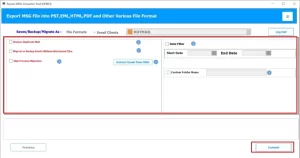
- To initiate, run the Aryson MSG File Converter as an administrator.
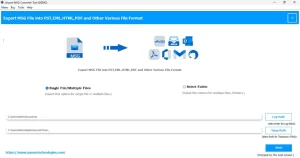
- After that, you can press Select Files/Folder to load the MSG files for export.
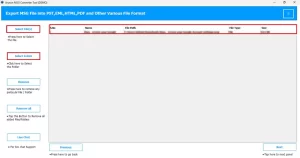
- Go through the email preview to confirm all files have been loaded correctly
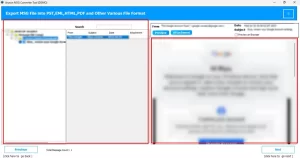
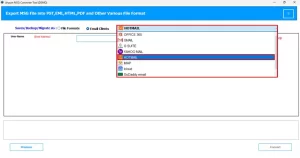
- Now, you have to choose Hotmail from the list of supported email platforms
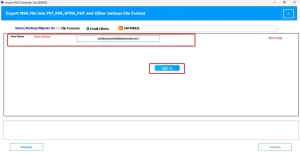
- Simply enter Hotmail login credentials >> Sign in to connect your account
- At last, you need to set any filters >> Convert to begin the export.
Method 02: Native Approach to Import MSG to Hotmail
This method works well for users who have a limited number of MSG files. Also, it relies on Microsoft Outlook combined with built-in Hotmail integration in order to transfer your emails.
Steps to Import MSG File into Hotmail:
- To begin, launch Microsoft Outlook and verify that your Hotmail account is correctly set up.
- Subsequently, either drag and drop the MSG files into Outlook or select File followed by Open to import them.
- Once emails appear, you need to simply right-click >> Move to transfer them to the Hotmail folder.
- Thereafter, you need to let Outlook sync the emails with your Hotmail account automatically.
- Finally, you have to log in to Hotmail and confirm that all transferred emails are visible.
Drawbacks of the Above Native Approach:
- Moving a large number of MSG files in one click is simply not possible.
- Outlook needs to be installed and set up on the system before you begin.
- The sync process between Outlook & Hotmail can be time-consuming.
- Likewise, users unfamiliar with Outlook settings may find the setup difficult.
Manual vs Automated Solution: A Quick Comparison
|
Basis |
Native Method |
Automated Solution |
|
Conversion Speed |
It is generally slow & only handles limited files at a time. |
This utility provides a quick conversion with zero downtime. |
|
Bulk Conversion |
It is not an available option. |
Supported with no file count limit. |
|
Attachment Handling |
This method may get disconnected during migration. |
When you use this tool, you stay linked to every email throughout |
|
Filter Option |
There is no filtering feature present. |
You can use the date and category-based filters that are available. |
|
Technical Knowledge |
Outlook setup and configuration is needed |
Any user can operate it with ease |
|
Data Loss Risk |
Some risk of data loss exists |
Full data accuracy is maintained |
End Note
In the above blog, we have discussed the most reliable approaches to import MSG file into Hotmail. The native method using Outlook works for basic requirements, but it has clear limitations when the number of files is large or the setup process is unfamiliar. The above-discussed MSG File Converter Tool is the appropriate method, as it handles your large volumes of data & makes the entire process simple. Also, it is advisable to try the tool out first and assess how it performs before deciding to move forward with a complete migration.
Frequently Asked Question
Q.1. Do I need Outlook to import MSG into Hotmail?
Ans: No, Aryson MSG File Converter works independently and doesn’t require Outlook.
Q.2. Is there a free method to import MSG files into Hotmail?
Ans: No direct free method is available, but you can use the free demo version of the above-discussed tool that converts up to 50 emails per folder.
Q.3. What tools help transfer MSG files to Hotmail?
Ans: Aryson MSG File Converter is a trusted option that transfers MSG files with complete data.
Q.4. How to upload MSG files to Hotmail?
Ans: You can easily upload MSG files using the Aryson MSG File Converter by following these steps:
1. Run the Aryson MSG File Converter on your system.
2. Click Select Files to add MSG files.
3. Preview emails to verify the data.
4. Choose Hotmail as the destination.
5. Enter login details and sign in.
6. Apply filters (if needed) and click Convert.
About The Author:

Eva Shirley is a skilled technical content writer with expertise in creating engaging and informative content. With over 5 years of experience and a passion for writing, she has solved many users' queries by providing quality content.
Related Post