-
Written By Eva Shirley
-
Approved By Shivam Rathore
-
Updated on May 26th, 2026
-
Reading Time: 4 minutes
How to import MSG to Google Workspace: Step-by-Step Explained

Summary: MSG files are email messages generated by Microsoft Outlook & stored in a proprietary binary format that Google Workspace does not natively support. When you migrate from Outlook to Google Workspace, these files cannot be accessed in Gmail without a proper conversion. Without a defined approach, there is a direct risk of data loss during the transition. Most of the IT teams and users face this exact challenge when they handle large volumes of MSG files with no clear migration path. This blog outlines reliable methods to import MSG to Google Workspace, which includes the Aryson MSG File Converter for a faster and more secure migration.
Reasons to Import MSG files to Google Workspace
- It helps when you move from Outlook to Google Workspace.
- Moreover, all your old emails can be kept safe in one place.
- Subsequently, you can’t directly open your MSG files.
- Emails can be searched quickly in Gmail instead of local folders.
- It reduces the need to depend on a single computer for email access.
- Important work emails can be used across different devices anytime.
- It makes email sharing with teams simpler and faster.
Proven Approaches to Import MSG to Google Workspace
This section covers some of the most workable ways to get your MSG files moved into Google Workspace. The methods discussed below keep the whole migration process easy to follow for any type of user.
- Native Approach
- Automated Solution
Approach 01: Manual Method to Transfer MSG files to Google Workspace
This method uses Microsoft Outlook as the middle ground to move MSG files into Google Workspace. It works best when the data volume is small, and you are comfortable handling a few configuration steps inside Outlook.
Steps to Import MSG to G Suite:
- To begin, open Microsoft Outlook and load all your MSG files into it.
- Add a Google Workspace account to Outlook via the Add Account option.
- After that, let both accounts sync and show up together inside Outlook.
- Now, drag and drop the MSG files from Outlook to Google Workspace folder.
- Lastly, access your Gmail account to verify that all emails have been successfully exported.
Limitations of the Manual Method:
- Microsoft Outlook must already be installed on the system.
- Subsequently, conversion through drag and drop takes up a lot of time.
- Any disruption during syncing can leave emails incomplete in Gmail.
- Moreover, the email folder structure may not be the same after the transfer.
- Running across multiple user accounts at the same time is not practical.
Approach 02: Automated Solution to Import MSG to Google Workspace
The Aryson MSG File Converter is a top-notch utility that helps to make the migration process quick and easy. It directly imports your selected MSG files into Google Workspace and even preserves all email data. Moreover, its simple design allows anyone to use it without difficulty, even without technical knowledge. A free version is also available to test its features before upgrading. Along with Google Workspace, you can import MSG to AOL Mail and other formats.
Quick Tutorial to Migrate Outlook MSG to G Suite:
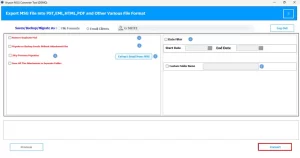
- To begin, you have to install the Aryson MSG File Converter.
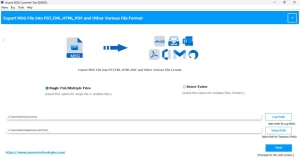
- After that, click on “Select Files” or “Select Folder” to load MSG data.
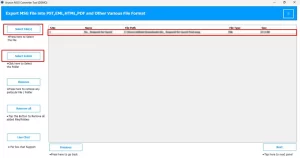
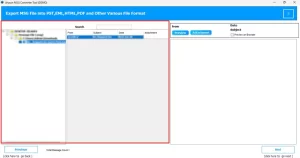
- Now, you need to preview the added files and continue the process.
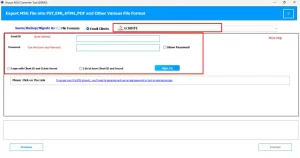
- Choose Google Workspace as the output saving option>> Sign in via details.
- Thereafter, set any additional options if required for your migration.
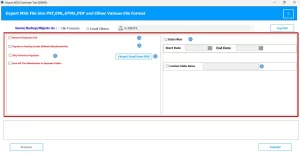
- Finally, you need to click on Convert to migrate MSG to Google Workspace.
Manual vs Automated Method for Conversion
|
Basis |
Manual Method |
Automated Method |
|
Process |
It is basically slow and complex. |
Conversion by this solution is quick & simple. |
|
Data Safety |
There is a risk of data loss. |
You will get a safe migration. |
|
Skills Needed |
Technical knowledge is always required for the export process. |
No skills are needed in order to perform migration. |
|
Formatting |
By the manual method, your original file structure may change. |
Your folder and file organization remains completely intact. |
|
Time |
This approach generally takes a longer time. |
Users can save their time with the help of this utility. |
End Note
This blog covered two different ways to import MSG to Google Workspace. The manual method through Outlook can work when the data size is small, and the setup is straightforward. But once the volume grows or the data becomes critical, that approach starts to show its limits. The above MSG File Converter fills that gap by handling bulk migration quickly & keeps every email, attachment, and metadata value fully intact. Furthermore, the tool is simple to use and provides a free demo version to check the output.
Frequently Asked Question
Q.1. What happens to attachments when I import MSG files to Google Workspace?
Ans: With the help of an automated utility, your attachments can be transferred along with the email and remain intact inside Google Workspace without any changes or loss.
Q.2. Do I lose email metadata (sender, date, CC) when migrating MSG to Google Workspace?
Ans: No. When you use the above Aryson MSG Migrator, all email details such as sender, recipient, CC, BCC, subject, and date are preserved during the migration.
Q.3. Is it possible to batch import multiple MSG files to Google Workspace at once?
Ans: Yes, the MSG Migrator Tool supports bulk migration, so you can import multiple MSG files to Google Workspace in a single process.
Q.4. How to migrate Outlook MSG files to G Suite without data loss?
Ans: You can easily move MSG files to Google Workspace without any data by following these steps:
1. Install the MSG Migrator tool.
2. Add MSG files or a folder.
3. Preview and proceed.
4. Select Google Workspace & sign in.
5. Set options if needed.
6. Click Convert to start migration.
About The Author:

Eva Shirley is a skilled technical content writer with expertise in creating engaging and informative content. With over 5 years of experience and a passion for writing, she has solved many users' queries by providing quality content.
Related Post