-
Written By Eva Shirley
-
Approved By Shivam Rathore
-
Updated on May 26th, 2026
-
Reading Time: 4 minutes
Simple way how to open msg file in HostGator- Complete Guide

Summary: Trying to open MSG files in HostGator Mail but facing compatibility issues? This usually happens because MSG files are made for Microsoft Outlook and cannot be opened directly in web-based email services like HostGator Mail. Therefore, it becomes difficult for most of the users to access their important emails, especially when they have attachments. In this blog, we’ll look at some easy and reliable ways to open MSG file in HostGator without any interruption or downtime. In addition, we will discuss how an Aryson MSG File Converter can make the whole process quicker.
Common Reasons to Move MSG Files to HostGator
Below are some of the most common reasons why users decide to shift their MSG files to HostGator Mail:
- You can check emails from any browser without Outlook being installed.
- All emails stay in one single account, making data much more organized.
- The process to access emails from different devices becomes convenient.
- Moreover, you get better control over your saved email data in one place.
- It makes team collaboration easier when emails are stored in a shared platform.
Best Approaches to Open MSG File in HostGator
There are several ways to get your MSG files into HostGatorMail, and the right one really depends on what works best for you based on your different needs.
- Native Method
- Automated Solution
Approach 01: Native Method to Import MSG to HostGator Mail
The manual approach is suitable when the number of MSG files is limited, and the user can perform file conversion & email setup steps carefully. Moreover, this method must be executed in a verified sequence to avoid format inconsistency or data accessibility issues.
Steps to Transfer MSG Emails to HostGator:
- Firstly, you need to launch Microsoft Outlook on your system.
- Then, just drag and drop your MSG files into any folder in Outlook.
- Go to File and click Add Account to add your HostGator email.
- Now, enter your credentials & select IMAP as the setup type.
- Thereafter, you have to wait for Outlook to fully sync your mailbox.
- Once synced, move your emails into the HostGator IMAP folder.
Limitations of the Manual Method
- Dealing with a large number of MSG files manually can take more time.
- Moreover, your emails can get misplaced during the manual transfer.
- Users not familiar with technical settings may find IMAP setup difficult.
- Likewise, an unstable internet connection can affect the sync process.
Approach 02: Automated Solution to Open MSG file in HostGator
Aryson MSG File Converter is a reliable solution that helps you to process your MSG files with high data integrity. Moreover, it includes advanced features such as batch conversion, attachment preservation, and support to maintain the original email properties. Subsequently, this solution is more appropriate for users who need a reliable and scalable method without manual complexity. For more details, you can also check how to migrate MSG to iCloud. Now, follow the steps below to perform the conversion without any data loss.
Steps to Import MSG Files to HostGator:
- To begin, you have to run the Aryson MSG File Converter on your system.
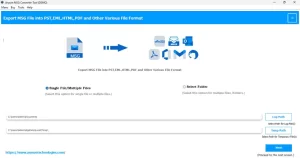
- After that, you need to add your required format files or folder >> Next.
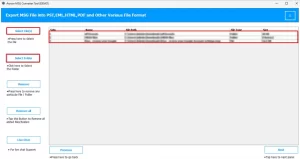
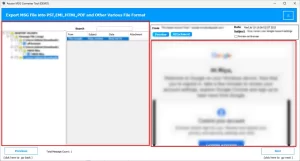
- At this step, you can choose your files and check them before moving ahead.
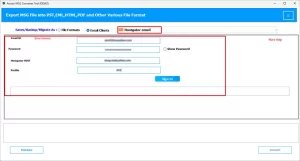
- Now, select HostGator Mail from the list and enter your account details.
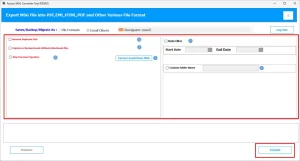
- Thereafter, you can use additional filters >> Convert for export process.
Difference Between Manual and Automated Backup Methods
|
Feature |
Manual Method |
Automated Solution |
|
Time |
This approach usually processes your data more slowly. |
It helps to save a lot of time by fast processing of your data. |
|
Effort |
More manual work is needed. |
Very little manual effort is required. |
|
Skills needed |
This method needs some basic setup knowledge. |
It can be used easily by anyone, even without much technical knowledge. |
|
Large data handling |
It is not ideal for many files. |
This solution works well with bulk data. |
|
Chances of errors |
There are higher chances of human errors. |
While using this tool, there is less chance of issues. |
End Note
To wrap up, the entire process to open MSG file in HostGator Mail can be confusing at first since both platforms don’t work together by default. If you only have a few files, the manual method can be helpful, though it may take some time. But when your data is large, or you want to avoid all the extra steps, then using software becomes a much more secure option. Choose a method that protects your emails and doesn’t make the process more difficult than it needs to be.
Frequently Asked Question
Q.1. What is the easiest way to open MSG file in HostGator?
Ans: Aryson MSG File Converter is the simplest way to directly convert and upload MSG files to your HostGator account without manual steps.
Q.2. What tools are used to transfer MSG emails to HostGator?
Ans: The above MSG Converter can help move your emails easily while keeping data and attachments intact.
Q.3. Can I bulk import MSG files into HostGator?
Ans: Yes, with the automated software, you can import multiple MSG files at once without doing it one by one.
Q.4. Do I need technical skills to open MSG files in HostGator?
Ans: No, if you are using the Aryson MSG File Converter, there is no need to acquire technical skills to open MSG files in HostGator.
About The Author:

Eva Shirley is a skilled technical content writer with expertise in creating engaging and informative content. With over 5 years of experience and a passion for writing, she has solved many users' queries by providing quality content.
Related Post