-
Written By Eva Shirley
-
Approved By Shivam Rathore
-
Updated on May 26th, 2026
-
Reading Time: 3 minutes
Best Ways to Convert MSG to EML in Minutes on Windows & Mac

Summary: MSG files are created by Microsoft Outlook to store individual email messages. However, EML files are supported by many email clients, such as Mozilla Thunderbird, Windows Live Mail, and Apple Mail. Because of compatibility reasons, many users need to convert MSG files to EML format. If you search for a reliable solution to convert MSG to EML, you should go through this complete guide. In this guide, you will learn the easiest ways to convert MSG files to EML on Windows and Mac, including the Aryson MSG file Converter Tool without data loss.
Common Reasons to Convert MSG File to EML:
There are some common reasons for which a switch is required to convert MSG file into EML file:
- The EML file format works with multiple email applications.
- In EML, it is easy to share emails between platforms.
- Besides that, open MSG files in EML file format without Outlook.
- Along with that, EML has better compatibility on Mac systems.
- Not only that, it has simple storage and backup management.
Most Effective Solution for MSG to EML Conversion:
We will go through the most appropriate solution to export MSG files to EML. Now, as per your need, you can choose any of the methods:
- Manual Method
- Professional Method
Solution 01: Manual Method to Convert MSG to EML
You can convert an MSG file into an EML file manually using Outlook. Follow these steps:
- To initiate the process, open Microsoft Outlook on your system.
- Next, you need to drag the MSG file into Outlook.
- After that, open the email message you want to convert.
- Then, click on File from the top menu and then click on Save As.
- At last, choose the EML format and save the file.
Limitations of the Manual Method:
- For this method, Outlook must be installed on your system.
- It is not suitable for bulk conversion of MSG files.
- There is a high risk of a change in the formatting of emails.
- Apart from that, it is a time-consuming method for multiple MSG files.
Therefore, if you need to convert many MSG files to EML files at once, a professional solution is better.
Solution 02: Professional Way to Convert MSG file into EML file
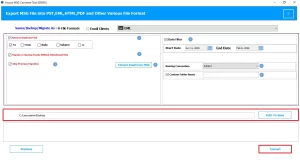
To simplify the conversion of the MSG files into EML format, you should use the MSG Converter Tool. It is user-friendly software that will convert the files in a secure way. It maintains the users’ files’ originality and preserves the folder structure without any loss. Along with that, its advanced features allow users to convert selective data and remove duplicate emails. Also, if you want to convert MSG files to PST, you can perform the conversion with this same software. Now, follow the steps to perform the conversion:
Process for MSG to EML Conversion:
- First, to start the process, install the MSG Converter Tool.
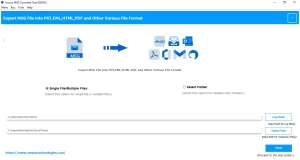
- Then, choose the file/folder and browse the .msg files, and click on open.
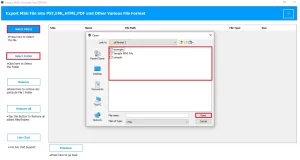
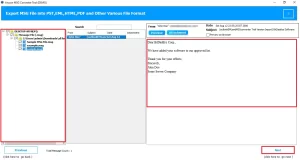
- Next, this software provides a preview of MSG files, and after that, click Next.
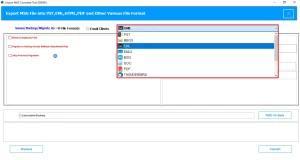
- Now, from the file format list, select EML as the output source.
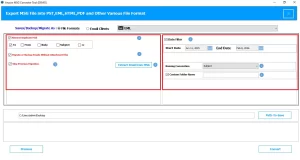
- If needed, apply the required filters to perform selective conversion.
- Finally, choose the path to save >> click Convert to start the process.
Key Features of this Software:
- It is suitable for bulk conversion of files at once.
- This makes sure to keep the email structure intact during and after conversion.
- Moreover, this software converts data in a faster and more secure manner.
- There is no need for Outlook to convert MSG to EML file.
- Additionally, its simple user interface helps users to use this software easily.
Conclusion
In conclusion, convert MSG files to EML is simple when you choose the right method. The manual method works for a small number of files and is not practical for bulk tasks. Whereas the professional software helps you to convert MSG to EML quickly without the need for Outlook. Therefore, choose the best methods that fit your needs and complete the conversion on Windows and Mac.
Frequently Asked Question
Q.1. Can I convert MSG to EML without Outlook?
Ans. Yes. You can use a professional MSG converter tool that works independently. It does not require Outlook installation and allows smooth conversion.
Q.2. Are there risks in MSG to EML conversion?
Ans. If you use manual methods, there can be risks such as data loss, missing attachments, or formatting issues. Using an MSG Converter tool reduces these risks and keeps your data safe.
Q.3. How to convert MSG to EML on Mac?
Ans. You can use Mac-compatible MSG Converter software. Add MSG files, select EML format, and start conversion. After that, open the converted file in Apple Mail or other supported email clients.
About The Author:

Eva Shirley is a skilled technical content writer with expertise in creating engaging and informative content. With over 5 years of experience and a passion for writing, she has solved many users' queries by providing quality content.
Related Post