-
Written By Eva Shirley
-
Approved By Shivam Rathore
-
Updated on May 26th, 2026
-
Reading Time: 4 minutes
Convert MSG Files to PST Instantly – Secure Way

Summary: Managing multiple MSG files can be difficult when you need them in one Outlook data file. A safe and direct method helps you convert MSG files to PST without data loss or file damage. With the right solution, you can keep emails, attachments, and folder structure the same while creating a single PST file for easy access and storage. In this guide, we will discuss the most appropriate method, along with the Aryson MSG file Converter Tool, which will securely convert your data.
Common Reasons to convert MSG to PST
Many users often need to manage and organise multiple Outlook MSG files efficiently. That is why converting MSG files to PST is becoming very essential. Below are some common reasons to convert MSG files to PST:
- PST files are easily accessible even without an internet connection.
- Moreover, PST allows storing multiple MSG files in a single Outlook data file.
- PST maintains the folder structure instead of handling MSG files separately.
- Furthermore, PST files are reliable for long-term email backup and storage.
- Additionally, when you combine MSG files into a PST reduces the scattered data.
Top Approaches to Import MSG to PST
Now, we will discuss the most appropriate conversion process to export MSG files to PST:
- Drag & Drop Method
- Copy and Paste Method
- Advanced Software
Approach 01: Drag and drop to Export MSG files to PST
- To initiate the process, open Outlook on your system.
- From the menu bar, click on the Mail option.
- After that, right-click on the screen and choose New Folder.
- Now, provide a name to the folder and click ‘Ok‘ to create that folder.
- Then, navigate to the MSG file that you want to migrate to PST.
- Thereafter, pick the MSG files and click >> to hold them.
- After that, hold the folder and drag it to a newly created Outlook folder.
- At last, let go of the mouse button to complete the action. The selected MSG files will then be transferred into the Outlook PST file.
Approach 02: Copy & Paste to Convert MSG files to PST
This method is suitable if you want to move a few MSG files to PST. Now follow the instructions to complete the conversion:
- To start, navigate to the MSG folders and select the required MSG files.
- After that, open Microsoft Outlook.
- Now, create a folder (follow steps 1 to 4 from approach 01).
- Thereafter, paste the selected files into the folder you created.
- At last, all your MSG files will be converted into PST format.
Limitations of Approaches 1 and 2:
- These approaches are suitable for a small number of files.
- Using this method can affect the data integrity and increase the risk of data loss.
- If you follow these approaches, you must have Outlook.
- Old file conversion is not possible, as Outlook does not support older version files.
Approach 03: Advanced Software to Transfer MSG files to PST
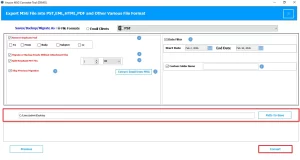
To smoothly transfer your MSG files to PST, you can use the Aryson MSG file Converter Tool. It is reliable software that will convert multiple files in bulk without the need for Outlook. It has several built-in features that allow you to import selective data for conversion. Also, using this same software, you can convert MSG file to MBOX and other file formats. Its valuable features help users to eliminate the previously migrated data. Now, follow the steps to convert MSG files into Outlook PST.
Simple Process to convert MSG files to PST
- First, install the Aryson MSG file Converter Tool on your system to get started.
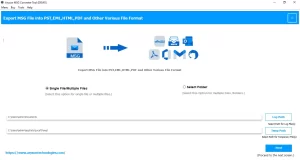
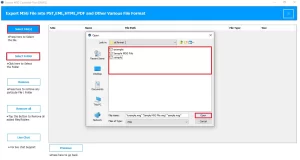
- After that, select the File/Folder and browse the .msg files >> open.
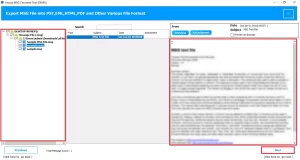
- Then, preview the folders along with attachments and click Next to proceed.
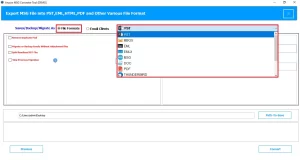
- Thereafter, in the file format, select PST as an output format.
- Next, apply the required filters for selective conversion.
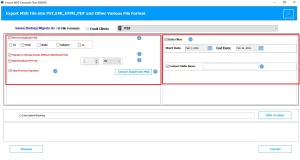
- Lastly, select the destination path to save the resultant file and click Convert.
Closing Quote
In this blog, we covered the important reasons to convert MSG files to PST. Choose the right method to convert your MSG file data with complete attachments for future use. The manual method is free but suitable for those users who have technical knowledge. Therefore, it is recommended to use advanced software that will securely convert your data without any loss.
Frequently Asked Question
Q.1. How can I convert MSG files to PST without Outlook?
Ans. For MSG file conversion without Outlook, use the Aryson MSG file Converter Tool, as it converts files without the need for Outlook.
Q.2. How to bulk convert MSG files to PST safely?
Ans. You can use the Aryson MSG file converter tool to convert MSG files to PST in bulk easily.
Q.3. Is it possible to merge multiple MSG files into one PST file?
Ans. Yes, this Aryson MSG file Converter allows you to merge multiple MSG files into a single PST file easily.
About The Author:

Eva Shirley is a skilled technical content writer with expertise in creating engaging and informative content. With over 5 years of experience and a passion for writing, she has solved many users' queries by providing quality content.
Related Post