-
Written By Eva Shirley
-
Approved By Shivam Rathore
-
Updated on May 26th, 2026
-
Reading Time: 5 minutes
Simple way to import MSG to AOL Mail – Step-by-Step Guide

Summary: AOL Mail is a commonly used email platform known for its simple interface and stable accessibility. To manage emails more efficiently, most of the users prefer to import MSG to AOL Mail. However, this conversion can become difficult since AOL does not support MSG files directly. In this article, we will explore the causes of these challenges and the solutions available. We will also walk through manual techniques, as well as a professional Aryson MSG File Converter, to smoothly transfer MSG files to AOL mail.
5 Quick Steps to Migrate MSG Files to AOL Mail
- Download and install the Aryson MSG Converter on your system.
- After that, you can import single or multiple MSG files.
- Now, you can preview the selected files and confirm your choice.
- Choose AOL Mail as the desired saving format >> enter credentials.
- At the end, apply filters if needed, and click on Convert to begin the process.
Why Do Users Transfer MSG Files into AOL Mail?
Below are some major factors that explain why users prefer to migrate their MSG files to AOL Mail:
- To view and access emails easily from any device connected to the internet.
- You can keep important messages safely stored as a cloud-based backup.
- Moreover, the AOL format provides smooth access across multiple devices.
- Likewise, you get efficient long-term email archiving in a scalable way.
Proven Methods to Import MSG to AOL Mail
There are different ways to save your MSG file to AOL format based on user needs and technical expertise.
- Native Approach
- Automated Solution
Method 01: Native Approach to Convert MSG to AOL Mail
In this approach, you need to first convert your MSG files into MBOX format via Microsoft Outlook, along with Mozilla Thunderbird. Then this process is followed by syncing Thunderbird with AOL Mail.
Steps to Upload MSG File into AOL Mail:
- Firstly, you have to run Microsoft Outlook on your computer.
- After that, add your AOL Mail account in Outlook via the File menu.
- Now, navigate to Account Settings >> New and enter your AOL credentials.
- Thereafter, you have to find the MSG files saved on your system.
- In this step, drag and place the MSG files into an Outlook folder.
- Finally, transfer the emails from Outlook into the AOL Mail folder.
Limitations of the Manual Approach
- There is a possibility of losing or missing data during the process.
- Users require good knowledge of the Outlook and Thunderbird platforms.
- This method can be difficult for users without technical expertise.
- Moreover, it does not allow direct migration of MSG files to AOL Mail.
- Likewise, it relies on several applications, which increases the chance of errors.
Method 02: Automated Solution to Import MSG to AOL Mail
Aryson MSG File Converter is a reliable tool that allows you to convert both single and multiple MSG files without any data loss. Subsequently, it preserves the original formatting and metadata during the entire process. Similarly, you can open MSG File in HostGator with ease, along with support for multiple other file formats and email services.
Steps to Import Outlook MSG Files into AOL Mail:
- To begin, launch the Aryson MSG File Converter on your system.
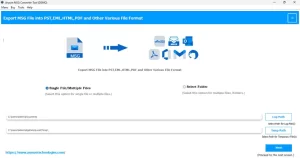
- After that, use “Select Files” or “Select Folder” to import MSG data.
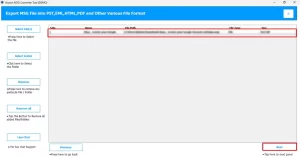
- Now, review the files, select the required ones, and proceed by clicking Next.
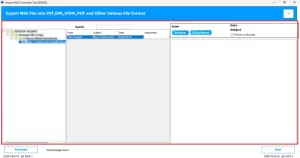
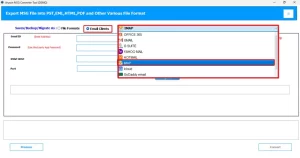
- Next, you need to pick “Save as Email Client” >> IMAP as the output option.
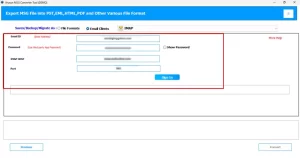
- Thereafter, you need to log in by entering your AOL email ID and password.
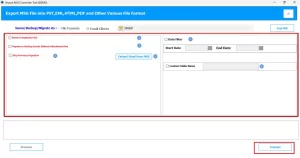
- At last, set any advanced options, then click Convert to start the process.
Comparison Between Manual and Automated Methods
|
Feature |
Manual Approach |
Automated Approach |
|
Process Type |
This approach consists of multiple steps and can be difficult to follow. |
It is a simple and well-structured process. |
|
Time Consumption |
Users require more time to complete. |
This method is fast and helps save time as well. |
|
File Handling |
It is not ideal for your large or bulk MSG files. |
This utility easily processes your multiple MSG files at once. |
|
Accuracy Level |
There is a possibility of human error. |
It delivers more precise & reliable results. |
|
Technical Skills |
Users need a basic technical understanding. |
It does not require any technical expertise to use. |
|
Data Safety |
There is a higher risk of data inconsistency or loss. |
Maintains better data security during conversion. |
|
Ease of Use |
It might be confusing for new users. |
It has an easy and user-friendly interface. |
End Note
In this article, we have discussed various approaches in order to import MSG to AOL Mail. The manual method is suitable for a small volume of emails, but it can be slow and prone to errors. On the other hand, the professional solution is a faster & more secure way to handle your bulk MSG file conversion. It helps its users to deliver accurate results with minimal interruption during the migration. Likewise, users can also try the demo version to explore its features and workings before opting for the complete version.
Frequently Asked Question
Q.1. What is the most effective method to move MSG files to AOL Mail?
Ans. The most reliable approach is to use a professional MSG converter tool, as it allows quick and accurate migration to AOL Mail.
Q.2. Is it possible to transfer MSG files to AOL Mail without using Outlook?
Ans. Yes, you can use the above-discussed conversion tool to import MSG files without relying on Outlook.
Q.3. Why can’t MSG files be imported directly into AOL Mail?
Ans. AOL Mail does not support the MSG file format natively, which is why direct import is not possible.
Q.4. How can I manually import Outlook MSG files into AOL Mail?
Ans. You need to first open MSG files in Outlook, then transfer or sync them through supported configurations, though the process can be complex.
Q.5. Which is better for importing MSG to AOL Mail: manual or automated method?
Ans. The automated method is generally preferred, as it is faster, more accurate, and suitable for bulk conversions compared to the manual approach.
About The Author:

Eva Shirley is a skilled technical content writer with expertise in creating engaging and informative content. With over 5 years of experience and a passion for writing, she has solved many users' queries by providing quality content.
Related Post