-
Written By Eva Shirley
-
Approved By Shivam Rathore
-
Updated on May 26th, 2026
-
Reading Time: 4 minutes
How to Import MSG to Yahoo Mail – Get Easy & Quick Solution

Summary: Are you looking for a way to import your MSG files into Yahoo Mail? Most of the users face difficulties when they try to access their MSG files in web-based email services. Yahoo Mail does not natively support this format. MSG files are primarily associated with Microsoft Outlook, which creates compatibility issues when users try to open or transfer them outside that environment. As a result, this leads to difficulties in order to view email content. In this blog, we will outline effective ways to import MSG to Yahoo Mail with complete accuracy. Also, we will cover the Aryson MSG File Converter Tool, which helps you in a smooth migration.
Why Do Users Import MSG Files into Yahoo Mail?
As Yahoo Mail does not support the MSG format, conversion or import becomes necessary to view and organise emails properly.
- MSG files cannot be opened directly in Yahoo Mail.
- Subsequently, it allows easy access to emails by a web-based platform.
- This helps to centralise multiple email files in one account.
- Yahoo Mail provides the availability of emails across different devices.
- Moreover, you will get improved email organisation and management.
Proven Approaches to Import MSG to Yahoo Mail
There are multiple reliable methods in order to import your MSG files into Yahoo Mail. Every approach supports different user expertise levels along with varying data requirements.
- Manual Technique
- Automated Solution
Approach 01: Manual Technique to Upload MSG files to Yahoo Mail
This method uses an email client in order to prepare your MSG files in a supported format. With proper setup, you have to make them available in Yahoo Mail.
Simple Steps to Open MSG Files in Yahoo:
- Firstly, you need to set up your Yahoo Mail account in Outlook by IMAP.
- After that, you have to open Outlook and select the Yahoo-linked folder.
- Now, you need to simply drag the MSG files into the folder.
- Afterwards, you have to let Outlook sync the emails.
- Then, via a web browser, you have to log in to your Yahoo Mail account.
- At the end, you need to check that emails appear correctly.
Drawbacks of the Manual Method
- The process includes several stages, which increase the time required.
- It is not ideal to manage your large volumes of MSG files.
- Relies on email clients such as Outlook to complete the process.
- Moreover, there is a risk of losing the email layout or attachments.
- Likewise, it requires a basic understanding of technical steps.
Approach 02: Automated Solution to import MSG to Yahoo Mail
The MSG Converter Tool is a reliable method to move your MSG files into Yahoo Mail without going through lengthy manual steps. It helps in fast email migration and retains the original layout, attachments, and key elements. Likewise, its simple interface allows users to complete the task without requiring advanced technical knowledge. Also, this tool is helpful in order to import MSG Files into Gmail.
Quick Steps to Import MSG Files to Yahoo Mail:
- Firstly, you need to download & open the MSG Converter Tool.
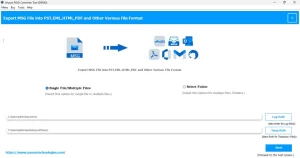
- After that, you have to add the MSG files or folders to the software
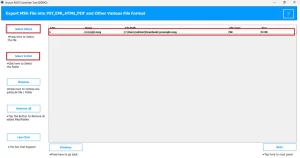
- Now, you can easily review the email data before proceeding.
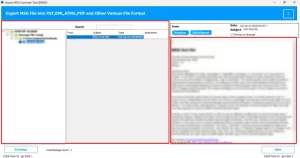
- Select Yahoo Mail as the output option and enter Yahoo Mail credentials.
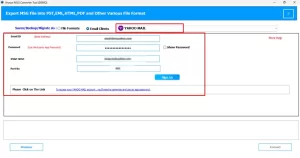
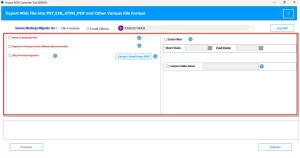
- Thereafter, you can apply filters as needed for selective migration.
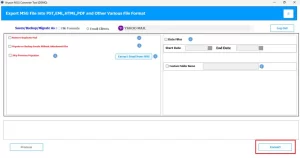
- At last, you have to press Convert to transfer MSG to Yahoo Mail.
Conclusion
In the above blog, we have covered the most reliable ways to import MSG to Yahoo Mail. The manual approach may work for a small set of files, but it involves several steps & may not always retain the original email layout. Compared to manual methods, a professional tool simplifies the task and safeguards data accuracy across the procedure. With the help of the right method, users can move their MSG files efficiently & keep their emails, attachments, and formatting properly intact.
Frequently Asked Question
Q.1 Is this given MSG to Yahoo Converter safe to use?
Ans: Yes, the above-discussed tool is built to handle email migration securely. It keeps the original email content, attachments, and metadata unchanged during the process, ensuring data integrity throughout the conversion.
Q.2 Can I directly open MSG files in Yahoo?
Ans: No, Yahoo Mail does not support MSG files directly. You need to convert them into a compatible format or use the MSG Converter Tool to access them in your Yahoo account.
Q.3. How to transfer MSG to Yahoo Mail with attachments?
Ans: You can use a professional tool to move MSG files to Yahoo Mail while keeping attachments and formatting intact. Follow the given steps of easy conversion:
1. Launch the MSG Converter tool.
2. Add MSG files or folders.
3. Select Yahoo Mail & enter details.
4. Apply filters if needed.
5. Start the migration process.
6. Verify emails and attachments after completion.
About The Author:

Eva Shirley is a skilled technical content writer with expertise in creating engaging and informative content. With over 5 years of experience and a passion for writing, she has solved many users' queries by providing quality content.
Related Post