-
Written By Eva Shirley
-
Approved By Shivam Rathore
-
Updated on May 26th, 2026
-
Reading Time: 4 minutes
How to import MSG to Office 365: explain step-by-step

Summary: MSG files are associated with Microsoft Outlook in order to store individual emails locally with limited scalability and sharing capabilities. In contrast, Office 365 offers a cloud-based environment that supports centralised storage, remote access, and advanced security controls. Due to this gap, most of the enterprises face difficulties in order to manage their MSG files efficiently. In this blog, we will discuss reliable methods to import MSG to Office 365 securely and efficiently. Along with that, we will cover how the Aryson MSG File Converter Tool is helpful for error-free migration.
Why do users import MSG files to Microsoft 365?
The process conversion helps to improve their accessibility & long-term data management:
- It helps to bring your multiple MSG files together in one centralised mailbox.
- Moreover, users can get secure email access from any location or device.
- It provides improved regulatory compliance and data handling standards.
- Office 365 reduces dependence on local systems and manual storage.
- It provides reliable data protection with cloud backup and security.
Proven Approaches to Import MSG to Office 365
There are two primary methods to transfer your email data from MSG to Office 365. Consequently, the right choice depends on mailbox size and technical skills.
- Native Method
- Automated Solution
Approach 01: Native Method to Import MSG Files into Microsoft 365
This method uses Microsoft Outlook as an interface in order to add your MSG files into a mailbox hosted on Microsoft Office 365. Before you start the process, you need to confirm that your Office 365 account is properly set up in Outlook and that mailbox synchronisation is complete. Moreover, it is recommended to keep the cached mode enabled for better performance during the process of upload.
Steps to upload MSG file into Office 365:
- Add and sync your Microsoft Office 365 account in Microsoft Outlook.
- After that, you have to create a folder in the mailbox for MSG files.
- Now, you need to open the location of your MSG files on your system.
- Thereafter, you have to drag and drop the files into the Outlook folder.
- Meanwhile, you need to wait for mailbox synchronisation.
- Finally, you have to verify your imported emails and attachments.
Limitations of the Native Approach
- This approach is inefficient to handle your large number of MSG files.
- It requires repeated manual actions, making the process time-intensive.
- Moreover, there is a possibility of missing or skipping files during transfer.
- The process to upload may remain incomplete if sync issues occur.
- Likewise, it is fully dependent on the proper setup of Microsoft Outlook.
Approach 02: Automated Solution to Import MSG to Office 365
The MSG Converter Tool is a direct and efficient way to move your MSG files into Microsoft Office 365 with ease. Moreover, it simplifies the entire process by reducing the chances of data inconsistency. With built-in options such as date-based filtering and preview functionality, the tool provides a more reliable transfer of your MSG data. Likewise, if you need to convert MSG to HTML, so refer to our blog, which will help you to complete the conversion.
Easy Tutorial to Open MSG File in Office 365:
- To begin, download the MSG Converter Tool & run it as an administrator.
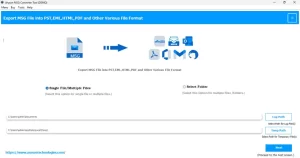
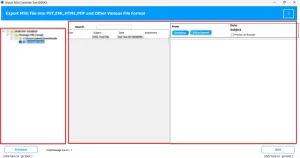
- After that, import your single or multiple MSG files into the tool interface.
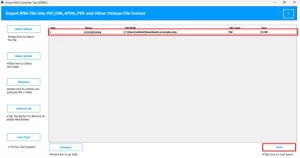
- Now, you can review the loaded emails with the help of the preview option.
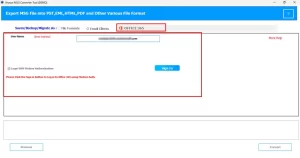
- Then, select Office 365 as the target platform >> sign in with credentials.
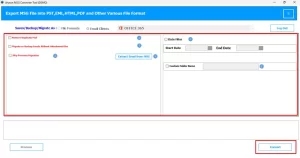
- Lastly, use available filters to refine the data >> Convert for migration.
Real-Time Success Story
A project manager needed to move more than 15,000 MSG files into Microsoft Office 365 after the organisation shifted to a cloud-based setup. At first, the team used a manual approach with Microsoft Outlook, but the process seems slow & needed regular checks. Therefore, to make the process easier, a professional MSG Converter tool was used. The entire data, which includes attachments and email details, was transferred in a few hours without any loss or errors.
End Note
In the above blog, we have outlined reliable ways to import MSG to Office 365 with accuracy. The manual approach is suitable for your small data sets, but it requires more time and constant attention. On the other hand, for your larger datasets or business-level requirements, use the above-discussed automated solution. Moreover, it provides improved control and consistent results. Choose the right method to keep email data intact and provide secure access in the cloud.
Frequently Asked Question
Q.1. How can I open a .msg file in Office 365 with full security quickly?
Ans: You can open MSG files in Microsoft Office 365 quickly by using a professional MSG Converter tool. The tool uploads files directly to your mailbox and keeps attachments, metadata, and folder structure intact.
Q.2. Is there any best tool to open MSG files in Office 365?
Ans: Yes, Aryson MSG Converter helps you import and access MSG files in Microsoft Office 365. It provides preview, selective migration, and filtering options for better control over your data.
Q.3. Can I import MSG files to Office 365 without Outlook?
Ans: Yes, you can import MSG files without Microsoft Outlook by using an automated tool. The tool connects directly to Microsoft Office 365 and completes the migration process.
About The Author:

Eva Shirley is a skilled technical content writer with expertise in creating engaging and informative content. With over 5 years of experience and a passion for writing, she has solved many users' queries by providing quality content.
Related Post