-
Written By Eva Shirley
-
Approved By Mithilesh Tata
-
Updated on January 29th, 2026
-
Reading Time: 4 minutes
How to Convert OLM File to MBOX – Full Guide

Summary: If you are still saving your valuable data to Outlook and facing issues, as it has the OLM file format. Don’t worry about it, we will be here to resolve your issue in this blog. We will discuss the methods on how you can convert OLM file to MBOX with different methods. Meanwhile, for the advanced conversion of the large and important files while maintaining the originality, you must use the Aryson OLM Converter Tool.
How MBOX is different from OLM
OLM File
- This format is mainly used for Mac Outlook.
- It stores users’ mailbox data, such as emails, calendars, and contacts.
- Archive and backup data for Mac Outlook.
MBOX File
- It is simple and stores plain-text messages.
- Useful for users to store messages for the long term.
- Moreover, this format works on both Mac and Windows operating systems.
Advantages of Converting Outlook OLM Email to MBOX
There are many advantages to converting your Outlook OLM email files to the MBOX file format. Below are some key reasons why you should convert Outlook OLM email to MBOX:
- Easy to switch to any operating system and enable data transfer and accessibility.
- MBOX is universal, allowing access to Thunderbird, Apple Mail, Eudora, and Other clients.
- These files are easy to use and very cost-effective to manage.
- Useful to maintain the folder hierarchy and its structure.
- No need for Outlook to access the MBOX files.
Further, we will discuss two effective methods by which you can convert Outlook OLM emails to MBOX. This process allows you to access and view the emails anywhere without any hassle.
Manual Method to Convert OLM File to MBOX
By simply dragging and dropping the files, you can export OLM to MBOX, which will quickly convert the file format. Using this method, you don’t need to use any third-party tool.
The steps are given below:
- To initiate the process, open Outlook on the Mac.
- Now, select the Mailbox or Folder you want to export.
- Then, drag and drop the mailbox or folder data to the folder in Finder.
- Further, a new folder is created in the Finder, and this will be in the MBOX format.
- Finally, you can convert MBOX files to any email client.
Limitations of the Manual Method
- It only converts mailboxes and folders.
- This conversion is not possible for every Mac.
- MBOX will only contain messages that are in the mailboxes.
|
Note: Convert OLM to MBOX manually, one by one at a time, can be hectic and tiring. To make the process easier, use the Aryson OLM Converter Tool, which migrates large files easily. |
Bulk Conversion Method to Convert OLM File to MBOX
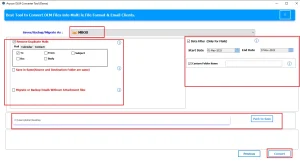
To convert files in a faster way, use the Aryson OLM Converter Tool, which is suitable for all operating systems. This software is capable of converting multiple files in bulk. For specific time period data, use the Date filter option. It provides multiple file formats to convert OLM file to PST, MBOX, EML, MSG, HTML, etc., and email clients such as Thunderbird, Yahoo, Zoho Mail, etc. You can also skip the migrated data. Next, follow the given steps to perform the conversion process:
Steps to Convert Outlook OLM to MBOX
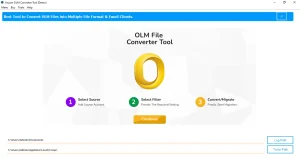
- First, download and install the Aryson OLM Converter Tool and click Continue.
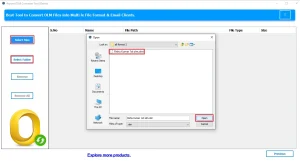
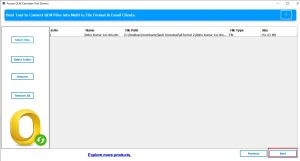
- Then, select the File or Folder from the system and click Open.
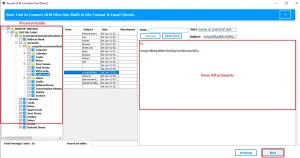
- Further, preview the folder and view the attachments, and click Next.
- After that, select the MBOX as the file format.
- At last, apply the filters and click on the Convert button.
Why use an OLM Converter Tool
- With this software, you don’t need to install Outlook.
- It is efficient to convert a large number of files.
- This tool is specially created to maintain folder structure and data integrity.
- Moreover, it offers several filters to obtain the desired data.
Conclusion
As per the above observation, it seems very important to convert your OLM files to MBOX. OLM is not compatible with Windows, which causes the issues. Here, we will discuss both the methods to convert OLM File to MBOX and choose one as per your specifications. But, it is suggested to always opt for the Aryson OLM Converter Tool for easy conversion of all files.
Frequently Asked Questions
Q.1 Can I convert Outlook OLM emails to MBOX without losing attachments?
Ans. Yes, the Aryson OLM Converter Tool safely converts OLM emails to MBOX while preserving attachments and folder structure without data loss.
Q.2 Does converting OLM to MBOX affect email formatting?
Ans. No, converting OLM to MBOX does not affect email formatting when using an Aryson OLM Converter Tool. It preserves the original layout, fonts, images, and email structure.
Q.3 Is it safe to use an automated OLM to MBOX converter?
Ans. Yes, it is safe when you choose a trusted Aryson OLM Converter Tool. It ensures secure conversion while maintaining email integrity.
About The Author:

Eva Shirley is a skilled technical content writer with expertise in creating engaging and informative content. With over 5 years of experience and a passion for writing, she has solved many users' queries by providing quality content.
Related Post