-
Written By Eva Shirley
-
Approved By Mithilesh Tata
-
Publish on December 29th, 2025
-
Reading Time: 5 minutes
Convert OLM File to PDF – Complete Guide

Summary: In today’s time, most users struggle to convert their OLM file data from Outlook for Mac to PDF. As seen in many user queries, finding a reliable solution becomes difficult when Outlook for Mac is unavailable or limited. To address this problem, this blog explains practical ways to convert OLM files to PDF and recommends the Aryson OLM Converter as a dependable solution for accurate, secure, and hassle-free conversion without data loss. It securely converts OLM file to PDF while preserving emails and attachments without data loss.
Why Should Users Convert Outlook OLM Files to PDF?
PDFs are a non-editable file format that will protect data from being misinterpreted. Moreover, the PDF files are easy to carry and can be opened on any device. PDF format is reliable and suitable for long-term accessibility. Further, see more factors why you should export OLM to PDF:
- Firstly, PDF is a universal file format developed by Adobe.
- Moreover, it includes text, images, videos, and hyperlinks.
- Additionally, the PDF supports all versions of operating systems (Mac/Windows).
- It supports password protection, which is helpful for legal document sharing.
- Further, PDFs are smaller in size and take up less space.
What are the Methods to Convert OLM to PDF?
Basically, there are two ways for the conversion process: Manual and Advanced, as mentioned below:
- Using Outlook
- Professional Tool
01 – Using the Outlook Method to Convert OLM file to PDF
This method helps you convert your OLM file data to PDF for free. You make sure that Outlook is installed on your Mac. Follow the steps given to convert OLM to PDF.
Step 01 – Import your OLM file to Outlook
- Initially, open Outlook and go to File >> Import.
- Now, click on the Outlook for Mac archive file (.olm) and then, press the Continue button.
- Next, select the important OLM file and start importing.
Step 02 – Open the OLM Email you want to Convert
- Further, from the sidebar menu, navigate to the folder where you saved the imported emails.
- After that, right-click to open the email you want to convert to a PDF.
Step 03 – Use Print Option to Save File
- Once the email is opened, go to File and then Print.
- Then, select the PDF from the bottom left and press the Save as PDF’ option.
- Lastly, choose the path to save files and click Save.
Limitations of Using this Method
Using the manual method to convert OLM files may have several limitations. Outlook does not allow users to convert multiple files at a time. Furthermore, have a look at resolving the issue before moving to the professional tool.
|
Issues Arise |
Why It Fails |
How to Fix |
|
Outlook Dependency |
Only if Outlook for Mac is installed and configured. |
To fix the issue, install the latest version of Outlook |
|
Time-Consuming Process |
Operating one by one is time-consuming for large files. |
By using a professional tool for bulk conversion. |
|
No Selective Filters |
Does not offer a date filter option or a subject-based option. |
Use a tool that offers a selective filter for faster conversion. |
|
Platform Limitations |
It only supports Mac Outlook |
You can use a cross-platform converter tool. |
02 – Advanced Conversion Method to Save OLM files to PDF
To overcome the above limitations, use the Aryson OLM Converter Tool. It is made with the clear thought that helps users to convert their OLM data easily to PDF and many file formats. In addition to this, the software saves your data while maintaining full data integrity and without any data loss. Additionally, you can use this software to convert OLM to CSV. To know further about this tool, you can go through the given pointers:
Why use the OLM Converter Tool
- Firstly, you can preview the mailbox data and attachments before conversion.
- For specific Date Range data, you can use the date filter option.
- Additionally, the software lets you migrate the data with or without attachments.
- Similarly, you can save the data in the same folder.
- Also, this software supports multiple file formats and email clients as output.
- In fact, it helps to Remove Duplicate files from the mailbox data based on mail calendars.
- Moreover, for easy recognition, you can assign a custom folder name.
Working Steps to Convert OLM File to PDF
- To begin with, download and launch the Aryson OLM Converter Tool.
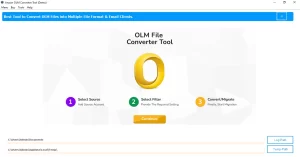
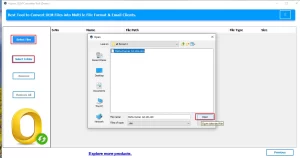
- After that, select the file/folder to browse the OLM file and click Open.
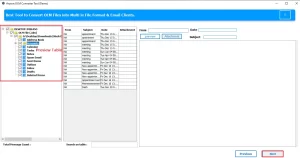
- Then, preview the attachments and emails and click Next.
- Now, select the PDF as a file format from the drop-down menu.
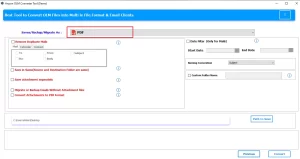
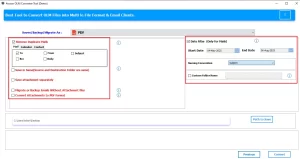
- Additionally, you can apply the filters to get the specific data from your mailbox.
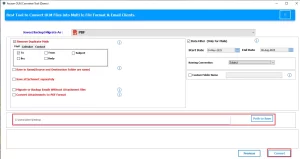
- Lastly, select the path to save the resultant file and then click Convert.
Which Method is the Best Method to Convert OLM to PDF
Similarly, it is important to understand which method you must choose to convert your data. For easy understanding, we mentioned the difference between the two methods in a tabular format.
|
Facts |
Manual (Using Outlook) |
Professional (Using Converter Tool) |
|
Good For |
Small files, hence one-by-one conversion |
Likewise, for business, large accounts, and bulk conversion. |
|
Pros |
Moreover, it is free of cost. |
As compared to manual, it is secure, reliable, and maintains original formatting. |
|
Cons |
Complex approach, risk of data loss |
It is paid software, whereas the demo version is for 50 email conversions per folder. |
Conclusion
In this blog, we have covered all the aspects that will help you understand the conversion process. Additionally, you can choose any of the methods based on your requirements. For the small data conversion, the manual method is good. Therefore, for businesses or individuals who have large mailbox data, it is advised to use the professional tool to convert OLM file to PDF quickly and safely.
Frequently Asked Questions
Q.1 Will attachments in OLM emails be preserved when converting to PDF?
Ans. Yes, the Aryson OLM Converter preserves email attachments and embeds them when converting OLM emails to PDF, keeping the attachments associated with the messages in the output files.
Q.2 Can I save OLM files to PDF without Outlook for Mac?
Ans. Yes, you can save OLM files as PDF using the Aryson OLM Converter tool without needing Outlook for Mac installed because it works as a standalone utility.
Q.3 Is it safe to convert OLM files to PDF using software?
Ans. Yes, it is generally safe to convert OLM to PDF with Aryson’s software, as it’s designed for secure, accurate conversion while maintaining data integrity and structure.
About The Author:

Eva Shirley is a skilled technical content writer with expertise in creating engaging and informative content. With over 5 years of experience and a passion for writing, she has solved many users' queries by providing quality content.
Related Post