-
Written By Eva Shirley
-
Approved By Mithilesh Tata
-
Publish on December 27th, 2025
-
Reading Time: 5 minutes
Convert OLM to CSV – Export OLM Data Easily

Overview: If you’re using Outlook on a Mac and planning to switch to Windows. You’re exactly where you need to be. Converting your OLM files to CSV helps you access Outlook for Mac data in a flexible and readable format. Users often need this conversion to analyse emails, manage contacts, or move data to other platforms. Using the right approach, you can convert OLM to CSV data easily while keeping emails, folders, and important details intact. To prevent data loss, you can use the Aryson OLM Converter Tool which will support bulk and safe conversion.
About OLM and CSV in Depth
To understand the user problem of why convert OLM files to CSV, let’s first look at both file formats.
OLM
- The OLM file format is exclusively used for Outlook on Mac.
- Windows Outlook does not support OLM files directly.
- Created when users manually export data from Mac Outlook, not by default.
- Additionally, it helps the users to back up data and migrate the OLM file to the other’s email system.
CSV (Comma-separated Values)
- Firstly, it stores data in tabular formats, which can be easily understood.
- The CSV file is easy to open on any device, like mobile phones, laptops, and computers.
- Also, a CSV file organises data into rows and columns, similar to a spreadsheet.
- Moreover, it is suitable for all operating systems.
Reasons to Convert OLM File to CSV
The following factors explain the reasons for conversion and make it easier for users to access their OLM files.
- CSV is a universal and easily accessible format that can be viewed on every device.
- Further, it is written in a human-readable format like Excel/Google Sheets.
- It is ideal for importing into other apps (Gmail, Thunderbird, CRM).
- CSV creates a backup, unlike OLM files, which are locked to Outlook for Mac.
- Additionally, creating access to backup for long-term storage.
- You can easily open the stored CSV data with any spreadsheet program, like Google Excel, Microsoft Excel, etc.
- Convert OLM contacts to CSV to easily retrieve and manage your data.
Furthermore, you understood the importance of OLM file conversion. Further, we will discuss the method to export OLM to CSV.
Top Methods to Convert OLM to CSV
Here we discuss two methods that will help you convert your OLM file data to CSV format. You can use any of them that will be useful for you to convert your data.
Method 01 – Manual Method to Convert OLM File to CSV
Basically, the manual method is a free-to-use technique to convert the data. To convert the less file from OLM to CSV, use this method:
- To initiate the process, open Mac Outlook and click on the Tool menu.
- Then, select Import/Export >> Outlook for Mac Data File (.olm) and click on Continue.
- Further, navigate to the OLM file you want to convert and then click on the Import button.
- After completion, go to the Tool menu and select the Export button.
- Then, choose the Export to a file’ option and then click on the ‘Continue’ button.
- Now, from the drop-down menu, select the CSV as output and click Continue.
- Select the data to export and click Continue, then select the location to save the file on your Mac.
- At last, enter the file name and click Continue to start the conversion.
Drawbacks of Using this Method
- This method converts OLM files one by one, which takes a lot of time.
- High chances of losing valuable file data during conversion.
- Although installation of Outlook is required to begin the transfer of files.
To overcome the limitations of the manual method, we have a professional tool that is more efficient and provides bulk conversion of data.
Method 02 – Reliable Method to Convert OLM to CSV on Mac
To convert OLM file to CSV on Mac safely and efficiently, you can use the OLM Converter Tool. If data accuracy matters to you, then this automated solution can maintain data integrity throughout the process. Along with that, this software is embedded with several advanced features that will be quite helpful for the selective data conversion process. To know more about this automated solution, proceed with the given pointers:
Key Features of this Secure Software
- Above all, it converts OLM to multiple file formats, such as PDF, PST, EML, MSG, MBOX, etc.
- Similarly, it supports migration to email platforms such as Office 365, Gmail, Zoho Mail, etc.
- Also, it allows users to remove duplicate files based on body, from, subject, and to.
- Provide a preview option to view the emails folder and attachments before conversion.
- Users can keep the source and destination folders the same for their ease.
- Moreover, split the large resultant PST file into small files.
- To get specific data, apply the date filter option and give a custom name to the folders.
To convert OLM to CSV on Mac, you can proceed with the steps.
- First, download and launch the Aryson Gmail Backup Tool.
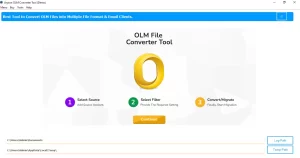
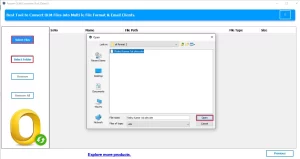
- Likewise, select the File/Folder that you want to migrate and then click Open.
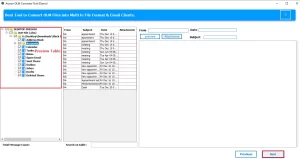
- Now, you can preview the folder and attachments and click Next.
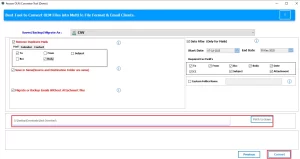
- Further, select CSV as the file format from the drop-down menu.
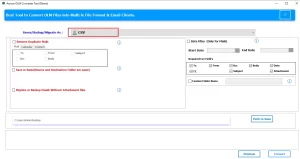
- After that, apply the additional filters to obtain the specific data.
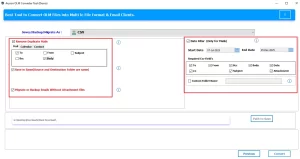
- Finally, select the path to save the file after export and click Convert.
Additionally, you can convert OLM file to MBOX using this software.
Why you should use the Aryson OLM Converter Tool
- This tool supports single-mode or batch-mode OLM file conversion.
- Further, this tool has various built-in features like a date filter and the ability to remove duplicates.
- Its user-friendly interface makes the conversion process easy, even for beginners.
- Additionally, this software maintains the original folder structure and email formatting.
- Above all, this software supports both Mac and Windows operating systems.
Conclusion
Above, we have discussed the importance of the conversion and the methods to convert OLM to CSV. You can analyse your requirement and then decide which method is suitable for you. In this blog, we have discussed an easy and quick solution that will ease your work of data conversion.
Frequently Asked Questions
Q.1 Can I convert an OLM file to CSV on Mac?
Ans. Yes, the Aryson OLM Converter Tool allows you to convert OLM files to CSV on Mac easily. It supports all Mac Outlook OLM versions without data loss.
Q.2 What is the best way to convert OLM file to CSV?
Ans. The best way is to use the Aryson OLM Converter Tool, as it provides a direct, fast, and accurate conversion. It maintains email data, attachments, and folder structure.
Q.3 Is Outlook required to convert OLM to CSV?
Ans. No, Outlook is not required. The Aryson OLM Converter Tool works independently and converts OLM files to CSV without installing Outlook.
About The Author:

Eva Shirley is a skilled technical content writer with expertise in creating engaging and informative content. With over 5 years of experience and a passion for writing, she has solved many users' queries by providing quality content.
Related Post