-
Written By Eva Shirley
-
Approved By Mithilesh Tata
-
Publish on January 8th, 2026
-
Reading Time: 5 minutes
Convert OLM to MSG – Export Outlook OLM Emails

User Query: Recently, I switched from Mac to the Windows operating system, but I have all the emails in .olm format. I want them to access Windows, but I’m not sure how to convert them without losing my data. Is there any method that will easily convert my .olm data?
Overview: Converting your OLM data into MSG is a reliable solution for users who want to access Mac Outlook data in Windows Outlook. Since the OLM format is only supported by Outlook for Mac, it is appropriate to convert them to the MSG format for easier access in Windows. This conversion is useful for email migration, backup, and cross-platform use. Convert OLM to MSG to preserve folder structure and attachments using the Aryson OLM Converter Tool.
Importance of OLM to MSG Conversion
There are many advantages of converting your OLM data to MSG format.
- Firstly, MSG files can be opened in Windows Outlook.
- Additionally, MSG files easily open with Windows Outlook.
- Further, it is suitable for backing up email data easily.
- Above all, wide supportability to share emails and legal data.
OLM Vs MSG – Comparison
|
OLM (Outlook for Mac Archive) |
MSG (Outlook Message) |
|
It only works for the Mac operating system. |
MSG is made for Windows & integrated with Windows Outlook as well. |
|
Store the entire mailbox data in one file. |
Whereas it stores each email in a separate file. |
|
It must be converted before use on Windows or Office 365. |
Directly import files to Outlook. |
|
OLM files are large and require Outlook for Mac to access. |
These files are easy to share and archive. |
|
Backup or archive for the Mac Outlook mailbox |
Email sharing, legal records, and selective migration. |
Manual Approach to Convert OLM to MSG
As the manual method does not convert OLM data to MSG directly. First, you need to export your Mac Outlook data and then convert Mac OLM files to MSG. Below are the steps to complete the conversion process.
Step-by-step Working Process for Conversion
- Firstly, open Outlook for Mac on your macOS system.
- Then, click on the Tools from the top menu bar.
- Now, select the Export option (alternatively, Menu → File → Export, depending on the version)
- Likewise, in the Export Wizard option, select Export to Archive File (.olm) and then click on the Continue button.
- Choose the required items, such as mail, contacts, calendars, tasks, and notes, and click Continue.
- Further, browse and select a destination folder on your Mac where you want to save the file.
- After that, enter a file name for the OLM archive and click on the save button.
- Now, Outlook will start exporting the selected data.
- Then, a confirmation message will appear after completion, and click Finish.
Drawbacks of the Manual Method
Common issues users face while performing manual methods:
- Initially, there is no direct manual method to export OLM to MSG.
- Furthermore, there is a risk of data loss or corruption in the manual method.
- Additionally, it cannot preserve folder hierarchy or email metadata during conversion.
- Moreover, it’s time-consuming for large mailboxes and requires technical knowledge.
Due to these limitations, it is suggested that users use a professional OLM to MSG converter, which is the safest and fastest approach.
Best Approach to Convert OLM to MSG
As the manual method does not support bulk conversion, it is suitable to opt for a tool that will easily convert your bulk data. The Aryson OLM Converter Tool allows you to convert data in bulk and maintain the folder attachments. Apart from that, it will give you a preview of your mailbox data along with attachments. Using this software, you can apply the filters for selective data conversion. The remove duplicate mails feature eliminates the emails based on subject, from, body, and to. Proceed further to know more advantages of this tool to convert Outlook OLM emails to MSG.
|
Note: Use the Demo Version of this software for a better understanding of the tool. |
Why use the Aryson OLM Converter Tool
This tool has several embedded features that make it more reliable.
- This tool is suitable for both Mac and Windows operating systems.
- It offers 10+ file formats and email clients for the conversion.
- Moreover, this supports bulk conversion of data and large files as well.
- Also, it convert OLM file to PDF and other formats.
- Suitable to handle multiple files simultaneously.
Because of these features, this tool makes the conversion process faster and more secure. Follow the given steps to accomplish the conversion process within a few clicks:
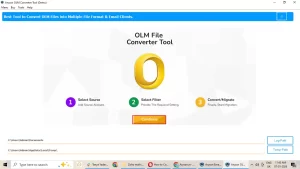
- To start the process, download and install the Aryson OLM Converter Tool.
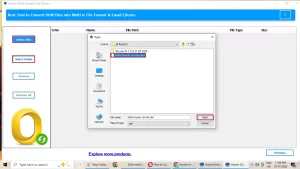
- Now, click on Select File/Folder and browse the .olm file and click Open.
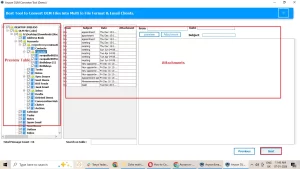
- Further, preview the mailbox data and its attachments, and click Next to continue.
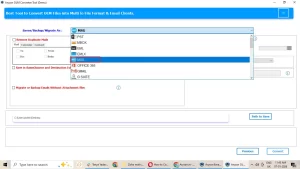
- Next, choose the MSG from the drop-down menu as your output file format.
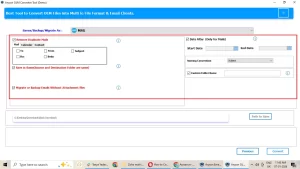
- Afterward, apply the required filters for selective data migration.
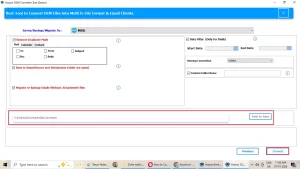
- Likewise, add the path to save file and click Convert to start the conversion process.
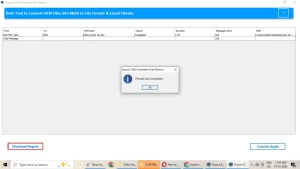
- At last, you see a report of your converted data; click Download Report to download the report file on your system.
Final Wording’s
In this blog, we covered all the aspects of why you must convert OLM to MSG. Go through the blog and understand the conversion process, and decide which approach is best for you. Both methods are good, but it depends on the file size you have. So, choosing the right approach is the best solution for you.
Frequently Asked Questions
Q.1 Can I export OLM to MSG without Outlook installed?
Ans. Yes, the Aryson OLM Converter Tool works standalone and does not require Outlook.
Q.2 Can I convert Mac Outlook OLM files to MSG on Windows?
Ans. Yes, the Aryson OLM Converter Tool allows direct conversion of OLM files to MSG on Windows while preserving emails, attachments, and folder structure.
Q.3 What is the best solution for OLM to MSG conversion?
Ans. Aryson OLM Converter Tool is the best choice for fast, safe, and accurate OLM to MSG conversion, with features like batch conversion, folder hierarchy preservation, and selective export.
About The Author:

Eva Shirley is a skilled technical content writer with expertise in creating engaging and informative content. With over 5 years of experience and a passion for writing, she has solved many users' queries by providing quality content.
Related Post