-
Written By Eva Shirley
-
Approved By Mithilesh Tata
-
Publish on January 16th, 2026
-
Reading Time: 4 minutes
Import OLM to Office 365: Simple Guide for Beginners

Summary: Switching from Mac Outlook to Office 365 and wondering how to import OLM to Office 365. If so, no worries. In this blog, we will explore different effective solutions for the import, including the Aryson OLM Converter. By the end of this article, you will learn everything about the import process, and all your queries will be answered.
Why Do We Need to Upload OLM to Office 365?
There are several reasons why a user would want to import OLM files to Office 365. Listed below are some of them.
- Users can easily access their Mac Outlook emails in an Office 365 environment.
- They can access their mailbox data anywhere at any time across devices.
- Moreover, users can move from local storage to a secure, centrally managed platform.
- Additionally, individuals can effortlessly collaborate using Outlook, Teams, & OneDrive.
- Also, the import process provides data security, compliance, & manages backup.
Best Solutions to Import OLM to Office 365
Now, let’s move on to the actual process of migration. Here, we will discuss two effective methods to import OLM data to Office 365.
- The Manual Import
- Automated Software
Solution 1: Migrate OLM to Office 365 Manually
You can manually upload your OLM files to Office 365 by adding your O365 account in Outlook for Mac. Then, transfer your OLM files to this added account. This process takes 3 steps to complete. Follow the steps below to perform the entire migration.
Step 1: Add an Active Office 365 Account in Outlook for Mac
- Firstly, run MS Outlook for Mac on your system.
- After that, navigate to Outlook >> select Preferences >> click on Accounts.
- Then, click on Add Account >> enter your Office 365 email credentials.
- Adjust the following IMAP settings:
|
Incoming Mail Server: |
outlook.office365.com |
|
Outgoing Mail Server |
smtp.office365.com |
|
Username: |
Full Office 365 email address |
|
Password: |
Office 365 account password |
- Now, your Outlook account would be connected to Mac Outlook.
Step 2: Import OLM File into Mac Outlook
- Next, open Mac Outlook >> click on File >> click on the Import option.
- Now, select the OLM file to import >> click on the Continue button.
- Then, select the OLM files to migrate & click on the Import option.
Step 3: Transfer Your Desired OLM Files to O365
- Next, open the MS Outlook application & select the imported OLM data.
- After that, drag & drop the selected files/folders into the Office 365 mailbox.
- The synchronization process will begin and may take some time to complete.
- At last, verify whether the emails, contacts, calendars, & other mailbox items are visible in your Office 365 account.
Drawbacks of the Manual Approach
- The manual method is a bit complicated and & time-consuming.
- You can’t import OLM files in bulk via this approach.
- This process completely relies on the installation of Outlook.
- Moreover, there are chances of data loss and duplication.
- Also, the folder structure & data integrity may get affected.
Solution 2: Innovative Solution to Import OLM to Office 365
Aryson OLM Converter is one of the most reliable software programs available to import OLM files to Office 365. This software allows users to transfer OLM emails to Yandex Mail without affecting the data integrity and formatting. Moreover, you can directly import your data without any manual configuration. Additionally, users can convert OLM file to EML, MSG, PDF, PST, etc. file formats. Also, the advanced features like removing duplicate emails, skipping previous migration, help organizations eliminate the redundancy from the data selection. Even users can verify their selection via the J-Table and the preview window of the software.
Simplified Tutorial to Import OLM File to Office 365
- First, install the Aryson OLM Converter on your system.
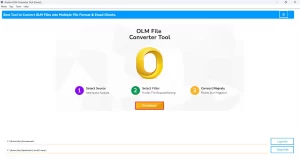
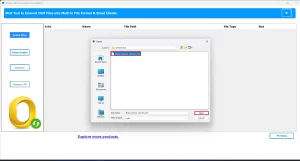
- After that, open the folder where you have saved the OLM data >> Next.
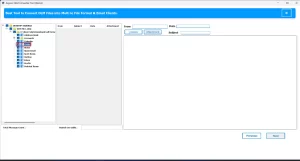
- Then, select the files/folders from tree-heirarchy to migrate >> Preview them >> Next.
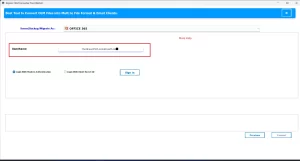
- After that, choose the Office 365 data from the dropdown & log in.
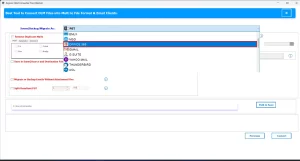
- Next, enter the credentials of your Office 365 account and log in to it.
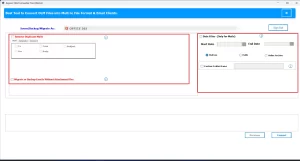
- Use the advanced filters of the software if needed.
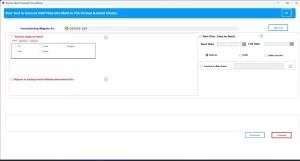
- Lastly, hit the Convert button to import OLM files to Office 365.
Conclusion
In the above blog, we mainly emphasized the benefits of the OLM to Office 365 import and the effective solutions to import OLM to Office 365. Between the two methods of migration, users can choose either one as per their expertise and convenience. For some, the manual method works fine. While the automated software is not an option, it is needed as it works like a saviour for beginners via its advanced features.
Frequently Asked Question
Q.1 Can I directly import an OLM file into Office 365?
Ans- Yes, you can directly import the OLM file to Microsoft 365 using the above automated solution. Steps to import are:
1. Install and launch the Aryson OLM Converter on your system.
2. Browse and select the required OLM files or folders.
3. Preview the selected data and proceed further.
4. Choose Office 365 as the destination and log in.
5. Apply filters if needed and click Convert to import OLM to Office 365.
Q.2 Do I need Outlook for Mac to import OLM files to Office 365?
Ans- No, you don’t need Mac Outlook to import OLM files to Office 365 if you are using the Aryson OLM Converter.
Q.3 Which tool is best to import an OLM file to Microsoft 365?
Ans- Aryson OLM file Converter is best to import OLM file to Microsoft 365.
About The Author:

Eva Shirley is a skilled technical content writer with expertise in creating engaging and informative content. With over 5 years of experience and a passion for writing, she has solved many users' queries by providing quality content.
Related Post