-
Written By Eva Shirley
-
Approved By Mithilesh Tata
-
Publish on January 20th, 2026
-
Reading Time: 5 minutes
Easily import OLM to Gmail on Mac & Windows without Outlook

Summary: Many Mac Outlook users import OLM to Gmail to move their emails and contacts to a secure, cloud-based platform easily. After the migration, users can access their data anytime, anywhere, without depending on a single device or email client. Not just this, several users do the same for leveraging the advanced search capabilities, better spam protection, & effortless integration with Google Workspace applications. To help you with the entire import process, this blog covers efficient solutions, including the Aryson OLM Converter for a quick migration. Now, just go through the entire article to get more insights.
Why Import OLM File into Gmail?
- Users can access OLM emails anywhere with Gmail’s cloud-based platform.
- They don’t need to depend upon the Mac Outlook.
- Moreover, you can securely back up your OLM mailbox data online.
- Additionally, Gmail provides the user with various search and management features.
- Also, your data will remain safe at times of system failure or corruption.
Considering all the above pointers, users should import their OLM files to Gmail.
Proven Solution to Import OLM to Gmail
Now, let me introduce you to two straightforward yet effective solutions to import OLM files to Gmail. The first method is to use the manual method. Whereas the other one is the automated software for a quick and secure import. Make sure to go through both methods carefully.
Solution 1: Manual Method to Import OLM Files to Gmail
Users can’t directly import OLM data to Gmail files; they have to rely on Mac Outlook as an intermediary. This entire method is divided into four major stages, provided below.
Step 1: Enable the IMAP Accessibility in Gmail
- To begin, you must enable IMAP in your Gmail account.
- After that, sign in to your Gmail account.
- Next, click on the Settings icon >> choose the See all settings option.
- Then, go to the Forwarding & POP/IMAP tab.
- Now, under the IMAP access section, select Enable IMAP.
- Next, click on Save Changes to adjust the settings.
Step 2: Set Up Your Gmail Account in Mac Outlook
- Next, set up your Gmail account in Outlook for Mac.
- After that, start the Mac Outlook application on your system.
- Then, go to the Tools tab >> click on Accounts.
- Click on the + icon >> select the New Account option.
- Provide your valid Gmail email address & credentials that are asked.
- Perform the on-screen instructions to complete the account setup.
Step 3: Import your OLM Files into Outlook for Mac
- After the configuration, you can import the OLM file.
- Next, open Mac Outlook >> click on File menu >> select the Import option.
- Then, choose Outlook for Mac archive file (.olm) >> click Continue.
- Next, browse your system >> select the required OLM file.
- Now, click on Import to load the OLM data into Outlook.
Step 4: Sync Your OLM Data with Gmail
- Now that your OLM data is available in Outlook, you can move it to Gmail.
- Find the imported OLM emails/folders in MS Outlook.
- Then, drag & drop the required data into the configured Gmail mailbox.
- At last, wait for some time until Outlook syncs the data with your Gmail account.
Drawbacks of the Manual Approach
- This manual approach is complex, as there is no direct method.
- The user must depend on Outlook for Mac for the import.
- Moreover, it may take you long hours to complete the migration.
- Also, you may lose your important data or have it corrupted.
Solution 2: Most Recommended Software to Import OLM to Gmail
Aryson OLM Converter Tool is the most efficient software to import OLM files to Gmail. This software provides the user with a preview panel to cross-verify data before the import. This maintains data integrity and security during the migration. Moreover, the advanced filters like Date range filter, remove duplicates, skip previous migration, etc. eliminates the duplicacy during the migration. Also, the users can effortlessly import OLM to Office 365, Thunderbird, Yahoo Mail, etc, email clients, using the same software within a few clicks.
Quick Steps to Move OLM files to Gmail
- Firstly, download & open the Aryson OLM Converter Tool on your system.
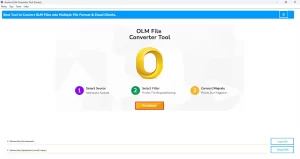
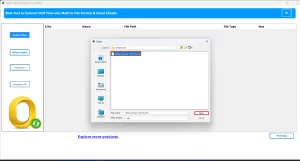
- After that, load the required OLM files into the software >> Next.
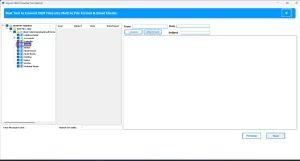
- Now, select the OLM files/folders to import to Gmail >> Next.
- Next, under the email clients, choose Gmail as the destination.
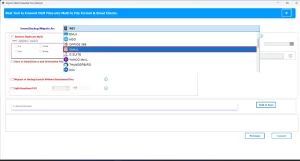
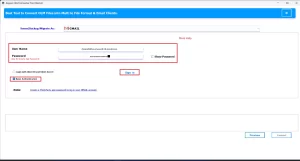
- Enter your Gmail credentials to log in.
- Use additional features if you require.>> hit Convert to transfer OLM File to Gmail.
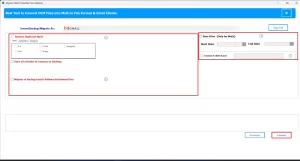
Within a few minutes, your complete Outlook for Mac data will appear in your Gmail account with the same structure and accuracy.
Conclusion
In the above write-up, we discovered different ways to import OLM to Gmail. Both solutions work well and have various pros and cons. But eventually, the choice of import method depends upon the user’s technical knowledge and the number of OLM files they have. Single users choose the manual method for import few OLM files. Whereas it is advised for enterprises to opt for the automated solution to import large datasets.
Frequently Asked Question
Q.1. Can I import OLM contacts and Calendars to Gmail?
Ans- Yes, you can import OLM contacts and Calendars to Gmail, using the above automated software. Steps are:
1. Download and launch the Aryson OLM file Converter Tool on your system.
2. Add the required OLM file(s) and click Next.
3. Select the specific OLM contacts and Calendars to import & proceed.
4. Choose Gmail as the destination email client.
5. Sign in with your Gmail credentials and apply filters if needed.
6. Click Convert to transfer OLM emails to Gmail.
Q.2. How can I move OLM files to Gmail on Mac?
Ans- You can move OLM files to Gmail on Mac, using the Mac version of the Gmail Backup Tool.
Q.3. How do I open an OLM file in Gmail on Mac without Outlook?
Ans- With the help of Aryson OLM file Converter Tool, you can import Outlook OLM to Gmail.
About The Author:

Eva Shirley is a skilled technical content writer with expertise in creating engaging and informative content. With over 5 years of experience and a passion for writing, she has solved many users' queries by providing quality content.
Related Post